Monthly client reports
Every month you send a client the same things: profit and loss, balance sheet, VAT, KPIs and open receivables at the end of the month. The firm prepares this for you, but nothing reaches the client until you approve it. You see the whole report before it goes out.
The report only reads the client’s books and posts nothing. A client on flat-rate taxation has no balance sheet, because they keep no double-entry books.
The Monthly reports to client section is on the client’s Review page.
Set up the schedule
Click Set up (later Schedule). Enter one to ten e-mail addresses under Recipients and the day of the month (1 to 28) on which the previous month’s report is prepared. Click Save. You can stop the schedule at any time with Stop schedule.
Prepare the report
On the chosen day the firm prepares the report itself. If you need it sooner, click Prepare now. The report opens for review with the status To review.
Review and approve
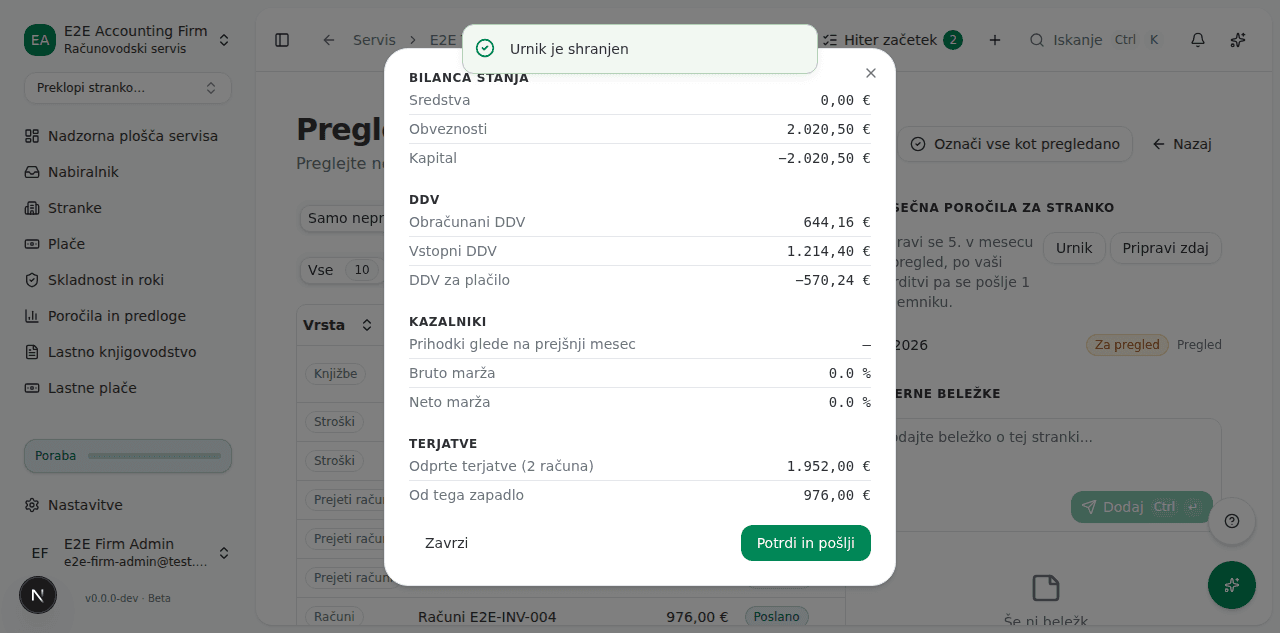
The figures are frozen when the report is prepared: the client receives exactly this. Receivables are the position on the last day of the month: an invoice the client paid later still counts, one issued after the month does not. If they are right, click Approve and send, check the addresses in the confirmation, then click Send to client. If you do not want to send it, click Discard.
Check the delivery log
Each recipient gets their own message with your firm’s logo and the report attached as a PDF, and their own row in the log. If a delivery fails, the report is marked Failed. Approve it again: it is sent only to those who have not yet received it.
The client finds the report in the portal
A sent report appears in the client’s portal, in the My accountant group under Reports. Each month has a Download PDF button. The portal shows sent reports only: a report you have not yet approved, or have discarded, is never visible to the client.