Stock movements by partner, and exporting them to Excel
Every stock movement comes from a document: a delivery note, an invoice, a credit note, a service work order or a production order. The movement’s partner is the customer or supplier on that document. That lets you see, in one place, everything that went to one customer in a period, and export it to Excel.
Find the movements for one partner
- In the left sidebar, go to Skladišče → Premiki zalog (“Warehouse → Stock movements”).
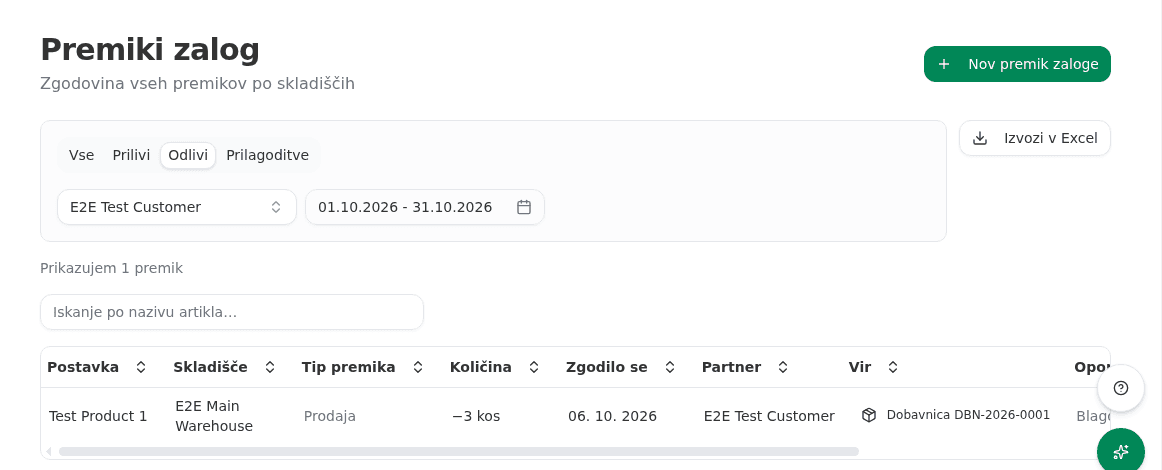
- Choose the direction: Odlivi (“Outgoing”) for goods that went out (sales, shipments), or Prilivi (“Incoming”) for goods that came in.
- Click Vsi partnerji (“All partners”) and start typing the customer’s name. Pick it from the list.
- Click Obdobje (“Period”) and choose the first and last day, or one of the ready-made months or quarters.
- The table now shows only that customer’s movements in that period. The Partner column shows the customer, and the Vir (“Source”) column shows the document and its number.
Export the list to Excel
- With the filters set, click Izvozi v Excel (“Export to Excel”).
- Your browser downloads
premiki-zalog-<date>.xlsx. It holds exactly the rows on screen, every page of them, not just the first.
One export covers at most 10,000 movements. If the filters match more, the export does not cut the list short. It asks you to narrow the period or pick a partner instead.
What success looks like
The file has one row per movement with the columns Datum (Date), Tip premika (Movement type), Šifra artikla (Item code), Artikel (Item), Količina (Quantity), Enota (Unit), Cena na enoto (EUR) (Unit cost), Skladišče (Warehouse), Partner, Vir (Source), Številka dokumenta (Document number) and Opombe (Notes). Outgoing movements have a negative quantity.
Vega can prepare the same list. Ask it, for example: “Export to Excel everything that went to Kupec d.o.o. this year.” If the name matches more than one customer, it asks which one you mean.
Common issues
- The movement you are looking for has no partner. A stock count, a manual adjustment, a transfer between your own warehouses and opening stock have no customer, so the partner filter never shows them.
- A sale to the customer is missing. Stock goes down when a delivery note is shipped, not when an invoice is issued. An invoice without a shipped delivery note did not move stock, so it is not on this list.