Access & change log
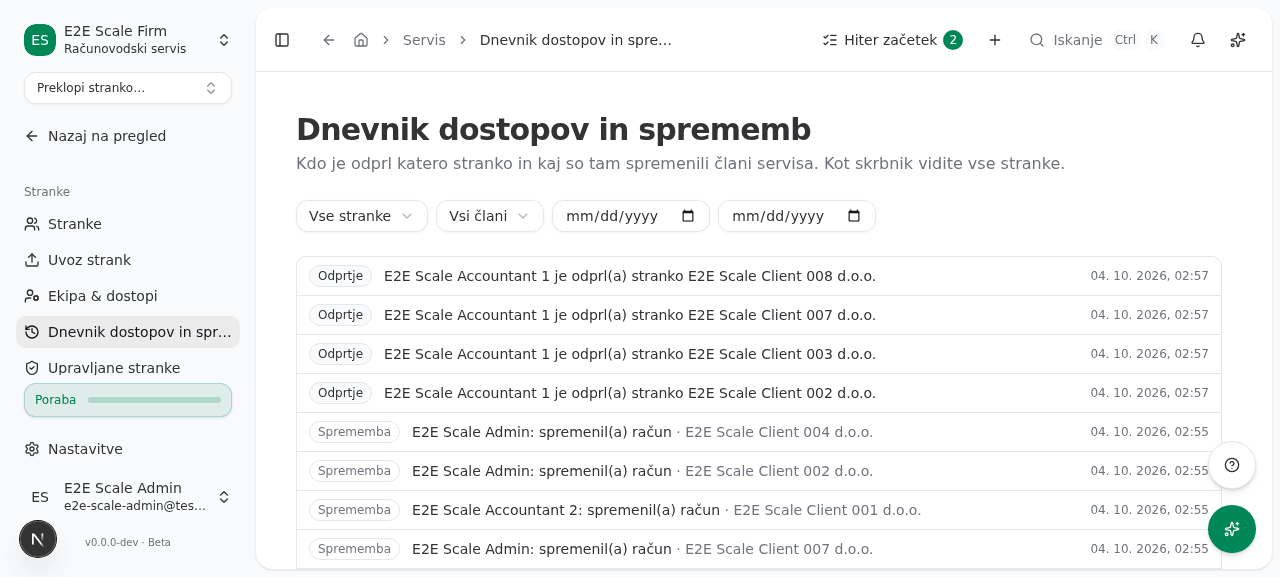
The access & change log (Dnevnik dostopov in sprememb) shows which firm member opened which client, and which audited changes firm members made in the client’s books. Each entry has the actor, the client and the time. The log does not store document contents or amounts.
You’ll find the page in the left menu under Servis → Stranke → Dnevnik dostopov in sprememb (Firm dashboard → Clients → Access & change log).
Who sees what
- A firm admin sees every client and every member.
- An accountant sees only the clients in their portfolio. If the firm has the confidentiality wall on, that means the clients assigned to them. Clients they may not open do not appear.
- A read-only member does not see the log.
Review the events
Open the log
Click Dnevnik dostopov in sprememb. The newest events are on top. An Odprtje (Opened) event means a firm member entered the client. A Sprememba (Change) event means an audited change a firm member made in the client’s books.
Narrow the list
- In Stranka (Client), pick one client.
- In Član (Member), pick a firm member. Only an admin sees this field.
- In Od datuma (From date) and Do datuma (To date), set the period. The end date is included.
Load older events
If there are more events than the list shows at once, click Naloži več (Load more).
The log of one client
The same events for one client are on the client’s review page, in the right-hand column, under the heading Dnevnik dostopov in sprememb.
What the log records
- Odprtje is written once each time a member enters a client, not on every later request.
- Sprememba is a row that existing parts of the app already write when they post or edit. The log does not add these rows; if an action is not audited, you do not see it here.
- Changes by members who have since left the firm show under Nekdanji član (A former member), or do not show if the membership is gone.
Common issues
- The list is empty. There are no events for the chosen filters. Widen the period or clear the Stranka and Član fields.
- The client you look for is not listed. An accountant sees only their own portfolio. Ask a firm admin to assign the client to you, or to review the events.
- The log did not load. Try again in a moment. If the error repeats, check your connection.