Importing data from Minimax
Minimax is one of the most widely used accounting tools in Slovenia, so VegaERP ships exact export instructions for it, for each type of data, rather than only a generic CSV-mapping tool.
Run every export to the same cutover date
Before you export anything, settle on a single cutover date and run every export to that date. The trial balance, the open issued and received invoices, and the opening stock all have to describe the same moment. If the trial balance is as at 31 December and the open-invoice list is as at 15 January, the receivables account and the sum of the open invoices will not agree in VegaERP, and the imported data no longer says why. This is the most common way a migration goes wrong.
Minimax has two different exports, and the difference matters
Minimax offers two different files for the same entity:
- An import template. In Minimax you produce it under “Nastavitve organizacije › Uvoz iz excela › Pripravi predlogo” (“Organization settings › Import from Excel › Prepare template”). It is meant for getting data into Minimax, not out of it, and it is empty.
- A grid export. Every list screen in Minimax carries an “Izvoz preglednice” (“Export grid”) button at the top right, which saves the current list as an .xlsx file. That file holds your data.
For a migration you want “Izvoz preglednice”. The two files have different columns for the same entity, so VegaERP first works out which of the two shapes you uploaded, and tells you if the file is not the one that step expected.
Opening stock is the exception. In Minimax it is a document rather than a list, so for it you prepare a row-import template and fill it in yourself.
Record the migration first
Before you import anything, go to Nastavitve → Nastavitve modulov → Uvoz podatkov (“Settings → Module settings → Data import”), find the Podatki o selitvi (“Migration data”) card on that page, and record that the company is moving from Minimax. VegaERP needs this to avoid booking things twice:
Izbira sistema vklopi kontrolni seznam migracije in prepreči, da bi se začetne zaloge, terjatve in obveznosti knjižile dvakrat. Enkrat samodejno in znova ob uvozu dejanskih začetnih stanj. Nastavite pred uvozom zgodovinskih podatkov. (“Choosing the system turns on the migration checklist and stops opening stock, receivables and payables from being booked twice, once automatically and again when you import the real opening balances. Set this up before importing historical data.”)
- On the Podatki o selitvi (“Migration data”) card, choose Minimax as the system you’re moving from.
- Fill in the rest of the requested migration details.
- Click Shrani podatke o selitvi (“Save migration details”).
What comes across and where it comes from in Minimax
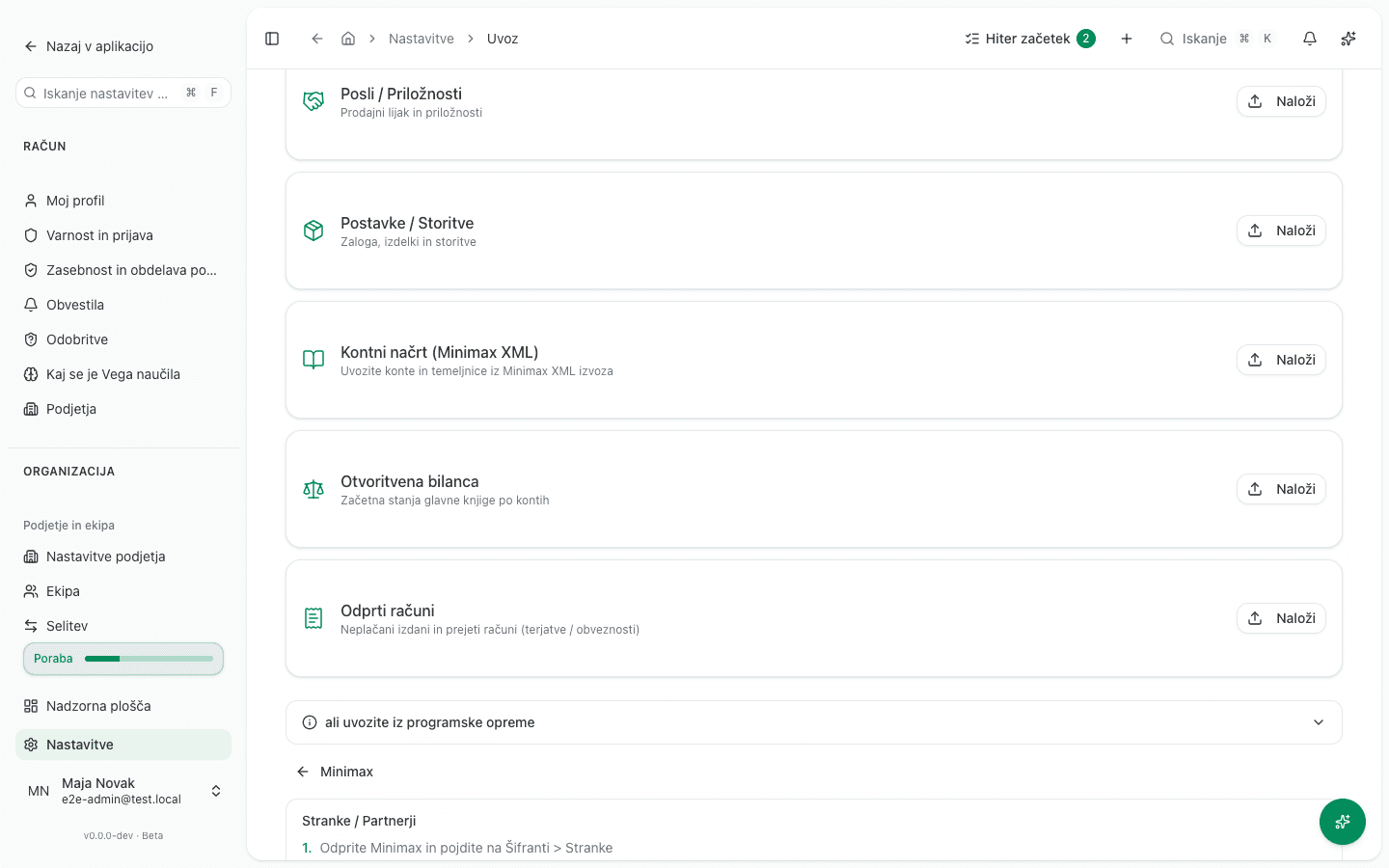
Import happens under Nastavitve → Nastavitve modulov → Uvoz podatkov (“Settings → Module settings → Data import”). Each row imports one type of data, and the rows follow dependency order. Each row shows its Minimax export path as a label, with the full steps behind the Kako izvozim? (“How do I export?”) button:
-
Stranke in dobavitelji (“Customers / Partners”): customers, suppliers, and contacts. In Minimax: “Šifranti › Stranke” (“Registers › Customers”), the “Izvoz preglednice” button.
-
Kontni načrt (“Chart of accounts”): accounts and, if the export contains them, the posted journal entries too. This card accepts two shapes. If you have an organization-data XML export that carries journal vouchers alongside the accounts, that is the only route that brings across real posting history. If you don’t, export “Šifranti › Konti” (“Registers › Accounts”) with the “Izvoz preglednice” button; that file brings the chart of accounts only, with no entries.
-
Začetna stanja (“Opening balance”): a single trial-balance snapshot as at the cutover date. In Minimax: “Knjigovodstvo › Dvostavno knjigovodstvo › Bruto bilanca” (“Bookkeeping › Double-entry bookkeeping › Trial balance”), set the cutover date, then export the grid. Two things go wrong with this file:
- Keep class 4 and class 7 accounts in the export, that is costs, expenses and revenue. If you narrow the report to the balance sheet, the profit-and-loss statement does not cover trading before the cutover, which also affects the corporate-income-tax base.
- The grid carries a debit and credit pair three times over, for opening balance, movement and total. VegaERP asks which pair is the right one on import. Pick the final pair, that is the balance as at the cutover date. Minimax’s closing balance is VegaERP’s opening balance, so the first pair (Minimax’s own opening balance) and the movement pair are both wrong.
-
Neplačani računi (“Open invoices”): only UNPAID issued and received invoices, as individual records with an amount, a due date, and a customer/supplier. In Minimax, for receivables export “Poslovanje › Izdani računi” (“Business › Issued invoices”), whose grid carries “Plačano” (“Paid”) and “Odprto” (“Open”) for each invoice. For payables export “Poslovanje › Prejeti računi” (“Business › Received invoices”), whose grid carries “Status plačila EUR” and “Odprto plačilo EUR”. You choose whether each row is a receivable or a payable at import time.
If you issue sales invoices outside Minimax, “Izdani računi” has nothing to export and you have no per-invoice source for what your customers still owe. Export “Knjigovodstvo › Odprte postavke” (“Bookkeeping › Open items”) instead, with the per-document detail option, not the per-partner summary. This card accepts it too, and reads each row’s account to tell a receivable from a payable. A row that is a payment recorded against no invoice, an advance or an overpayment already in Minimax, is not imported: it is reported in the review step as its own count and total, so you know to close it in Minimax or enter it here as a customer or supplier advance.
-
Artikli in storitve (“Items / Services”): the catalogue of items and services. In Minimax: “Šifranti › Artikli” (“Registers › Items”), the “Izvoz preglednice” button.
-
Šifranti (“Master data”): cost centres, item groups and price lists. The card opens the Uvoz šifrantov (“Import master data”) page, which holds three importers in the order they have to run in. In Minimax you export them under “Šifranti › Analitike”, “Šifranti › Blagovne skupine” and “Šifranti › Ceniki”, each with the “Izvoz preglednice” button. Details are in the master-data section below.
-
Skladišča (“Warehouses”): the warehouse-master importer. Run it before opening stock. The Minimax opening-stock template is keyed by warehouse code, so the warehouses have to exist first. The card is marked done once at least one warehouse exists besides the GLAVNO warehouse created at sign-up. If the company has only one warehouse in Minimax and it is also coded GLAVNO, the import has nothing to add, so skip this step.
-
Osnovna sredstva (“Fixed assets”): opens the fixed-asset register importer itself, the same two-step wizard described below. The card is marked done once at least one fixed asset has been imported with its carried-in accumulated depreciation. An asset bought after the switch and entered by hand does not count. A switch with no history does not ask for this step.
-
Začetna zaloga (“Opening inventory”): a shortcut card to the opening-stock importer. It opens the same Zaloga page described in the Opening stock section below.
-
Plače in zaposleni (“Payroll & employees”): a shortcut card to the employee and payroll carry-in importer, described under “What doesn’t come across” below.
The Minimax item export contains no stock quantities. The item grid has no stock-on-hand column at all, only code, name, unit of measure, VAT rate, price, item group and accounts. Opening stock is a separate document in Minimax and does not come across on this card. If you start issuing invoices after importing the catalogue, VegaERP counts stock from zero and your first stock report will not agree with Minimax. Opening stock is imported separately, from its own file; the Opening stock section below says how.
The Posli / Priložnosti (“Deals / Opportunities”) card on this page is not Minimax-specific: Minimax has no sales-pipeline concept, so there are no dedicated export instructions for it. If you tracked deals elsewhere, enter them by hand or import them from a generic CSV file.
The “Izvoz preglednice” button in Minimax produces an .xlsx file. If you import an older Windows-1250 encoded CSV export, VegaERP detects that automatically.
The order
Nothing imports before what it references. A price-list row names an item, and an opening-stock row names both an item and a warehouse. A reference that does not exist is not imported and comes back listed among the import report’s errors.
Import the item groups before the item catalogue. The Blagovna skupina column of an article
export carries the group’s code (10), not its name, so VegaERP attaches the item to the
group the item-group import created under that same code. If the group is not there yet, the
item imports without one and the report names the code it could not resolve.
- Import the cost centres, then the chart of accounts, then the customers.
- Import the warehouses and the item groups, then the item catalogue. Add price lists and employees after that.
- Import the opening balance, then the open issued and received invoices, then the opening stock. Import the fixed-asset register, then the payroll carry-in, last.
- Only then post the first new document in VegaERP.
Running the import
- Go to Nastavitve → Nastavitve modulov → Uvoz podatkov (“Settings → Module settings → Data import”).
- For each type of data, click Uvozi (“Import”) on its row and pick the exported file. VegaERP parses it and, where needed, shows a column-confirmation step before it writes anything. A row waiting on an earlier import is disabled and says what to import first. The Šifranti button under Drugi uvozi (“Other imports”) is the exception: it leads to a page holding three separate importers.
- Import Stranke in dobavitelji (“Customers / Partners”) first, since later documents (open invoices, journal entries) reference them.
- Then import Kontni načrt (“Chart of accounts”) or Začetna stanja (“Opening balance”), whichever matches your export.
- Finally import Neplačani računi (“Open invoices”) and, if needed, Artikli in storitve (“Items / Services”).
All files at once
Instead of taking each file to its own card, you can drop every Minimax export on the same page together. VegaERP recognises each file by its columns and points you to the right importer; it does not import anything itself.
- In the Izvožene datoteke iz Minimaxa (“Minimax export files”) section, drag all the exported files into the upload area.
- The files that can be imported are listed in the order to import them. Click Odpri uvoz (“Open importer”) on each: its usual importer opens with the file already loaded.
- A file VegaERP did not recognise, or an export that cannot be imported (a bank-statement list, for example), shows the reason. Re-export that file or leave it out.
If a file says it was identified from the file’s shape, VegaERP did not match its columns to a known Minimax layout. Check before importing that it really is the file that importer expects.
The Pameten uvoz iz računov (“Smart import from invoices”) button now lives on the Prejeti računi (“Received invoices”) page, no longer on Uvoz podatkov. It is a separate path for uploading scanned or PDF invoices, which VegaERP reads with AI. It’s useful for individual received invoices, but it isn’t meant for migrating your whole history out of Minimax.
Make sure you export the right grid
Several Minimax lists have similar names and completely different contents. If you upload the wrong one, VegaERP recognises the file and tells you what you exported, and the import does not run.
- For journal lines you want “Knjigovodstvo › Dvostavno knjigovodstvo” (“Bookkeeping › Double-entry bookkeeping”), the “Knjižbe” (“Journal lines”) tab. The “Temeljnice” (“Journal vouchers”) list has one row per voucher, with no account and no amount, so nothing can be migrated from it. This is the most common mix-up.
- For the chart of accounts you want “Šifranti › Konti” (“Registers › Accounts”). “Avtomatični konti” (“Automatic accounts”) is a posting-rule table, not the chart of accounts.
- For open receivables you want “Poslovanje › Izdani računi” (“Business › Issued invoices”). The “Predračuni” (“Proforma invoices”) list is not a receivable and must not be imported as an open invoice.
Do not use the “Poslovanje › Odprte postavke” (“Business › Open items”) export. That grid has one row per partner, with columns for the partner, the currency, the total and the amount overdue, and no invoice number at all. It cannot seed per-invoice open items. If you issue invoices in Minimax, use the issued-invoice and received-invoice grid exports instead, which carry each document’s own open balance. The “Knjigovodstvo › Odprte postavke” per-document report is a DIFFERENT export, one row per open document, and VegaERP does read that one; see the “Odprti računi” entry above.
Re-running an import
Re-running the import on the same row will not duplicate existing records. A row’s button can change from Uvozi (“Import”) to Uvozi znova (“Import again”), but only if you recorded the migration on the Podatki o selitvi (“Migration data”) line (Nastavitve → Nastavitve modulov → Uvoz podatkov), and only once VegaERP finds data of that type for the company. Where VegaERP knows it, the row also shows how many records arrived and when. The button label doesn’t change the import itself; what happens to a record that matches depends on which kind of data you are re-running:
- Stranke in dobavitelji, Posli / Priložnosti (“Deals / Opportunities”) and Artikli in storitve: on the upload step, the update checkbox is already ticked (Posodobi obstoječe stike, če se ujemata e-pošta ali davčna številka, “Update existing contacts when the email or tax number matches”, and the matching wording for deals and items). So a matching record is updated by default. Untick the box before importing if you want existing records left alone.
- Kontni načrt: here the default is the opposite. VegaERP lists the conflicting accounts before it writes anything and sets each one to Preskoči (“Skip”). To overwrite an account from the file, switch that account to Posodobi (“Update”) yourself. If the account already carries posted journal entries, its account type and normal balance are not overwritten even then. The name, category and posting flag are updated, and those two are left as they are. The import reports each such row. See Konto ni sprejet for why and what to do. An account you leave on Preskoči is listed too, by code and name, so the skipped count on the result screen always says which accounts it counted.
- Začetna stanja: a second import is refused. You get Otvoritvena bilanca že obstaja (“An opening balance already exists”), and the overwrite has to be confirmed with Zamenjaj obstoječo otvoritveno bilanco (“Replace the existing opening balance”).
- Neplačani računi: the same invoice cannot be imported twice, and it is never updated either. An issued invoice number is unique per company, a received one per supplier. Rows that were already imported come back listed among the errors in the import report.
Master data: cost centres, item groups and price lists
One page imports all three. Open it from the Šifranti (“Master data”) button on the Uvoz podatkov page, or from Uvoz šifrantov (“Import master data”) in the sidebar. It holds three importers, numbered in the order they have to run in:
- Analitike (“Cost centres”). Carries the parent-child structure across as well. It reads the Minimax grid export (“Naziv”, “Šifra”, “Šifra višje analitike”, “Naziv višje analitike”, “Konec”) and the AN import template (“Šifra” and “Naziv” only).
- Blagovne skupine (“Item groups”). Do these before the items, so the group list is ready. The item grid’s “Blagovna skupina” column holds the group’s CODE (for example “10”), and the catalogue importer looks a category up by that same code, so no column edit is needed. If a code names a group that was never imported here, the item comes in unclassified and the report carries one error per row naming the code.
- Ceniki (“Price lists”). Each row prices one item, so the catalogue has to exist first.
Every importer shows a column-confirmation step before it writes anything.
Fixed assets, warehouses and opening stock import on their own pages
All three now have a row on Uvoz podatkov, but the importer itself lives on its own page, same as before:
- Fixed assets. On the Osnovna sredstva (“Fixed assets”) page, click Uvoz registra osnovnih sredstev (“Import fixed-asset register”). It reads either Minimax shape for this entity, the OS import template or the grid export, and carries the accumulated depreciation across as an opening figure rather than re-deriving it.
- Warehouses. On the Skladišča (“Warehouses”) page, click Uvozi (“Import”). It reads the Minimax “Skladišča” grid export as it is, with one exception: a warehouse that is not kept at acquisition cost. Stock here is valued at weighted-average acquisition cost, and a warehouse kept at selling price holds its margin and embedded VAT in balances this system does not keep, so the import refuses the whole file and writes nothing. Obtain a cost-based valuation for those warehouses, or take them out of the file, before you import it.
- Opening stock. On the Zaloga (“Stock”) page, click Uvozi začetno zalogo (“Import opening stock”). See the section below.
Import the warehouses before the opening stock, since every stock row names a warehouse code.
What Minimax exports but VegaERP does not import yet
VegaERP recognises these files and tells you what they are, but there is no import route for them yet on the Uvoz podatkov page. You carry their contents across by hand:
- Stock movements. Stock movement history cannot be migrated. Enter the position as at the cutover date instead.
- Journal lines. The journal-line export from double-entry bookkeeping is a full per-line ledger, but it does not import by this route. Posting history comes across only through a Minimax XML export that carries journal vouchers. If you don’t have one, import the trial balance as at the cutover date as your starting point.
- Bank statements. The statement list in Minimax is only a list, not the statements themselves. Import the transactions from your own bank’s files (MT940 or camt.053) on each bank account in VegaERP.
- Orders and payment orders. No history comes across.
Opening stock
Opening stock is not a list in Minimax but a document, so there is no grid export for it. You prepare the file in Minimax under “Poslovanje › Zaloge › Začetno stanje” (“Business › Stock › Opening position”), with “Uredi › Uvoz vrstic › Pripravi predlogo” (“Edit › Import rows › Prepare template”). The template has the columns “Šifra artikla”, “Naziv artikla”, “Šifra skladišča”, “Količina”, “Cena”, “Vrednost”, “Serija”, “Prodajna cena” and “Prodajna cena z DDV”; fill it in with the position as at the cutover date.
Then, in VegaERP, open the Skladišče (“Warehouse”) module, go to the Zaloga (“Stock”) page and click Uvozi začetno zalogo (“Import opening stock”). The import resolves an item by its code and a warehouse by its warehouse code, so import both first. Re-running the same file never doubles the stock.
Every row with an opening quantity also needs a purchase price. If you don’t have one, mark the row as cost unknown and it imports at a value of 0. Cost of goods sold is then 0 on every sale until you correct the price, so do that before you sell. The import also refuses to run at all until the migration question is answered, because opening stock is itself evidence of a migration. If the company is migrating from another system, record the migration details on the Uvoz podatkov (“Data import”) page first: the stock then imports with no general-ledger entry, since the opening-balance import is what carries that. If it is a fresh start with no prior books, confirm that in the import dialog and the opening stock does post to the general ledger. See also Stock levels by warehouse.
What doesn’t come across
- Document line items don’t come across, because Minimax does not export them at all. No Minimax export carries the lines of an issued or received invoice with the item, quantity and unit price. So invoice line history does not migrate by any route.
- Paid (closed) invoices don’t come across as standalone documents in Fakturiranje (“Invoicing”); only open (unpaid) ones are imported. Their financial effect is only visible in your books if you imported the full journal-entry history via the Kontni načrt (“Chart of accounts”) card.
- An imported open invoice is one record with a total amount, a due date, and a customer/supplier, not individual lines with a per-line VAT breakdown.
- Employees and payroll data have a shortcut card here (Plače in zaposleni), but the importer itself is a separate wizard in the Payroll module. In Minimax, export the list under “Šifranti › Delavci” (“Registers › Employees”) with the “Izvoz preglednice” button. That file carries employees’ EMŠO, tax numbers and bank accounts, so handle it as personal data.
- Whether a DDV-O, RP-O, REK-O, or any other return was already filed for this company isn’t recorded here. You record that separately, form by form, as described in Why can’t I file a return for this period?.
- Attached documentation (scanned originals of old invoices) doesn’t come across, only the data about them.
What to check afterward
- Duplicate contacts. With no stable Minimax id to go on, the importer matches an existing contact by tax number, or by email where the row carries no tax number, or by name and address together where it carries neither. Still skim the contact list after a large import.
- Foreign suppliers/customers. Check that foreign tax numbers carried over correctly; this matters for VAT-book reporting on cross-border transactions.
- Opening balances or journal entries. Reconcile the imported trial balance (or posted journal entries) against Minimax before you post the first new document in VegaERP.
- Open invoices against the receivables account. The sum of the imported open issued invoices has to agree with the receivables account balance in the imported trial balance, and the open received invoices with the payables account. If they don’t, the two exports were run to different dates.
- Stock. Check that the per-warehouse position is entered before you issue the first delivery note. Importing the item catalogue does not bring stock with it.
- On the Uvoz podatkov (“Data import”) page, click Prikaži zgodovino uvoza (“View import history”), or, if you recorded the migration, Prikaži povzetek selitve (“View migration summary”), to see exactly what was imported, how many records, and when.
If something is wrong after the import, don’t fix individual records by hand. Fix the source export and import it again. Check the per-card list above first: only the contact, deal and item cards overwrite what is already there on a re-run. Kontni načrt and Začetna stanja need the extra step described there. Neplačani računi cannot be overwritten by any step. An invoice that was already imported can’t be put right this way. Correct it in Invoicing instead.
Migration checklist
A company that arrives mid-life brings a set of facts the product cannot compute from the imported documents: what the previous provider already filed in eDavki, the VAT surplus carried over, whether the company is on a special VAT scheme, how much leave and sick leave employees have already used, and so on. The product does not assume any of them: until they are recorded, the affected filing (DDV-O, REK-O, the ZZZS claim, the regres run …) refuses to submit and names the page where the fact is recorded.
So that those refusals do not catch you one at a time in a filing week, every such fact is collected on one page:
- Open Nastavitve (“Settings”) → Kontrolni seznam prenosa (“Migration checklist”).
- The page shows only the facts you still owe: rows marked red block a filing, yellow rows are computed on a default until recorded. The sections that still hold something red come first.
- On every open row click Evidentiraj (“Record”). The button takes you to the page where the answer is entered (for example Nastavitve → DDV for the VAT opening position). Where a row names another fact to record first, the button takes you to that one instead. Until that one is recorded, the second answer cannot be saved.
- An explicit “none” or “0” always counts. A blank never does, because it cannot be told apart from a question nobody asked.
- The employees’ opening vacation-provision balance is the per-employee split of the vacation-provision line in the opening balance you imported, so it can only be recorded once that import is done, and the amounts you record have to add up to that line. Once leave has been consumed against it or the year-end true-up has posted, the amount can no longer be changed here; correct it through the opening balance instead. A company on the flat-rate regime at the cutover keeps no books and is not asked for it.
Facts you have already recorded, and rows that do not apply to your company (for example DDPO for a sole trader), are folded under the button at the bottom of the page rather than removed: click it to see those too, so it stays visible that they were considered. The box at the top of the page says how many facts are recorded.
If you can’t fix this yourself
The import can be run by the company’s administrator or accountant. If an import rejects a file with an error you don’t understand, or the message doesn’t match anything you see in the exported file, contact support and attach the file you tried to import.