Time tracking and billing
This page is for accounting-firm staff: log the time you spend working on a specific client, track each client’s profitability, and bill logged time or a monthly fee directly from this page.
You’ll find it in the left menu under Servis → Poročila in predloge → Sledenje časa (Firm dashboard → Reports & templates → Time Tracking).
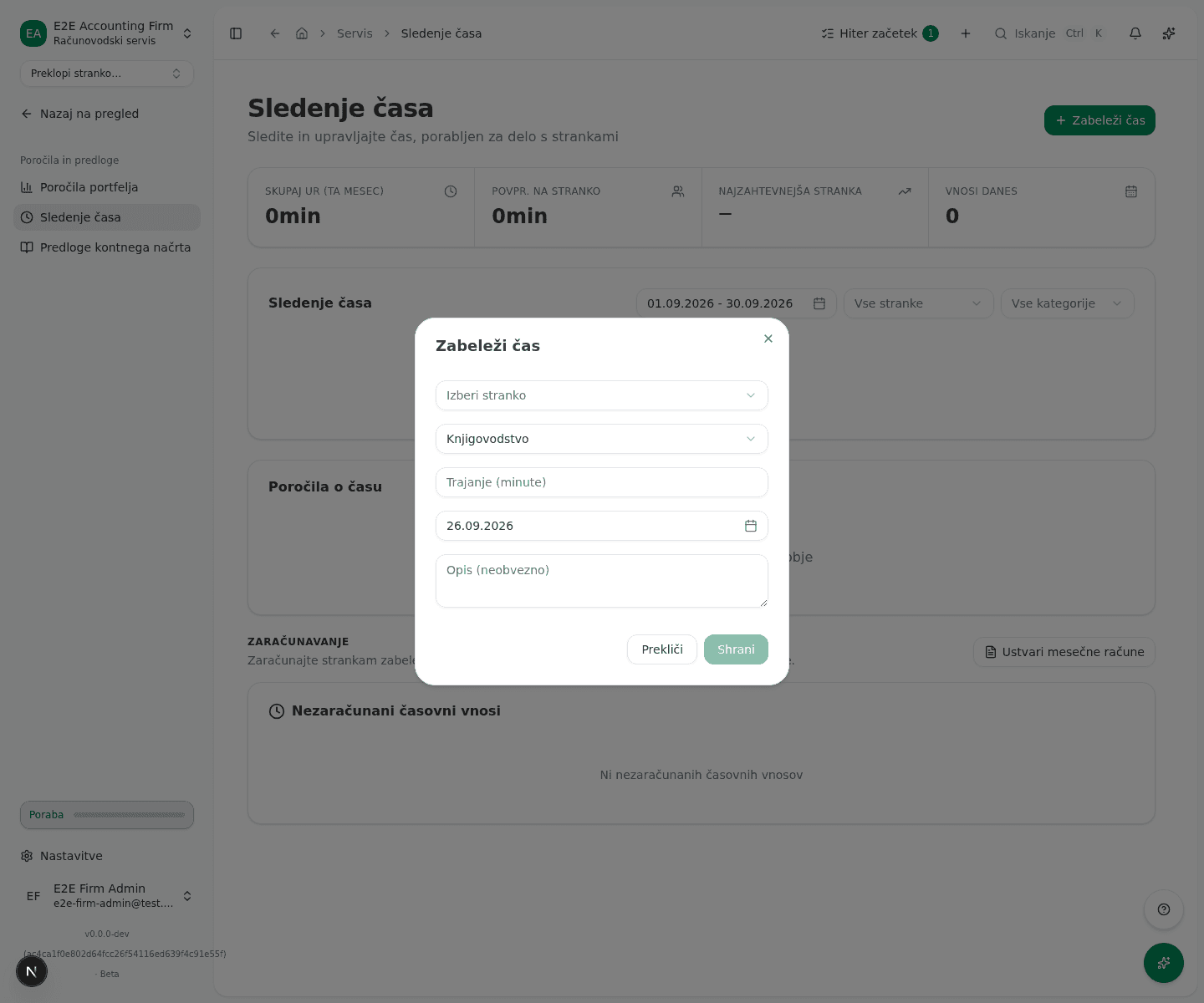
Log time
- Click Zabeleži čas (log time) at the top right.
- Under Izberi stranko (select client), pick the client you worked for.
- Under Izberi kategorijo (select category), pick one of the categories: Knjigovodstvo (bookkeeping), DDV (VAT), Plače (payroll), Svetovanje (consultation), Letno poročilo (annual report) or Drugo (other).
- Enter Trajanje (minute) (duration in minutes), pick a date and optionally add Opis (neobvezno) (description, optional).
- Click Shrani (save).
If anyone on your team has a timer running (started from the quick-create button at the top of the app, or from the toolbar shown while working inside a client), it appears in the table as a special row marked Teče (running), with a time that keeps increasing. A timer left running for more than 10 hours prompts that team member with “Still working?” the next time the app loads, and one left running past 16 hours can’t be stopped without picking a stop time. See Time tracking.
Review entries and profitability
Above the entries table are four metrics: Skupaj ur (ta mesec) (total hours this month), Povpr. na stranko (average per client), Najzahtevnejša stranka (most time-consuming client) and Vnosi danes (entries today). You filter entries by date range, client (Vse stranke, all clients) and category (Vse kategorije, all categories); below the table is the Skupaj (total) time for the current filter.
Below that is the Poročila o času (time reports) table by client, with columns Stranka (client), Skupaj ur (total hours), Mesečna pristojbina (monthly fee) and Dejanska urna postavka (effective hourly rate). The effective hourly rate is the fee for the selected period divided by the hours logged. For a month that is still running, only the days up to today count, for the fee and the hours alike. How that compares with the firm’s own hourly rate is shown in the Donosnost (profitability) section on the Poročila (reports) page, which the Odpri donosnost link under the table opens.
Bill logged time or a monthly fee
Below the tables is the Zaračunavanje (billing) section. The Nezaračunani časovni vnosi (unbilled time entries) card shows, client by client, the total time since the start of the month and an Ocenjen znesek (estimated amount), priced from the client’s hourly rate or the firm’s default rate. If a client has no hourly rate set at all, a warning appears instead of an amount, with a Nastavi urno postavko (set hourly rate) link, and the Ustvari račun (generate invoice) button is disabled.
- For a client with an hourly rate set, click Ustvari račun.
- The app generates a draft invoice in your firm’s books from the time logged since the start of the month.
For a monthly fee instead of logged time, use the Ustvari mesečne račune (generate monthly invoices) button in the section title:
- Pick Mesec (month) and Leto (year).
- Click Ustvari račune (generate invoices).
- The app shows the result with a count of Ustvarjeno (generated) and Preskočeno (skipped), plus two lists, Ustvarjeni računi (created invoices) and Preskočene stranke (skipped clients), with the reason each client was skipped.
The monthly invoices are drafts in your firm’s books. The app does not currently charge the client or collect the fee for you: issue the invoice to the client yourself and collect the payment directly.
What success looks like
- Manual entry: a new entry appears in the table, the metrics at the top and the Skupaj total update.
- Invoice from logged time: the button on the client’s row changes to Ustvarjeno (generated), and the message Račun uspešno ustvarjen (invoice generated successfully) appears.
- Batch monthly invoices: the Ustvarjeni računi list appears, showing the number and amount of each new invoice.
Common issues
- The Ustvari račun button is disabled. The client has no hourly rate set, so the app cannot ask for an amount it has no way to calculate. Click Nastavi urno postavko and set a rate in the firm’s settings.
- Batch generation creates fewer invoices than active clients. Skipped clients are listed under Preskočene stranke with a reason, for example that the client has no monthly fee configured, or that an invoice for this period was already generated.