Why won’t the RP-O statement generate?
On the RP-O (rekapitulacijsko poročilo) page you clicked Predogled (Preview) or Pripravi (Generate), and instead of the list of partners the app showed an error. No statement was generated and nothing was sent to FURS. Fix the detail and try again.
If Pripravi is greyed out and the card above it reads “Oddaja RP-O še ni mogoča” (RP-O filing isn’t possible yet), the handover from a previous provider isn’t recorded. That is covered in Why can’t I file a return for this period?. Predogled still works in that case.
What the screen says
A customer has no VAT identification number
One invoice reports a supply to another EU member state, but the customer has no valid VAT identification number (ID za DDV), which the recapitulative statement requires, so this period could not be prepared. Affected: 2026-0087 (Kunde GmbH). Enter that customer’s VAT identification number, with its country prefix (e.g. DE811234567), in the customer’s “VAT ID (ID za DDV)” field. That is the field this report reads. A number left only in “Tax Number” is still read as a fallback, but the VAT ID field is where it belongs. A bare number in “Tax Number” is filed under the customer’s recorded country as a fallback, on this report and in the KIR alike; that clears this refusal but does not make it a VAT identification number; without a valid ID za DDV the supply may not be exempt at all, so check the number in VIES. Or correct the invoice: without a valid ID za DDV the supply is not exempt and is taxed as a domestic supply. Nothing was generated and nothing was sent to FURS.
The app checks every invoice in the period in one pass and lists all the ones that block after “Affected”, with the invoice number and the customer’s name.
The customer’s number isn’t shaped like a VAT number
One invoice reports a supply to another EU member state, but the number recorded for the customer is not a VAT identification number (ID za DDV) of the shape that member state issues, so this period could not be prepared. Affected: 2026-0087 (Kunde GmbH). Only a VAT identification number may be reported here; a national tax number is not one (a German Steuernummer is not a USt-IdNr). Check the customer’s number in VIES and record the VAT identification number, with its country prefix (e.g. DE811234567), in the customer’s “VAT ID (ID za DDV)” field. Or correct the invoice: without a valid ID za DDV the supply is not exempt and is taxed as a domestic supply. Nothing was generated and nothing was sent to FURS.
You only get this message when every listed customer has a number recorded and all of them are the wrong shape. If some are missing a number, you get the previous message first and this one on the next attempt.
The period type does not match the dates
The period type (monthly) does not match the period 01/04/2026 to 30/06/2026, which is a whole calendar quarter. Filing this RP-O statement would declare the wrong tax period. Change the period type to match the range, or change the range to match the type. No statement was generated and nothing was sent to FURS.
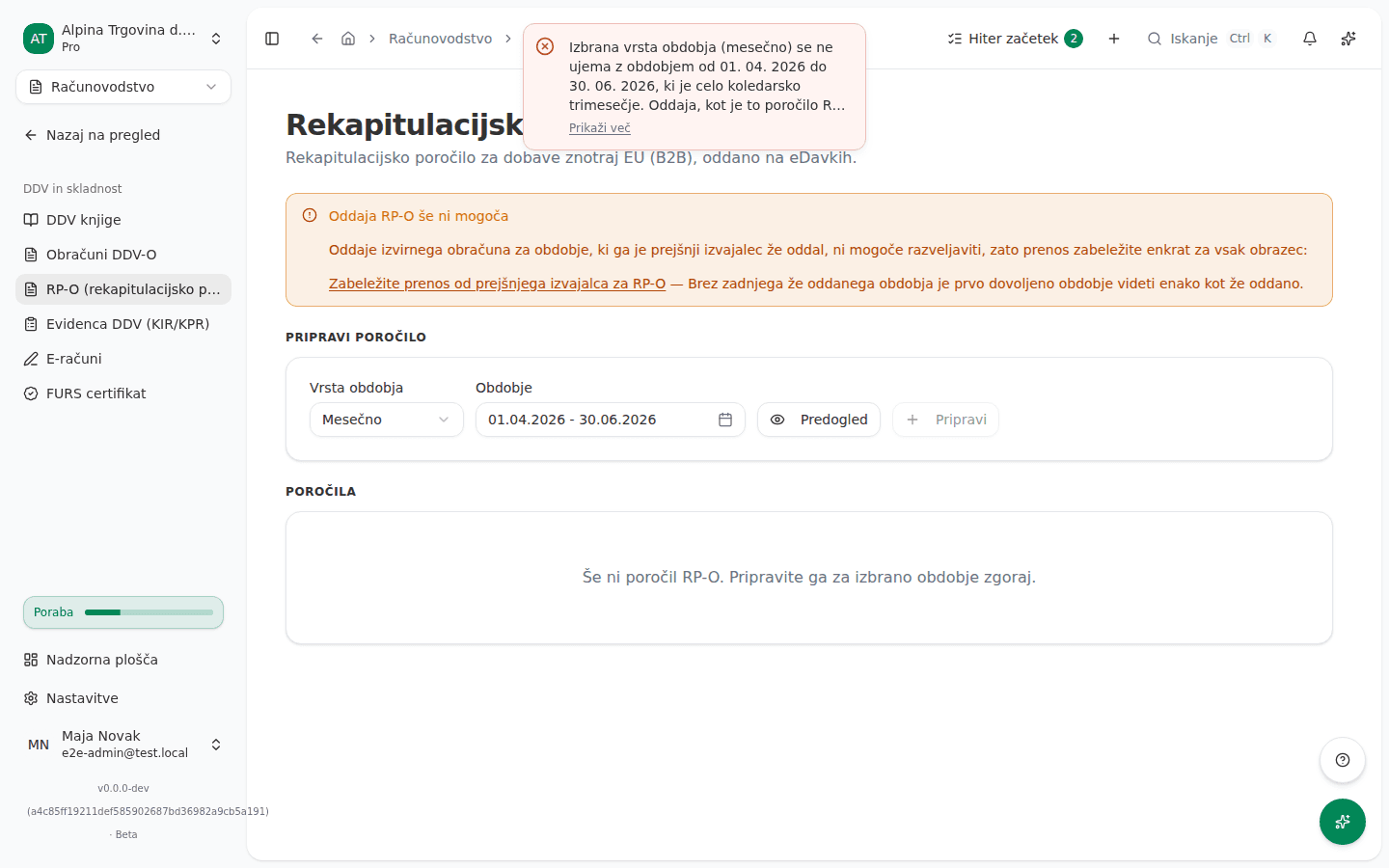
The screenshot shows the Slovenian interface. A long message is shortened in the notification; click Prikaži več (Show more) to read all of it.
A related message appears when the range is longer than the period the chosen type declares, for example two months with Mesečno (Monthly). It tells you the latest day the range may end on. A shorter range, such as a first period that starts mid-month, is fine.
The statement for this period is already accepted
An RP-O for this period has already been filed and accepted by FURS. Generating a new original would file a second one for the same period, which FURS treats as the wrong document type — the lawful remedy is a correction (samoprijava). The app does not yet offer that from this screen; contact support to have one prepared.
If a statement for the period exists but isn’t accepted yet (for example an Osnutek, draft), open it from the Poročila (Statements) list instead of generating a new one.
Why this happens
The RP-O reports the VAT identification number of each customer in another EU country, so the app won’t prepare it when that number is missing or plainly the wrong shape. It never invents a number; the only fallback is a number in the same customer’s Davčna številka (Tax number) field. The declared period comes from Vrsta obdobja (Period type) while the supplies are summed over the whole chosen range, so the two have to agree, or the statement’s header would name a different period from the figures in it. Both checks already run on Predogled, so you don’t first discover the problem when generating.
What to do
- Read which invoices and customers are listed after “Affected”.
- Under Partnerji (Partners) open each listed customer and enter their VAT identification number, with the country prefix, in ID za DDV (VAT ID). Check that Država (Country) is filled in. Check the number in VIES if needed. Save.
- For a mismatched period, pick the Vrsta obdobja that fits the range, or use a whole-month or whole-quarter shortcut in the Obdobje (Period) field.
- Click Predogled and check the list of partners.
- Click Pripravi.
More on generating and filing the statement is in Recapitulative statement (RP-O).
If you can’t fix this yourself
If a customer has no VAT identification number, or VIES won’t confirm it, the question is how VAT was treated on the invoice itself, not a setting in the app. Talk to whoever keeps your books before you change the invoice.
For a period whose statement FURS has already accepted, the app can’t prepare the correction (samoprijava) yet. Contact support.