Why can’t this partner be saved, merged or imported?
When you add, edit, merge or import partners, VegaERP refuses with a message. Most often it is because the same business is already in your partner list.
A tax number and a VAT ID are not the same thing. Davčna številka (Tax number) of a Slovenian partner is eight digits with no prefix. ID za DDV (VAT ID) carries a country prefix (SI followed by eight digits) and is entered only if the partner is VAT-registered. Many of the messages below appear because one was typed into the other’s field.
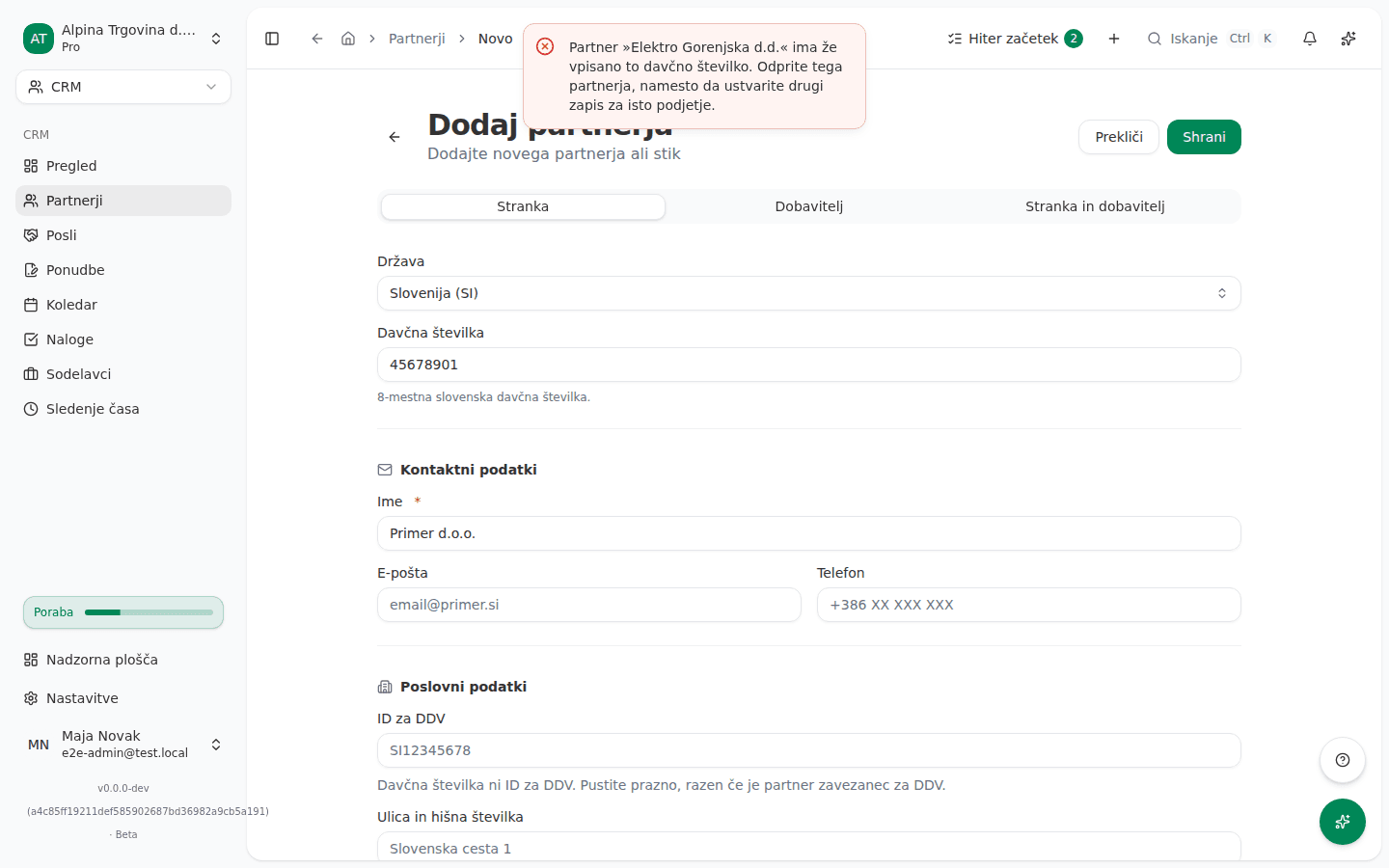
What the screen says
The partner already exists
Partner »Elektro Gorenjska d.d.« ima že vpisano to davčno številko. Odprite tega partnerja, namesto da ustvarite drugi zapis za isto podjetje.
(“Partner “Elektro Gorenjska d.d.” already has this tax number. Open that partner instead of creating a second record for the same business.”)
To davčno številko ima že vpisan drug partner v tej organizaciji.
Ta e-poštni naslov že uporablja drug partner v tej organizaciji.
Partner s temi podatki v tej organizaciji že obstaja.
(Another partner already has this tax number; another partner already uses this e-mail address; a partner with these details already exists.)
VAT ID and country
»12345678« ni identifikacijska številka za DDV: začeti se mora s predpono države izdajateljice (…). Davčna številka brez predpone sodi v polje za davčno številko.
Identifikacijsko številko za DDV »DE123456789« je izdala država DE, pri partnerju pa je vpisana država SI. Identifikacijska številka za DDV nosi svojo državo na sebi, zato tujo registracijo vpišite kot davčno številko ali popravite državo.
»GR123456789« se začne z GR, vendar Grčija izdaja identifikacijske številke za DDV s predpono EL (na primer EL123456789). Popravite predpono ali vrednost vpišite kot partnerjevo davčno številko, če ne gre za identifikacijsko številko za DDV.
Partner ima vpisano identifikacijsko številko za DDV »DE123456789«, ki nosi svojo državo na sebi, zato države ni mogoče izbrisati samostojno. Če partner ni zavezanec za DDV, v istem koraku izbrišite tudi identifikacijsko številko za DDV.
In order: the value has no country prefix, so it is not a VAT ID; the VAT ID’s country differs from the partner’s country; Greece uses the prefix EL, not GR; the country cannot be cleared while a VAT ID is held.
A company from the business register
Izbrane družbe iz registra ni bilo mogoče najti. Poiščite jo znova.
(“The selected registry company could not be found. Search for it again.”) If you pick a company the register records as deregistered, a Podjetje ni več v registru (Company no longer in the register) dialog opens instead, with a Poveži vseeno (Link anyway) button.
Merging duplicates
Za združitev izberite dva različna partnerja.
Partner, v katerega združujete, ne obstaja več. Osvežite seznam in poskusite znova.
Ta partner je že združen z drugim partnerjem.
Iskanje podvojenih partnerjev lahko teče enkrat na minuto. Poskusite znova čez 40 sekund.
(Pick two different partners; the partner you are merging into no longer exists; this partner was already merged; the duplicate scan can run once a minute.)
Importing partners
An import refuses individual rows and imports the rest:
Manjka naziv partnerja. Vsak partner mora imeti naziv.
To je davčna številka vašega podjetja. Podjetje ni partner samemu sebi, zato ta vrstica ni bila uvožena.
Popust mora biti med 0 in 100.
Dosegli ste omejitev partnerjev vašega paketa (500), zato ta vrstica ni bila uvožena. Za uvoz preostalih nadgradite paket.
Partner »Kovinar d.o.o.« je vpisan kot kupec, datoteka pa bi ga spremenila v samo dobavitelja. S tem se odvzame ena stran in obstoječi dokumenti se nehajo povezovati, zato uvoz tega ne stori: odstranite stolpec z vrsto, uporabite »BOTH« za dodajanje strani ali vrsto spremenite na partnerjevi strani.
(A name is missing; the row carries your own company’s tax number; the discount must be 0 to 100; your plan’s partner limit is reached; the file would turn a customer into a supplier only.) If the file cannot be read at all:
Uvozne datoteke ni bilo mogoče prebrati. Preverite, ali je veljavna datoteka CSV ali Excel, in poskusite znova.
The import also returns warnings for rows that were imported: that it kept a name or address verified in the register instead of the one in the file, or that it could not confirm the tax number in the register. Those partners are imported; the warning asks you to check the number against the partner’s own invoice.
Exporting and sending documents
Ta izvoz zajame 6200 partnerjev, kar presega omejitev 5000 vrstic na izvoz. Zožite filtre (vrsta, iskanje, časovno obdobje, oznake) in poskusite znova.
»…« ni eden od partnerjevih e-poštnih naslovov, zato nanj ni mogoče pošiljati računov. Naslov najprej dodajte partnerju.
(The export matches more than 5,000 partners; the address is not one of the partner’s own e-mail addresses.)
Why this happens
- One business, one partner. A tax number can be held by only one partner within a country. A second record for the same business would split its invoices, payments and open items across two customers, so the program does not create it and names the partner that already holds the number.
- A VAT ID carries its country. The prefix (SI, DE, EL) is part of the number and must match the partner’s country. A number with no prefix is not a VAT ID. Greece uses EL, not GR.
- An import never narrows a partner’s type. If an import turned a customer into a supplier only, its issued invoices would be left without a customer. An import can add a side (BOTH); removing one is done on the partner’s own page.
- A merge happens once. Once a partner has been merged, it cannot be merged again, even if the list on your screen is out of date.
What to do
- The partner already exists: in CRM → Partnerji (CRM → Partners) find the partner the message names and edit it instead of creating a new one. If the existing record is wrong, correct that one.
- Two records for the same business already exist: on the Partnerji list click Najdi dvojnike (Find duplicates), then Poišči dvojnike (Search for duplicates). In the group pick the record to keep and click Združi v izbranega (Merge into selected) beside the duplicate.
- VAT ID: move an eight-digit number with no prefix into Davčna številka. In ID za DDV enter the number with the country prefix that matches Država (Country).
- Country with a VAT ID: if the partner is not VAT-registered, clear ID za DDV in the same edit before you save.
- Import: fix the refused rows in the file and upload it again. For the type message, remove the type column or change the type on the partner’s page.
- Export: narrow the filters so the export covers at most 5,000 partners, and export in parts.
- Sending a document: first add the address to the partner’s e-mail addresses, then pick it as the recipient.
What success looks like: the partner saves, and the business appears once in the Partnerji list.
If you can’t fix this yourself
The message “Partner s temi podatki v tej organizaciji že obstaja.” (“A partner with these details already exists.”) does not say which detail is duplicated. Search for the partner by name, e-mail and tax number. If you can’t find it, contact support.
Partners with no recorded country, and the messages on that list, are covered in Partners with no country. Adding a partner is described in Adding customers, suppliers, and deals (CRM).