Batch document intake for many clients
The Paketni uvoz (batch import) page takes a pile of documents for different clients at once. Each document finds its own client by the buyer’s tax number printed on it. A document whose client cannot be named without guessing waits for you. You find the page in the left menu under Servis → Prejeto → Paketni uvoz.
A document that finds its client lands in that client’s document list, the same as a document you would upload in the client itself. A person still books it, nothing is booked automatically.
Upload the documents
Click Izberi datoteke or drop the files on the field. PDFs, images and ZIP files are accepted. A ZIP is opened and each file in it is handled on its own. Files go up one after the other, and the result of each shows under Zadnje nalaganje.
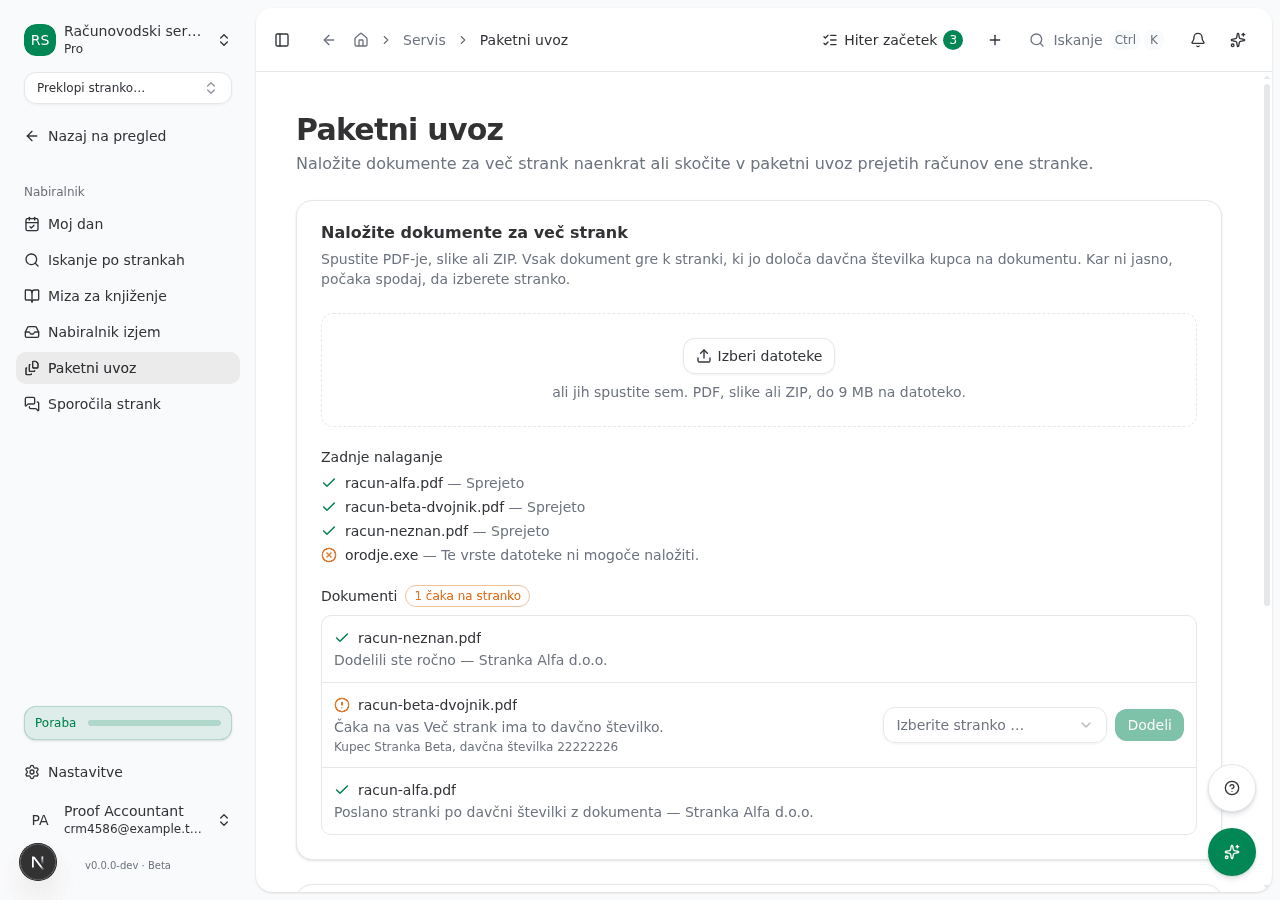
A file you already dropped is refused as a duplicate, so it is not read twice. A file of a type we do not accept, or one that cannot be read (a Word document, for example), is refused with a reason. Such a file uses no AI credits. If you reject a document that already reached a client in that client’s document queue, you can drop it again.
The document finds its client
The document is read. A client is named only when exactly one of your active clients carries the buyer’s tax number from the document and you may see that client. When the number is not on the document, cannot be read reliably, matches no client or matches several, the document does not sort itself. The document’s status states the reason.
An invoice the client issued itself, whose buyer is none of your clients, finds its client by the seller’s tax number. It reaches the client as an Izdani račun (issued invoice), not as a received invoice, so it cannot be booked as a supplier invoice.
Assign the documents that wait
You assign a document in the state Čaka na vas yourself. Pick the client in the list and click Dodeli. Clients with the same buyer tax number are suggested first. You can only choose among clients you may see. A document that belongs to no client is discarded with Zavrzi. An accountant with client confidentiality switched on sees only their own documents and their assigned clients.
Common issues
A document stays in reading for a long time. Reading can take a minute or two. If the state does not change, open the page again: the document is also sorted when the page is not open.
A document waits although the client exists. The client must be active and assigned to you, and the buyer’s tax number must be printed on the document and valid. If the client is not yours or the number differs, assign the document by hand.