Why can’t a payroll run be created, approved or filed?
The app refused a payroll step. In every case below nothing was saved, nothing was posted and nothing was sent to FURS: either no draft was created, or the run stayed in the state it was in. Which message you see depends on which button you clicked.
Refusals about missing REK-O data (the collective agreement code, the responsible person, holiday allowance paid before you moved to this app) are covered in Why won’t the REK-O be built?.
What the screen says
Performance-related pay without a confirmed act
On the Nov obračun plače (New payroll run) form with type Poslovna uspešnost (Performance-related pay), you click Ustvari osnutek (Create draft):
Plačilo za poslovno uspešnost se lahko izplača davčno ugodneje le, če je pravica določena v splošnem aktu ali kolektivni pogodbi. Akt potrdite v razdelku Plačilo za poslovno uspešnost na obrazcu za nov obračun plač in obračun ustvarite znova. (“Performance-related pay can be paid tax-exempt only when the right to it is set in a company act or a collective agreement. Confirm that act in the Performance-related pay section of the new payroll run form, then create the run again.”)
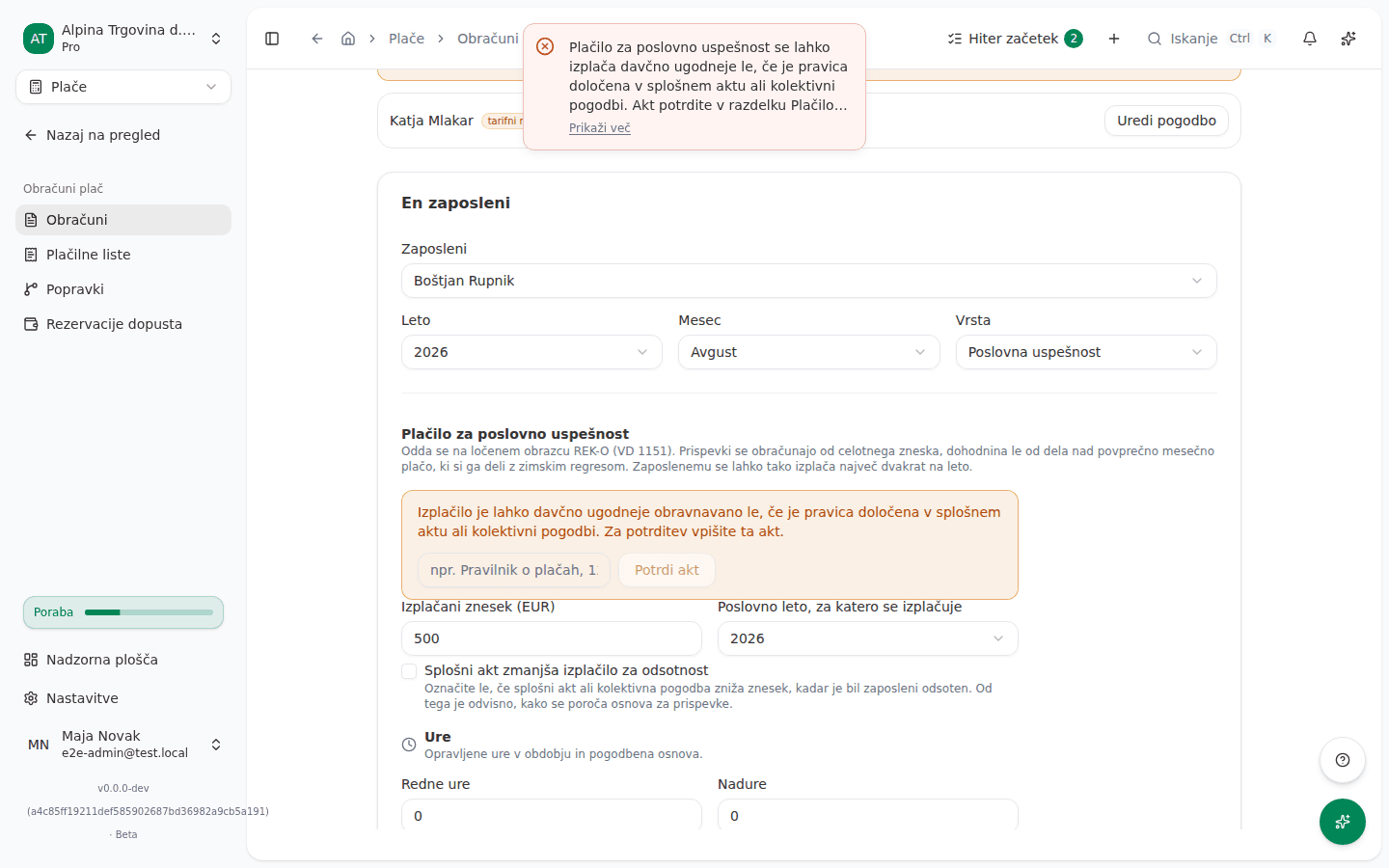
Once the act is confirmed, the app refuses a performance-pay line on an ordinary monthly salary run and points you to a separate Poslovna uspešnost run. The form does not offer such a line, so you mainly meet this in a payroll correction or through Vega AI. You also get a separate message when the payment would be the third one in the same calendar year, or when the employee was not employed by you in the selected Poslovno leto, za katero se izplačuje (Business year it rewards).
Holiday allowance or winter allowance carrying salary items
On a Regres (Holiday allowance) run you entered Dnevi prehrane (Meal days) or Prevoz km (Commute km):
Obračun regresa ne more izplačati povračil stroškov za malico, prevoz na delo ali dnevnic. Malica, prevoz na delo in dnevnice se obračunajo na mesečni plači (REK-O 1001), ne na regresu, tudi če je regres nakazan isti dan. (“A holiday-allowance (regres) run cannot pay meal allowance, commuting costs or per-diems. They are reimbursed on the monthly salary run (REK-O 1001) for the month they were incurred, even when the holiday allowance is transferred on the same day.”)
The app likewise refuses a holiday allowance, winter allowance or performance-pay run that would carry a benefit in kind, travel-order reimbursements, a work-from-home allowance or one-off supplements. Each message names the run the item belongs on. For a winter allowance it also refuses an amount above the entitlement when you have not confirmed the performance-pay conditions, and a payment to someone with no recorded employment with you in the entitlement year.
An attached travel order
In the Potni nalogi (službene poti) (Travel orders) section you attached an order that cannot be paid:
Potnega naloga PN-2026-0012 ni mogoče pripeti temu obračunu. Pripadati mora temu zaposlenemu, biti odobren (ali v obračunu poti), pot pa se mora začeti do konca obračunskega obdobja. (“Travel order PN-2026-0012 cannot be attached to this payroll run. It must belong to this employee, be approved (or in settlement), and the trip must start by the end of the payroll period.”)
On Odobri (Approve) or Oddaj (File) you may also get:
Potni nalog PN-2026-0012 se je spremenil po pripravi osnutka. Osnutek pripravite znova, da bo potrjevalec videl trenutne zneske. (“Travel order PN-2026-0012 changed after this run was drafted. Create the draft again so the approver sees the current figures.”)
Two related messages say the order was already reimbursed (through another run or outside payroll) or that it has no amount to reimburse.
Filing the run
On Oddaj (File) with a Datum izplačila (Payment date) entered, for an employee whose contract states a net salary:
Pogodba tega zaposlenega določa neto plačo, bruto plače, ki bi dala točno ta neto, pa za vneseni datum izplačila ni bilo mogoče znova izračunati (dogovorjeni neto 1200.00 €; najbližji dosegljivi neto je 1199.98 €). Nič ni bilo oddano. Preverite dogovorjeno neto plačo na pogodbi in datum izplačila na obračunu, nato oddajte znova. (“This employee’s contract states a net salary, and the gross wage that produces exactly that net could not be re-derived for the payment date you entered (agreed net 1200.00 €; the closest reachable net is 1199.98 €). Nothing has been filed. Check the agreed net salary on the contract and the payment date on the payroll run, then file again.”)
For a winter allowance the app refuses a payment date before 1 January 2026 and names the date you entered.
The calculation cannot run
On Ustvari osnutek (Create draft) or Ustvari osnutke iz ur (Create drafts from hours), or when you file the run:
Obračuna plač ni mogoče izračunati, ker za datum, na katerega se izračuna, ni nobene veljavne zakonske vrednosti: to je obračunsko obdobje ali datum izplačila. Šifrant ni prazen. Manjka obdobje, kar običajno pomeni, da vrednosti za novo leto oziroma polletje še niso vnesene. V zakonskem šifrantu plač dodajte vrednosti, ki pokrivajo ta datum, in znova zaženite obračun. (“Payroll cannot be calculated because no statutory value covers the date it is calculated at: the payroll period, or the payment date. The catalogue is not empty. A period is missing, which usually means the new year’s or half-year’s values have not been published into it yet. Add the values covering that date under the payroll statutory catalogue and run the payroll again.”)
The tax brackets and the tax reliefs are those of the year the wage is PAID in, so a December wage paid in January needs the new year’s values.
A related message says the collective agreement (KPD) assigned to the employee lacks one of its supplements for this period. A third says the statutory catalogue is empty altogether.
Discarding a draft
In the Več dejanj (More actions) menu you chose Zavrzi osnutek (Discard draft) on a run that someone approved in the meantime:
Zavreči je mogoče samo osnutek. Ta obračun je odobren. Odobren, oddan ali plačan obračun ostane v evidenci; oddan obračun popravite s popravkom obračuna. (“Only a draft can be discarded. This run is approved. An approved, filed or paid run stays on record; correct a filed run with a payroll correction.”)
A payroll correction draft cannot be discarded, so the Več dejanj menu does not offer it. Create a wrong correction draft again on the Popravki (Corrections) page.
Why this happens
Before saving a draft, the app checks that the run type may carry every item you entered, that every value the calculation needs exists for the period, and that each attached travel order can be paid. Before approval and filing it checks the travel orders again, because they can be edited or paid elsewhere in the meantime. At filing it recalculates the run on the payment date you entered. A run that fails one of these checks is refused whole, rather than filed with an amount the app cannot justify.
What to do
- Read the message to the end. The last sentence says where the fix is.
- For performance-related pay, on the Nov obračun plače form in the Plačilo za poslovno uspešnost section, fill in Splošni akt ali kolektivna pogodba (Company act or collective agreement), click Potrdi akt (Confirm act), then Ustvari osnutek again. See Performance-related pay.
- For a holiday or winter allowance, remove the item the message names and enter it on the monthly salary run for the right month.
- For a travel order, edit or approve it in Travel orders and per-diems, or leave it unattached. If it changed after drafting, discard the draft with Zavrzi osnutek in the Več dejanj menu and create it again. An approved run cannot be discarded, so in that case contact support.
- For a net salary, check the agreed net on the contract (Uredi pogodbo, Edit contract) and the payment date, then click Oddaj again.
- For a missing KPD supplement, add it or remove the KPD assignment, see Collective-agreement supplements (KPD).
- Do not discard an approved or filed run. Correct a filed one with Ustvari popravek (Create correction), see Correcting a filed payroll run.
If you can’t fix this yourself
Company users cannot edit the payroll statutory catalogue. If you get a message that no statutory value covers the period or that the catalogue is empty, contact support and name the payroll period and the payment date.
The app does not file a third performance-related payment in the same year. The message says to report such a payment outside the app.
Messages about data from before you moved to this app (the opening vacation provision, sick leave and holiday allowance before the move, missing months for the wage-compensation base) mostly send you to Plače → Prenos začetnih stanj → Podatki o zaposlenih (Payroll → Carry-in → Employee facts). An explicit zero is a valid answer. If you cannot find the column the message asks for, contact support.