Travel orders and per-diems
A travel order (potni nalog) documents a business trip and triggers the per-diem (dnevnica) calculation, which follows its own statutory rules, separate from an ordinary expense reimbursement.
Check your mode first: simple or advanced
VegaERP has two travel-order modes, chosen by an administrator under Nastavitve → Nastavitve modulov → Potovanja (“Settings → Module settings → Travel”), under Način vodenja potnih nalogov (“Travel order mode”):
- Osnovno (“Simple”, the default for smaller companies): “One screen to issue a travel order with per-diems and mileage, plus a PDF printout.”
- Napredno (“Advanced”): “Adds approval, spending rules, multi-stop routes, reports, and invoicing.”
In Osnovno (“Simple”) mode, the form shows no route map, no adding intermediate stops, and no partner selection, and the left sidebar under Potovanja (“Travel”) has no Poročila (“Reports”), Odobritve (“Approvals”), or Koledar (“Calendar”) entries. These aren’t missing features, they’re deliberately hidden in this mode. This page describes simple mode first, then what advanced mode adds.
Creating a travel order
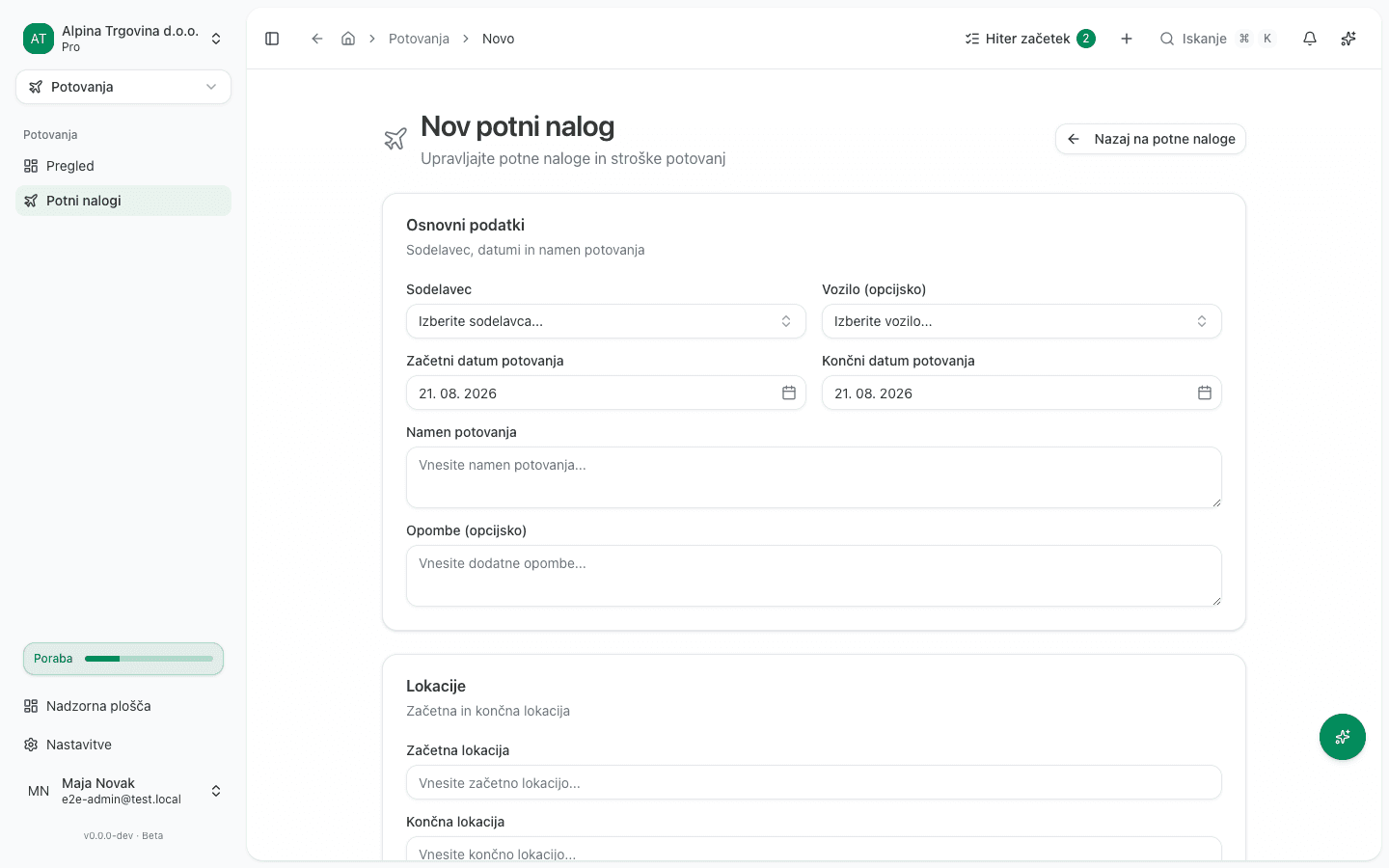
- Go to Potovanja → Potni nalogi (“Travel → Travel orders”) and click Nov potni nalog (“New travel order”).
- Under Osnovni podatki (“Basic info”), pick the Sodelavec (“Coworker”) who’s travelling, and enter Začetni datum potovanja (“Travel start date”) and Končni datum potovanja (“Travel end date”), with the time. These two decide which per-diem band the trip falls into, so enter them precisely.
- Enter the Namen potovanja (“Purpose of travel”).
- Under Lokacije (“Locations”), enter Začetna lokacija (“Origin”) and Končna lokacija (“Destination”).
- Save the order with Shrani (“Save”).
Calculating the per-diem
You don’t enter the per-diem amount by hand. Turn on Omogoči dnevni dodatek (“Enable per-diem”), then under Dnevni dodatek (“Per-diem”) pick the Ciljna država (“Destination country”): for a trip inside Slovenia, pick Slovenia; for a trip abroad, pick the actual destination country. Click Izračunaj dnevni dodatek (“Calculate per-diem”).
VegaERP works out the per-diem band from the trip’s duration (the departure and return you entered) and destination, then reads the amount from the statutory table in force for that date, separately for domestic and foreign trips. The result shows under Dnevna razčlenitev (“Daily breakdown”), with Skupaj dnevni dodatek (“Total per-diem”) at the bottom; click Shrani dnevnice (“Save per-diem”) to attach it to the order.
If the system has no statutory table covering the travel date (yet), VegaERP refuses the calculation instead of paying a wrong or a zero amount. The message for a domestic trip reads:
Za datum 2026-08-25 ni evidentirane zakonske domače dnevnice. V katalog povračil dodajte veljavno obdobje ali spremenite datum potovanja. (“No statutory domestic per-diem is recorded for 2026-08-25. Add a valid period to the reimbursement catalog, or change the travel date.”)
For a trip abroad, the message is the same shape, tied to the destination country instead. Either way, it means an entry is missing in the shared catalog your system administrator maintains, not a wrong value on your order.
Mileage and other expenses
Actual travel costs are recorded on the travel order separately from the per-diem: the per-diem is a flat statutory amount, while costs are reimbursed at their actual value based on receipts.
| Per-diem | Mileage | |
|---|---|---|
| What it is | Flat statutory amount | Actual value based on distance |
| How it’s calculated | From the band by trip duration and destination, read from the statutory table in force for that date | Distance (one way, km) × Rate (€/km) |
| Where you enter it | Omogoči dnevni dodatek → Ciljna država → Izračunaj dnevni dodatek → Shrani dnevnice | Razdalja (v eno smer, km) → Stopnja (€/km) → Shrani kilometrino |
Merging the two into one figure breaks both how per-diems are treated in payroll and the audit trail of costs.
- Mileage: enter Razdalja (v eno smer, km) (“Distance, one way, km”) and, if needed, adjust Stopnja (€/km) (“Rate, €/km”, pre-filled from the vehicle or the company policy), then click Shrani kilometrino (“Save mileage”). Skupaj kilometrina (“Total mileage”) appears.
- Other costs (transport, accommodation, tolls): under Stroški (“Expenses”), click Dodaj strošek (“Add expense”) and enter each cost’s type, amount, and date. Skupaj stroški (“Total expenses”) appears.
Once the order is ready, download it as a document with Prenesi PDF (“Download PDF”).
What advanced mode adds
In Napredno (“Advanced”) mode, a travel order doesn’t stay a draft after creation, it goes through a workflow: Pošlji na odobritev (“Submit for approval”, status Poslano, “Submitted”), then it’s either approved with Odobri (“Approve”) or refused with Zavrni (“Reject”, status Odobreno/“Approved” or Zavrnjeno/“Rejected”). An approved order is then moved to Obračunavanje (“Settling”) with Začni obračun (“Start settlement”), and finally Označi kot povrnjeno (“Mark as reimbursed”) closes it with status Povrnjeno (“Reimbursed”).
This mode also adds the Poročila (“Reports”), Odobritve (“Approvals”), and Koledar (“Calendar”) entries under Potovanja (“Travel”), and the new-order form additionally shows a Partner (opcijsko) (“Partner, optional”) field, a map of the planned route, and adding intermediate Postaje na poti (“Stops along the way”).
Common mistakes
- Entering the wrong departure or return time, which you only notice once it has already changed the per-diem band. Check both date/time fields on the form before calculating the per-diem.
- Recording a meal the employer already paid for (e.g. lunch at a conference) as an ordinary travel cost under Stroški (“Expenses”) instead of accounting for it in the per-diem calculation. This double-counts the meal.
- Looking for Poročila (“Reports”), Odobritve (“Approvals”), or the partner field on the form in simple mode: these only appear once an administrator switches to Napredno (“Advanced”) under Nastavitve → Nastavitve modulov → Potovanja.
If you can’t fix this yourself
Only a company administrator can switch between simple and advanced mode. If the per-diem calculation still refuses with a missing statutory table for a recent date, contact support, since that means a missing entry in the shared catalog, not a setting on your company.