Client search
The Iskanje po strankah (client search) page finds an issued invoice, a supplier invoice, a document or a partner across all your clients at once, instead of opening client after client. Find it in the left menu under Servis → Prejeto → Iskanje po strankah.
The search always stays inside the clients you may open. A firm admin searches every active client. An accountant searches their own portfolio, or, when the firm has switched on the client confidentiality wall, only the clients assigned to them. Another firm’s clients never appear.
Type a search term
Type at least three characters into the box: an invoice number, a partner name or part of a file name. Results appear when you stop typing.
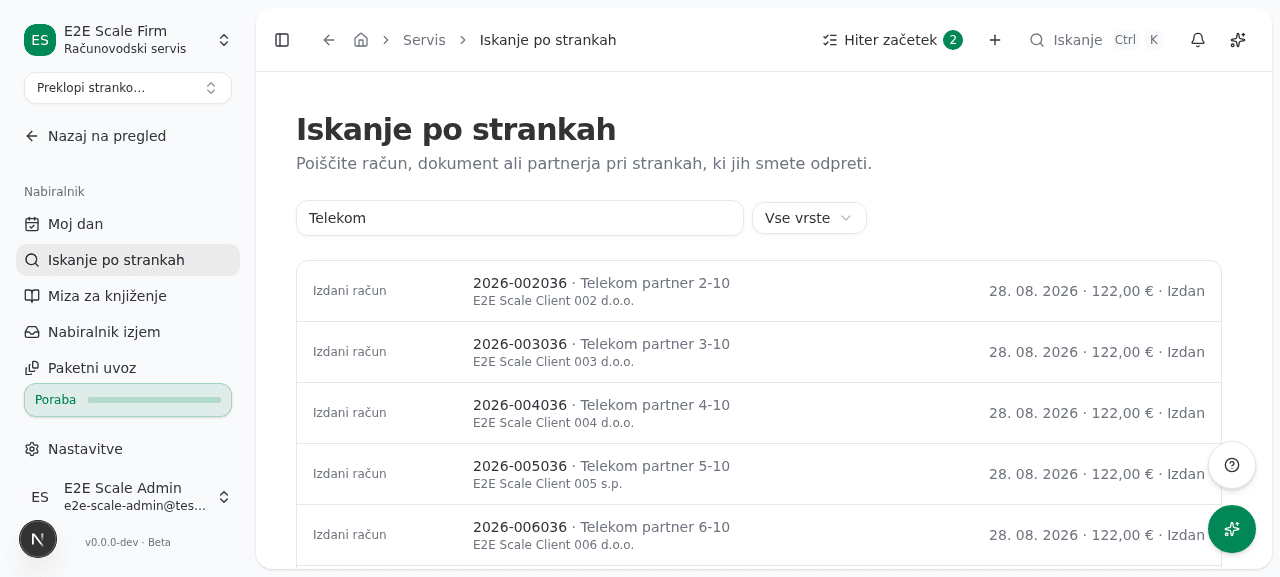
Each hit shows its kind (Izdani račun, Prejeti račun, Dokument or Partner), the number or name, the partner, the client name, the date, the amount and the status.
Narrow by kind
Use the Filtriraj po vrsti dropdown to keep one kind of hit. When there are more hits than the page shows, it says so; narrow the search with a longer term.
Open a hit
Click a hit. The client’s books open on that invoice or partner, the same way choosing a client from the client list does. A document opens the client’s document list. Return to the firm from the accountant toolbar.