Why can’t a delivery note’s shipment be cancelled?
When you ship an issued delivery note, stock goes down and the cost of goods sold is booked. Storniraj odpremo (Cancel shipment) undoes both: the goods go back into stock and the booking is reversed. The app only allows it while the cancellation wouldn’t leave the books out of step, so in some cases it refuses, or doesn’t offer it at all.
What the screen says
On the delivery note
The app offers Storniraj odpremo (Cancel shipment) in the delivery note’s three-dot menu only when the cancellation is possible at that moment. Clicking it opens a confirmation:
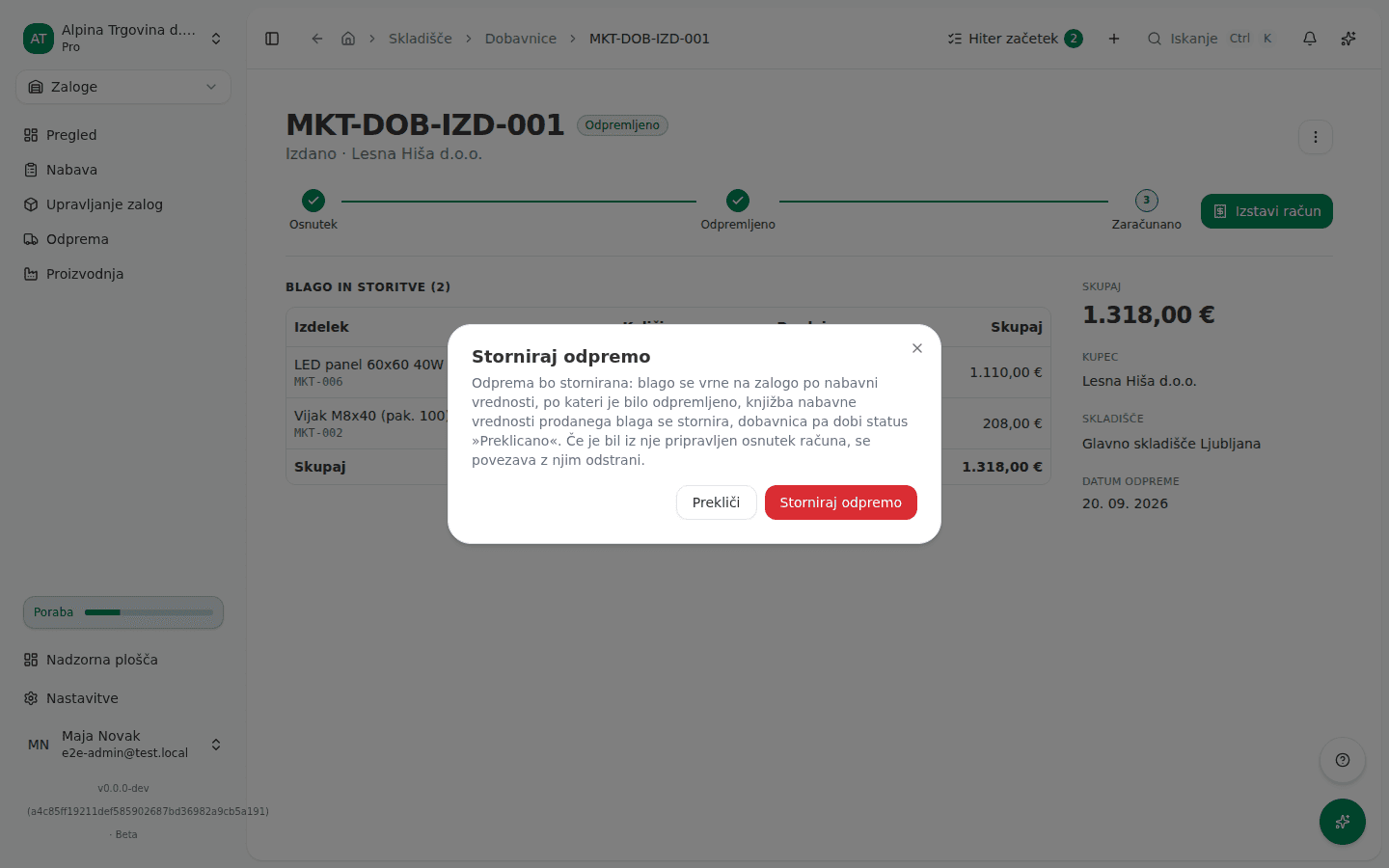
If something changed between opening the page and confirming, for example someone else issued the invoice or closed the period, the app refuses when you confirm, with one of these:
Za to dobavnico je bil račun 2026-00042 že izdan, zato odpreme ni več mogoče stornirati. Za vračilo blaga izdajte dobropis. (“Invoice 2026-00042 has already been issued for this delivery note, so the shipment can no longer be cancelled. Issue a credit note to return the goods instead.”)
Odpreme ni mogoče stornirati: nabavna vrednost prodanega blaga je knjižena v obračunskem obdobju »september 2026«, ki je zaključeno. Najprej ga znova odprite. Nič ni bilo spremenjeno. (“The shipment cannot be cancelled: the cost of goods sold was booked in the accounting period “September 2026”, which is closed. Reopen the period first. Nothing was changed.”)
Odpreme ni mogoče stornirati: nabavna vrednost prodanega blaga je knjižena v obračunskem obdobju »september 2026«, ki je zaklenjeno in ga ni več mogoče odpreti. Nič ni bilo spremenjeno. (”… which is locked and can no longer be reopened. Nothing was changed.”)
S to odpremo je bilo prodano blago, ki ga ni bilo na zalogi, njegova nabavna vrednost pa še ni poravnana. Najprej prevzemite manjkajočo zalogo, nato stornirajte odpremo. (“This shipment sold goods that were not in stock, and their cost is not settled yet. Receive the missing stock first, then cancel the shipment.”)
Dobavnica ni več odpremljena: njena odprema je bila že stornirana. Osvežite stran. (“This delivery note is no longer shipped: its shipment was already cancelled. Refresh the page.”)
Knjižbe nabavne vrednosti prodanega blaga za to odpremo ni bilo mogoče stornirati, zato ni bilo nič spremenjeno. Poskusite znova, če se napaka ponavlja, pa se obrnite na podporo. (“The cost-of-goods-sold entry for this shipment could not be reversed, so nothing was changed. Try again, and contact support if it keeps failing.”)
When deleting a draft invoice
If you delete a draft invoice that a shipped delivery note was created from, the Izbrišem osnutek računa? (Delete draft invoice?) dialog lists the delivery note as a document that has to be closed first. When its shipment can’t be cancelled, the delivery note shows no checkbox, and instead reads:
Te odpreme ni mogoče preklicati, zato računa ne morete izbrisati, dokler to ni mogoče: (“This shipment can’t be cancelled, so this invoice can’t be deleted until it can:”)
Below it is the reason, usually one of the closed-period or not-in-stock messages from the previous section.
Why this happens
Cancelling a shipment has to put the goods back into stock and reverse the cost-of-goods booking at the same time. If either step can’t be done, the app does neither, so stock and the books never drift apart:
- The invoice is already issued. The issued invoice has already booked revenue and VAT. Cancelling the shipment would bring the goods back while the invoice stays. The right correction is a credit note, which restocks the goods its own way.
- The period is closed or locked. The cost-of-goods booking sits in a period the app may no longer post into. A closed period can be reopened, a locked one can’t.
- The goods weren’t in stock. If Dovoli prodajo v negativno zalogo (Allow selling into negative stock) is on, the cost booked at shipping was only provisional and waits for the goods to be received. Until that is settled, a cancellation would mean two cost bookings that don’t add up.
- It isn’t issued or isn’t shipped. Only the shipment of an issued delivery note in Odpremljeno (Shipped) status can be cancelled. Received delivery notes and drafts don’t have this option.
What to do
- Refresh the delivery note. If Storniraj odpremo (Cancel shipment) is no longer in the three-dot menu, the cancellation isn’t possible right now, for one of the reasons above.
- If the invoice is already issued, don’t cancel the shipment. Issue a credit note on the invoice for the returned goods (see Fixing an invoice you already issued).
- If the period is closed, reopen it (see Closing and locking periods), then open the delivery note, click Storniraj odpremo (Cancel shipment) and confirm with Storniraj odpremo again. If the period is locked, correct it with a credit note instead.
- If the goods were sold into negative stock, first receive the missing goods with a received delivery note. Once the cost is settled, Storniraj odpremo (Cancel shipment) comes back in the menu.
- If the delivery note is still Osnutek (Draft), there’s nothing to cancel: no goods have moved, so you can simply delete it.
Once the cancellation succeeds, the delivery note moves to Preklicano (Cancelled), the goods are back in stock, and the app shows “Odprema stornirana, blago je vrnjeno na zalogo” (“Shipment cancelled, goods returned to stock”). If a draft invoice was prepared from the delivery note, the link to it is removed.
If you can’t fix this yourself
The message about a cost-of-goods entry that couldn’t be reversed means the general ledger refused the reversal for a reason the rules above don’t cover. Nothing was changed. Try once more, and if it happens again, contact support with the delivery note number.
Two messages in this group don’t appear in the app, only when working with the Vega AI assistant: that a delivery note can’t be created from an invoice because the invoice was deleted or cancelled. In that case you don’t need the delivery note, since there are no longer any goods to ship for that invoice.
The full shipping and cancellation flow is in Receiving and shipping goods (delivery notes).