Firm dashboard
The firm dashboard is the first page an accounting firm sees in VegaERP after signing in. It gathers the state of every linked client company in one place, instead of opening each one separately. The page is only available to accounts registered as an accounting firm; a single company doesn’t have this page.
You’ll find it in the left menu by clicking Nadzorna plošča servisa (Firm dashboard) at the top of the module list.
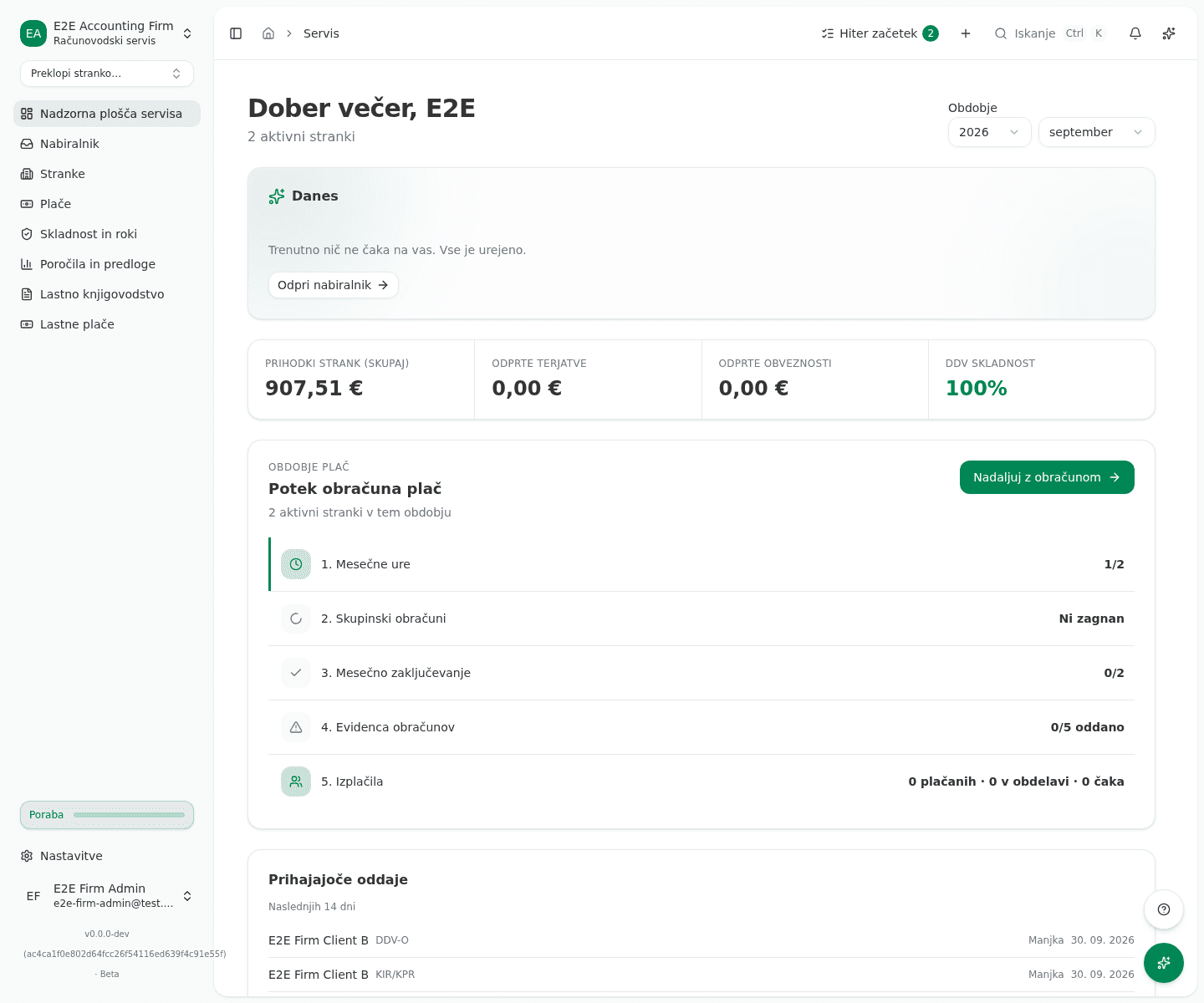
Read the Today section
At the top of the page is the Danes (Today) section: what Vega handled on its own overnight and what is waiting on you. When something is waiting, click Odpri nabiralnik (open inbox) to open the Exception inbox straight at those items.
Check the client KPIs
Four KPIs summarize the selected period across every linked client: Prihodki strank (skupaj) (clients’ revenue, total), Odprte terjatve (outstanding AR), Odprte obveznosti (outstanding AP) and DDV skladnost (VAT compliance). Change the period with the month/year picker next to the greeting.
Follow the payroll progress
The Potek obračuna plač (payroll progress) section shows five steps for the selected period: 1. Mesečne ure (monthly hours), 2. Skupinski obračuni (bulk payroll batch), 3. Mesečno zaključevanje (monthly close), 4. Evidenca obračunov (filings) and 5. Izplačila (payouts). Click Nadaljuj z obračunom (continue with payroll) to open the next unfinished step, or click any step directly.
Use upcoming filings and quick actions
Prihajajoče oddaje (upcoming filings) lists what’s due in the next 14 days across every client; clicking a row opens the filings register pre-filtered to it. Below that is a Hitra dejanja (quick actions) row of shortcuts: Zaženi obračun plač (run payroll), Dodaj stranko (add client), Zaključi mesec (close month), Oddaj obračune (file submissions), Dokumenti strank (client documents) and Beleži čas (log time).
What success looks like
- All four KPIs show real numbers for the selected period, not blank values.
- The Potek obračuna plač section lists all five steps with their current state; once every step is done, the Nadaljuj z obračunom button is replaced by an Vse opravljeno (all clear) badge.
- When nothing across any client is waiting on you, the Danes section says so instead of rendering empty.
Common issues
- The header shows only the firm’s name instead of a greeting. That’s the placeholder title shown while your user profile is still loading; once it loads, it’s replaced by the greeting with your first name.
- The KPIs are blank and the selected period is a future month. The period hasn’t started yet: the page says so with To obdobje se še ni začelo. KPI-ji se bodo izpolnili po prvi izdani fakturi + obračunu plač. Pick the current or a past month instead.
- The overview couldn’t load. Loading the data failed, for example due to a dropped connection. Click Poskusi znova (retry) next to the error message.
- You only see some of your clients. The firm admin turned on client confidentiality (see Accounting firms & multi-client access); accountants without the admin role then only see the clients assigned to them.