Partners with no country
Partners imported from another program or from a spreadsheet often arrive with no country. The country is not cosmetic: it decides how VAT on a purchase is treated and which box of the VAT books the purchase lands in. That is why VegaERP will not guess it.
Every night the program tries to find the country in the business register. It adopts one only when the tax number hits exactly one active entry and the partner’s name corroborates the name in the register. Every other case is left without a country and waits for you. Those are the partners the Partnerji brez države (Partners with no country) page collects.
The app’s screen labels below are quoted from its Slovenian UI, since that’s what the product actually shows; the numbered steps still work if you’ve switched the app to its English UI.
Where the page opens
- In the left menu choose CRM → Partnerji (Partners).
- If any partner is missing a country, a warning above the list says how many. Click Preglej (Review).
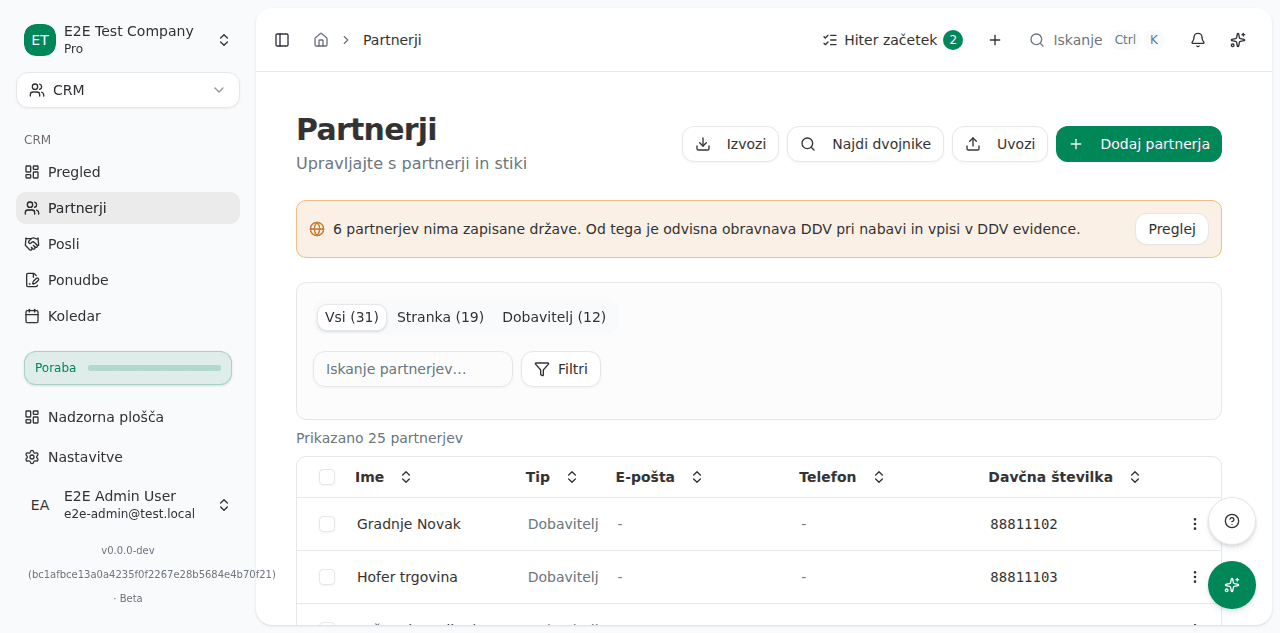
There is no warning when every partner has a country. Nothing needs doing then.
How to record a partner’s country
Each partner sits on its own card. The tax number is under the name, and the badge on the right says why the nightly check did not decide on its own:
- Ujemanje v registru (Registry match): one active entry, and the names corroborate.
- Naziv se ne ujema (Name mismatch): the tax number hits one entry, but the names differ.
- Več vnosov (Several entries): the same tax number is recorded under several countries.
- Izbrisan vnos (Deregistered entry): the only matching entry is no longer registered.
- Ni v registru (Not in the register): the tax number is not in the register at all.
Then:
- Read the register entry on the card. The program shows its name, country and address, so you can judge whether it really is the same partner.
- If it is, click To je ta partner (This is the partner) beside that entry. The country is recorded at once and the partner is linked to the register entry, so the source of the figure is on the record.
- If none of the entries is this partner, or there is no entry, pick the country where the partner is based in the Država (Country) field and click Shrani državo (Save country). This path links no register entry, because there is none.
- If you do not know the partner well enough, click Odpri partnerja (Open partner). The partner opens in a new tab and the list stays where it is.
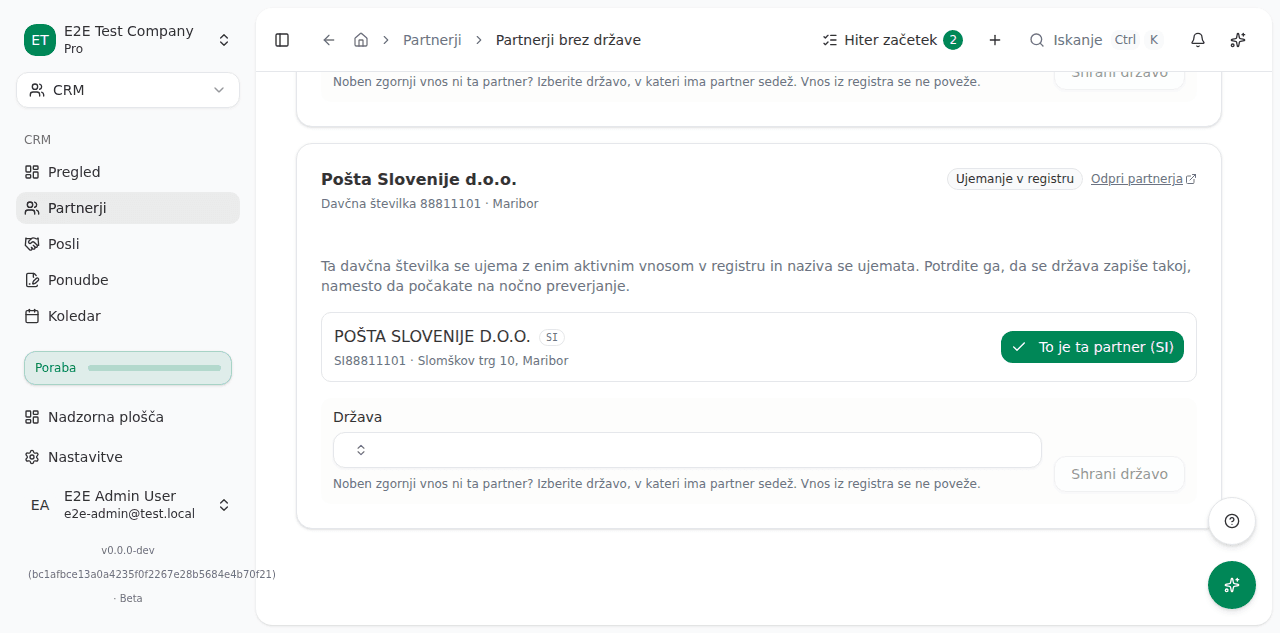
On an Izbrisan vnos (Deregistered entry) badge the company is recorded as struck off the register. Confirming is still possible and is your decision; the program never makes it on its own.
What success looks like
The partner you answered leaves the list, and the figure in the warning above the Partners list drops by one. Both are the same figure, so they cannot disagree. Once the list is empty, the warning above the Partners list is gone.
Another country’s VAT ID in the tax number field
Sometimes a foreign supplier has, for example, the United States as its country, an Irish VAT
ID (such as IE4276970QH) in Davčna/registrska številka (Tax/registration number), and an
empty ID za DDV (VAT ID). The DDV-O return files a supplier by the VAT ID it invoices
under, not by its address: this supplier’s services land in the EU boxes (23a and 32a; 23 and
32 for goods), because the VAT ID was issued by another EU country.
The VAT ID still belongs in ID za DDV, so VegaERP points the record out in three places:
- when you save the partner, a notification appears with a button that applies the correction;
- on the partner’s edit page, a warning with the same button sits above the form;
- in a partner import, the row for this partner carries a warning.
Prepare the next DDV-O with Pripravi before you change such a partner. That return corrects the returns already filed with this supplier in the third-country boxes, and it reads the partner as it is now: change the partner first and that correction is lost.
If the supplier is established in the country that issued the VAT ID:
- Open the partner, click Več (More) and then Uredi (Edit).
- Save any other changes first with Shrani (Save). While the form has unsaved changes, the correction button is disabled.
- In the warning, click the button named after the country, for example Nastavi IE (Set IE).
The program puts that country in Država (Country), writes the full VAT ID with its prefix
in ID za DDV, and keeps only the number without the prefix as the tax number.
If the supplier is established in the recorded country and only registered for VAT in the other one, you can leave the data as it is. The DDV-O files it in the EU boxes either way.
Once the partner is corrected, the warning on its edit page is gone. Booked invoices do not change.
Common issues
- The same partner is in the register twice. If another partner already holds the same tax number in the same country, the program records nothing and says so. Merge the two first through Najdi dvojnike (Find duplicates) on the Partners list, then record the country on the one that remains.
- The partner has no tax number. Without one there is no register to check it against, so it is not on this list. Enter the tax number on the partner, or set the country there directly.
- The badge says Več vnosov (Several entries). The same tax number sits under several countries in the register, so the program does not pick. Choose the entry whose country is where the partner is based.