Setting up payroll
Payroll (obračun plač) has more setup dependencies than most modules, because Slovenian payroll calculations depend on statutory parameters that must exist before any run.
Statutory catalog
VegaERP ships with the current statutory payroll catalog (minimum wage, contribution rates, tax brackets, per-diem caps). You normally don’t need to touch this, since it’s seeded and kept up to date centrally. But it’s worth knowing it’s the foundation every calculation reads from.
Employees
Go to Plače → Zaposleni → Zaposleni (“Payroll → Employees”) and add each employee with their personal and employment data. If you migrated from Minimax, this step may already be done. See Importing from Minimax.
Contracts
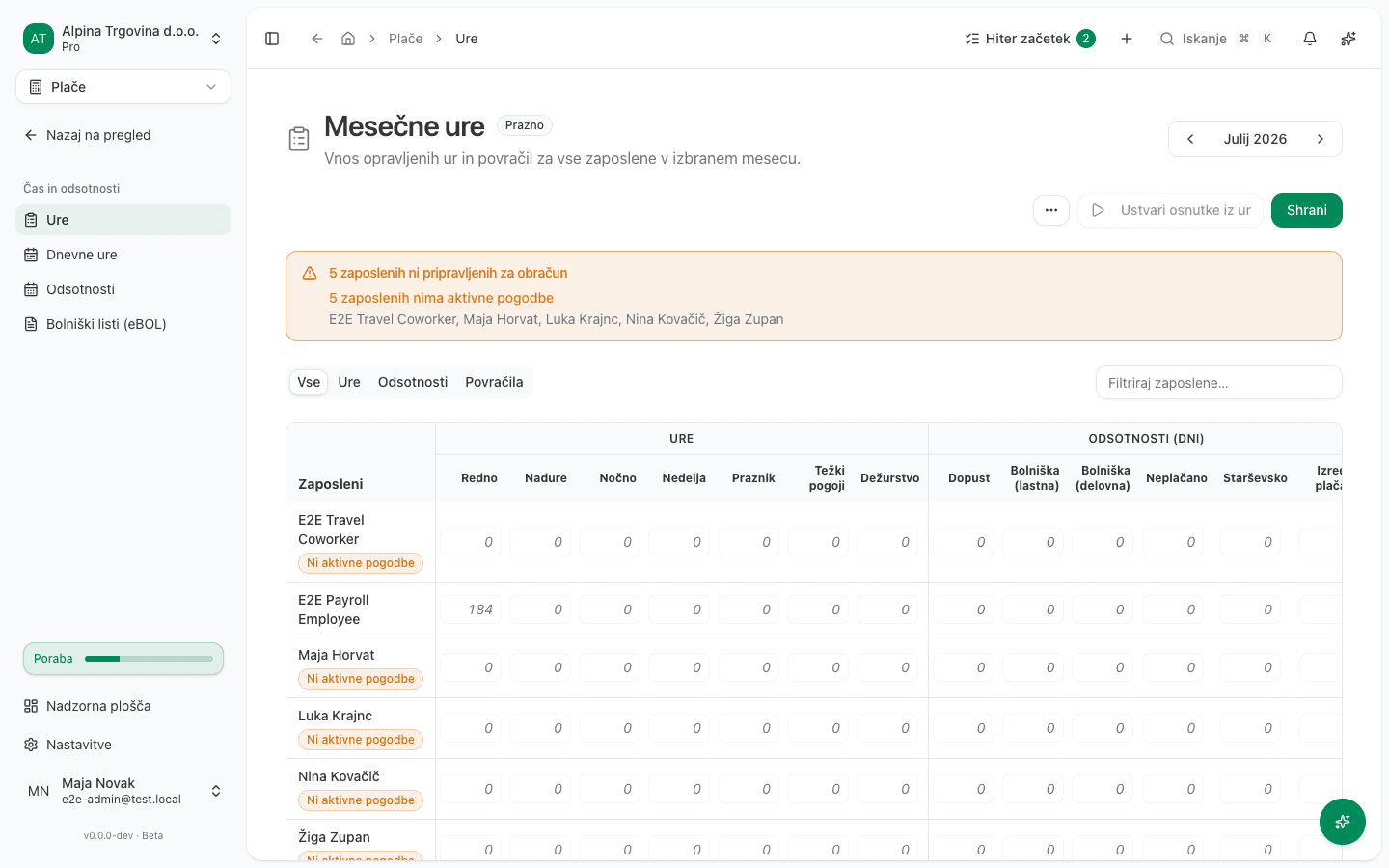
Each employee needs an active employment contract record under Plače → Zaposleni → Pogodbe (“Contracts”): contract type, start date, base salary or hourly rate, and working-time arrangement. The contract is what the payroll engine actually reads when calculating a period. An employee without an active contract can’t be included in a run. On the monthly-hours grid, an employee missing one shows a Ni aktivne pogodbe (“No active contract”) link right where their hours would go, instead of silently excluding them.
Under Delovni dnevi (“Working days”), tick the weekdays the employee works, for example Tuesday to Saturday. The monthly hour norm the hourly rate is derived from counts those days in the month, less any public holidays that fall on them: a holiday on a Saturday lowers the norm for someone who works Saturdays, and not for someone who works Monday to Friday. The days-per-week figure fills itself in. If no day is ticked, the norm is counted on the Monday-to-Friday calendar, prorated by the days per week.
If the employer provides a recurring benefit in kind, for example an insurance premium paid for the employee, record it on the contract under Bonitete (benefits in kind): pick the kind, write the description that should print on the payslip, and enter the monthly EUR value. Every payroll run then adds it to the contribution and income-tax base and reports it on the REK-O, but never pays it out in cash. The employee already received the benefit itself.
Carry-in data (mid-year starts)
If you’re starting mid-year, import what your previous system already paid this year under Plače → Prenos začetnih stanj: the per-employee, per-month detail export plus the year-to-date summary export (cumulative gross, income tax, contributions, net, regres).
These figures are an audit and reconciliation record: they let you tie the year’s totals back to your previous system, and you can review them any time under Plače → Preneseni podatki. They do not feed the monthly calculation. Income tax is computed per month by annualising that month’s base (ZDoh-2 §127), not from a running year-to-date total.
The one calculation effect is regres: a carried-in regres line tells the app the holiday allowance was already paid this year, and it blocks a second tranche for that employee. The cutover month you enter also seeds the vacation-provision checkpoint, so provisions resume the month after your previous system stopped reserving.
Enter monthly hours
- Go to Plače → Čas in odsotnosti → Ure (“Hours”). The Mesečne ure (“Monthly hours”) grid lists every employee for the selected month, with columns for Redno (regular), Nadure (overtime), Nočno (night), Nedelja (Sunday), Praznik (holiday) hours, plus Dopust (vacation) and Bolniška (sick leave) days and allowances (Delo od doma (home-working days), Malica (dni) (meal days), Prevoz (commuting), Dnevnice (per diems)).
- Fill in each employee’s hours for the period and click Shrani (“Save”).
- Record a day worked entirely from home in the Delo od doma column (or pick the Delo od doma day type on the daily grid). Such a day counts as working time and keeps the meal allowance, but earns no commuting reimbursement. If the employment contract states a Nadomestilo za delo na domu (EUR/dan) (the home-working allowance field on the contract form), it is paid automatically for those days. If that field is empty, no allowance is paid and the run warns you when you approve it. The law (ZDR-1 Article 70(1)) grants the right to the allowance but leaves the amount to the contract, so the program cannot pick one for you. Enter the agreed amount, or enter 0 if you have checked and none is agreed. Then create the payroll draft again. An existing draft has the figures frozen into it and does not pick up a contract change on its own. Leave a day partly worked at the office recorded as regular work.
- For an employee who works from home permanently, turn on Delo na domu kot običajni način dela (“works from home by default”) on the contract form. Such an employee’s timesheet normally marks no home days at all, because for them home is not the exception. Without this setting the month is prepared as a full month at the office: commuting reimbursement for journeys nobody made, and no home-working allowance. With it on, a month the timesheet says nothing about counts every worked day as a home-working day. A record always wins: a daily hours grid (even one that marks no home day) and a hand-entered monthly figure in the Delo od doma column are both left alone. The setting lives on the contract, so for a mid-employment switch to remote work add a new contract starting on that date rather than editing the existing one. Earlier months then stay calculated the way they were.
- The Prevoz (commuting) column of kilometres to and from work is paid at the per-kilometre rate agreed in the employment contract: the Povračilo za prevoz na delo (EUR/km) field on the contract form. If that field is empty, the run pays the statutory tax-free ceiling (Uredba, Article 3), which is a maximum and not the agreed amount, and warns you when you approve it. If you agreed less (sector collective agreements commonly set 0,18 or 0,19 EUR/km), every commuting employee is over-paid, every month. Enter the agreed rate and create the payroll draft again. A higher agreed rate is allowed; the part above the ceiling is taxed like salary.
Generate the run
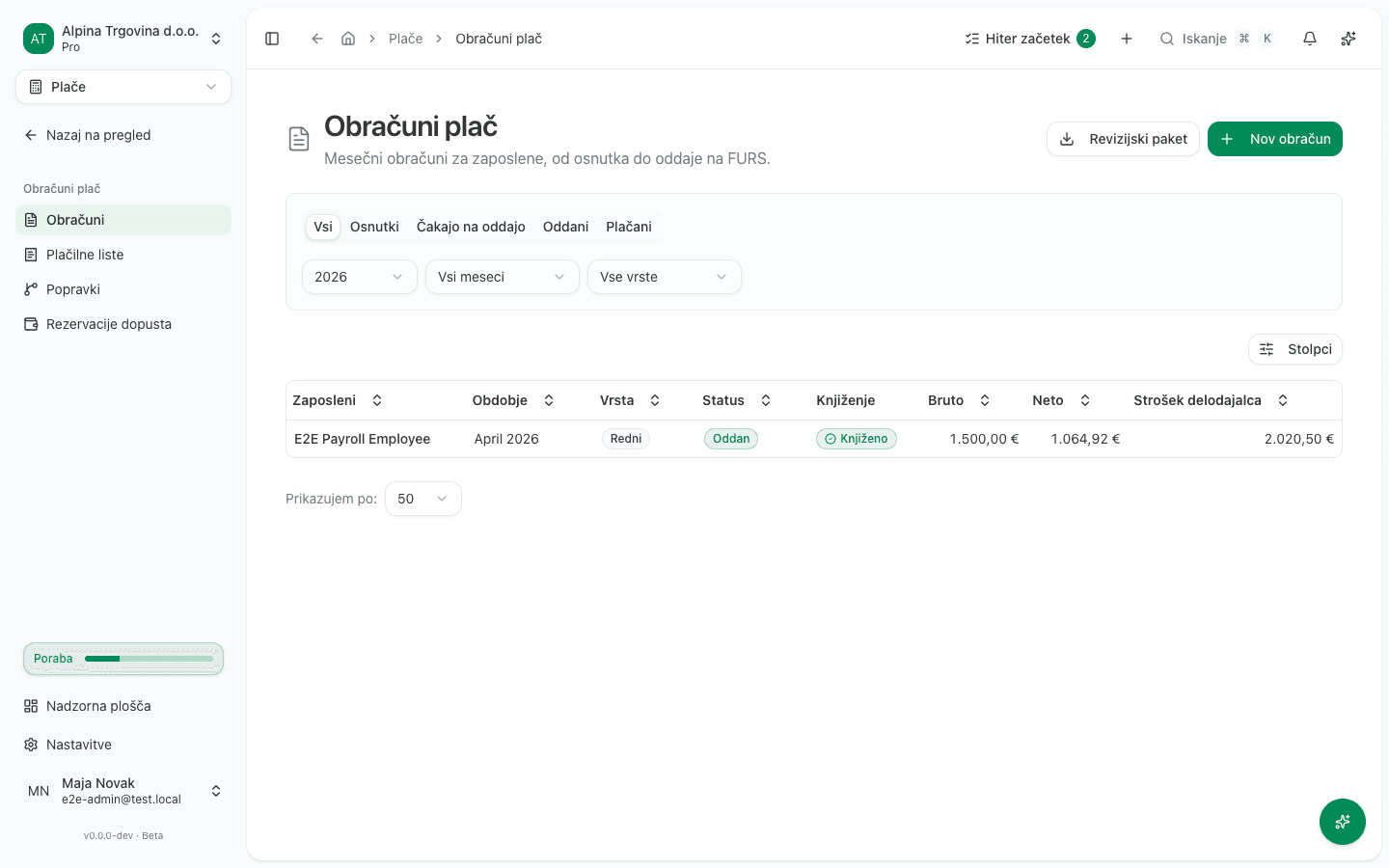
Click Ustvari osnutke iz ur (“Generate drafts from hours”) on the same Hours page. This creates a draft obračun (payroll run) per employee for the period, calculating gross-to-net pay and statutory contributions from the hours you entered. The runs then appear under Plače → Obračuni plač → Obračuni, filterable by Osnutki (drafts), Čakajo na oddajo (pending submission), Oddani (filed), and Plačani (paid).
Where applicable, VegaERP books the corresponding journal entries automatically.
Flat-rate (normirani s.p.) companies don’t get GL postings for payroll, since flat-rate taxpayers don’t keep double-entry books. This is expected, not a bug.
Details FURS requires before you can file a REK-O
Besides the calculation itself, the REK-O form carries a few company details FURS checks when you file. The app cannot derive them, so it refuses to build the form until they are recorded and tells you which one is missing.
It refuses rather than guesses, because a wrongly filed form cannot be withdrawn.
All three are recorded under Settings → Company:
- The person responsible for preparing the REK form (fields F008 and F009). Their name, and a phone number or e-mail. Both sit in the ZZZS & AJPES identifiers card.
- The registered company address (street, post number, post name). FURS checks this
against the business register, so the same card carries three separate fields. Left empty,
the app derives the address from the single Address field above, which is enough as
long as it reads like
Slovenska cesta 1, 1000 Ljubljana. Fill in all three or none: mixing the two sources is what produces a register mismatch. - FURS payment subaccounts. FURS requires a payment subaccount for every contribution family the form declares. The FURS payment subaccounts (REK-O) card uses the accounts in the official FURS register, so you normally enter nothing. If FURS gave the company a different subaccount, record it by hand.
The app does not fetch subaccounts from eDavki: that fetch would have to log in to eDavki as a person, and a person’s certificate may only be used by that person. Building a REK-O only reads the subaccounts, so filing never depends on eDavki being reachable.
Vacation pay reservation
VegaERP accrues a holiday-pay (regres) provision automatically as part of the monthly run, and reduces it as employees take vacation or receive payout. This, too, is skipped for flat-rate companies for the same reason as above.
Common setup mistakes
- Using “Nov obračun” for a routine month. The Obračuni page also has a Nov obračun (“New run”) button, but it opens a form for one single, one-off run for ONE employee (a regular run or regres). The app itself flags this: “Za rutinski mesečni obračun uporabi Mesečne ure in »Ustvari osnutke iz ur«. Ta obrazec ustvari en sam, enkratni obračun.” (“For a routine monthly run, use Monthly Hours and ‘Generate drafts from hours’. This form creates a single, one-off run.”) Use the Hours-page flow above for a normal month; reach for Nov obračun only for a one-off run. To correct a run you have already filed, use Ustvari popravek (“Create correction”) from the Več dejanj (“More actions”) menu on that run instead of this form. It is not a button on the page; it sits behind the three-dots button.
- Running payroll before an employee’s contract is active: the run will simply exclude them, which looks like a missing person rather than an error.
- Forgetting carry-in data on a mid-year migration: the app then can’t see that regres was already paid this year, and you lose the record you’d reconcile the year’s totals against.
- Not confirming the flat-rate flag on the company profile before the first run: it changes which screens and postings apply.
- Leaving the step-7 details until filing day. The run still calculates and posts without them; it is the REK-O filing that stops, which means it stops on the day you are most pressed for time. Record them during setup.