Why did the master-data import not accept every row?
On the Uvoz šifrantov (Master data import) page you imported Analitike (cost centres), Blagovne skupine (item categories) or a price list, and the result reads Uvoz zaključen z napakami (Import finished with errors). Each refused row is listed with its number and the reason.
A refused row is not written; the other rows of the same file are. So you don’t need to fix the whole file: correct the refused rows and upload the same file again. A re-import matches on the code (šifra), so rows that already came in are not duplicated.
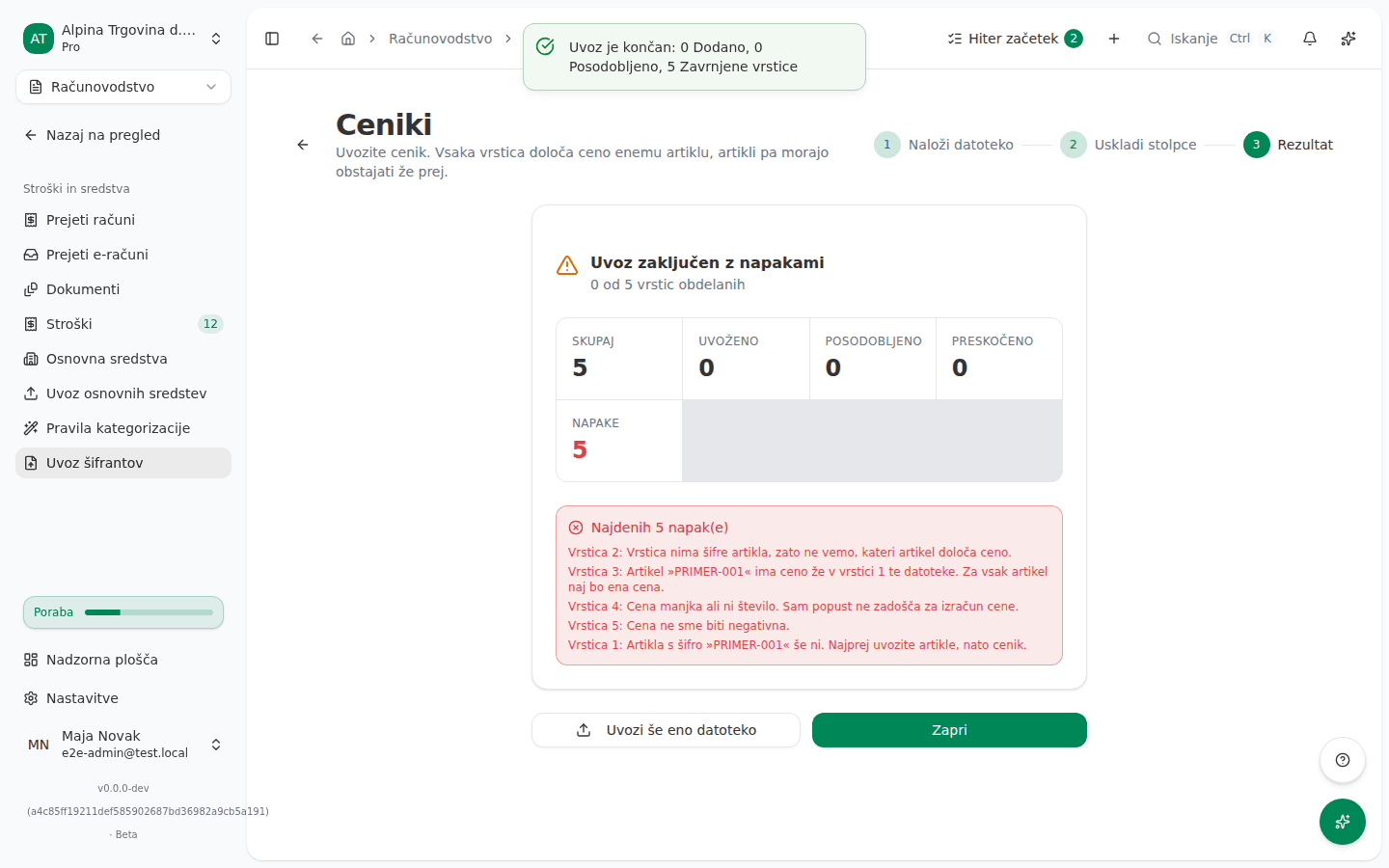
What the screen says
Each message is preceded by Vrstica (Row) and a number. Counting starts at the first data row under the heading row, which itself is not counted. The result shows the first five refused rows and then how many more there are.
A required value is missing
Vrstica nima šifre. Vsak zapis jo potrebuje – po njej se ravna ponovni uvoz. (“This row has no Šifra. Every entry needs one, because a re-import matches on it.”)
Vrstica nima naziva. Vsak zapis mora imeti naziv. (“This row has no Naziv. Every entry needs a name.”)
Vrstica nima šifre artikla, zato ne vemo, kateri artikel določa ceno. (“This row has no Šifra artikla, so we cannot tell which article it prices.”)
The same code or name twice
Šifra »A100« je v tej datoteki že v vrstici 4. Za vsako šifro naj bo ena vrstica.
Naziv »Material« je v tej datoteki že v vrstici 4, in sicer pod drugo šifro. Dva zapisa ne moreta imeti istega naziva.
Artikel »ART-001« ima ceno že v vrstici 4 te datoteke. Za vsak artikel naj bo ena cena.
Zapis z nazivom »Material« že obstaja pod drugo šifro. Enega preimenujte in znova uvozite.
Zapis s šifro »A100« že obstaja.
The first three are a duplicate inside the same file (“already appears on row 4 of this file”); the last two are a record already stored in VegaERP (“already exists”).
Cost centres: the parent and the end date
Šifra višje analitike »A1« ne ustreza nobeni analitiki v tej datoteki ali v vaših podatkih. Dodajte nadrejeno vrstico ali izpraznite stolpec.
»A100« je naveden kot svoja lastna višja analitika.
»A100« bi sklenil zanko prek »A110«. Analitika ne more končati pod sabo.
»31.13.2026« ni datum, ki bi ga znali prebrati. Zapišite ga kot 31.12.2026 ali 2026-12-31.
In order: the parent code matches no cost centre; the row names itself as its own parent; the new parent would close a loop; the Konec (End) date cannot be read.
Price lists
Artikla s šifro »ART-001« še ni. Najprej uvozite artikle, nato cenik. (“No article with Šifra “ART-001” exists yet. Import the articles first, then the cenik.”)
Cena manjka ali ni število. Sam popust ne zadošča za izračun cene.
Cena ne sme biti negativna.
Popust mora biti odstotek med 0 in 100.
Artikel »ART-001« ima ceno že po ceniku »MPC«. Shranjena je ena splošna cena na artikel, zato je cenik »VPC« ne more prepisati – izberite en cenik ali drugo ceno vnesite na artiklu.
Artikel »ART-001« že ima splošno ceno. Shranjena je ena splošna cena na artikel, zato je cenik »VPC« ne more prepisati – obstoječo ceno najprej odstranite ali deaktivirajte.
The last two mean the article already has its one general price, set by another price list or entered by hand.
Why this happens
- The code is the record’s key. A re-import uses it to recognise a record you already have and update it instead of creating a second one. A row with no code, or a code used twice, would break that key, so it is refused.
- An item category’s name must be unique. Two item categories cannot share a name, even under different codes.
- The cost-centre hierarchy is checked before anything is written. Šifra višje analitike (Parent cost-centre code) must point at a cost centre in the file or already in VegaERP, and the program checks whether the new links, together with the existing ones, would form a loop.
- The end date is never guessed. The Konec date decides whether a cost centre is still active. An unreadable date could leave a closed cost centre open for posting, so the row is refused.
- A price list prices articles that already exist. Articles are a separate import and must come first. A discount without a price is not enough, because the program does not derive a base price on its own.
- An article has one general price. A second price list may not silently overwrite a price the first one set, or one you entered by hand, so the row is refused and the message names the price list that already holds the price.
What to do
- Note the refused row numbers and reasons from the import result.
- Fix those rows in your original file:
- fill in the missing code, name, article code or price;
- delete a duplicate row, or give it its own code and name;
- for a wrong parent, add the parent row or clear that cell;
- write the Konec date as 31.12.2026 or 2026-12-31.
- If the price list names an article that does not exist yet, import the articles first, then the price list. Import item categories before articles, so the articles are sorted into them, and articles before the price list.
- For a price already held by another price list, decide which price list is the general price. Import only that one, and enter the other price on the article.
- Upload the same file again. Keep Posodobi zapise, ki že obstajajo (Update records that already exist) on if the re-import should correct records already imported; turn it off to keep changes you made by hand after the first import.
What success looks like: the notice after the import starts with Uvoz je končan (Import finished) and reports zero errors, and the result shows how many records were added and how many updated.
If you can’t fix this yourself
- The message “Te vrstice ni bilo mogoče uvoziti.” (“This row could not be imported.”) is an error the program cannot explain. Send support the row number and the file.
- The file cannot be read at all. Check that it is an Excel or CSV export and that it has at least one data row under the heading row. A file with no data rows is refused as a whole, with a message in English.
Moving over from Minimax is described in Importing data from Minimax.