Reports
VegaERP gives you four views onto the company’s finances, each answering a different question:
- Bruto bilanca (Trial balance): every account’s balance on a chosen day.
- Bilanca stanja (Balance sheet): assets against liabilities and equity on a chosen day.
- Poročila (Reports): revenue, profit, and outstanding receivables for a PERIOD you choose, not a single day.
- Denarni tokovi (Cash flow): the actual bank balance, overdue invoices, and a forecast of upcoming payments.
Open the first three from the left menu under Računovodstvo in poročila (Accounting & Reports); open cash flow under Bančništvo in denar (Banking & Cash).
If your tenant is a flat-rate sole trader (normirani s.p.), you will not see the Računovodstvo in poročila group in the menu at all, so no trial balance, no balance sheet, and no Poročila page. Flat-rate tenants do not keep double-entry books, so those three pages are hidden for them. Denarni tokovi stays available, because it is not derived from the general ledger, it comes from the actual bank balance and the due dates on your invoices.
Trial balance, when to use it
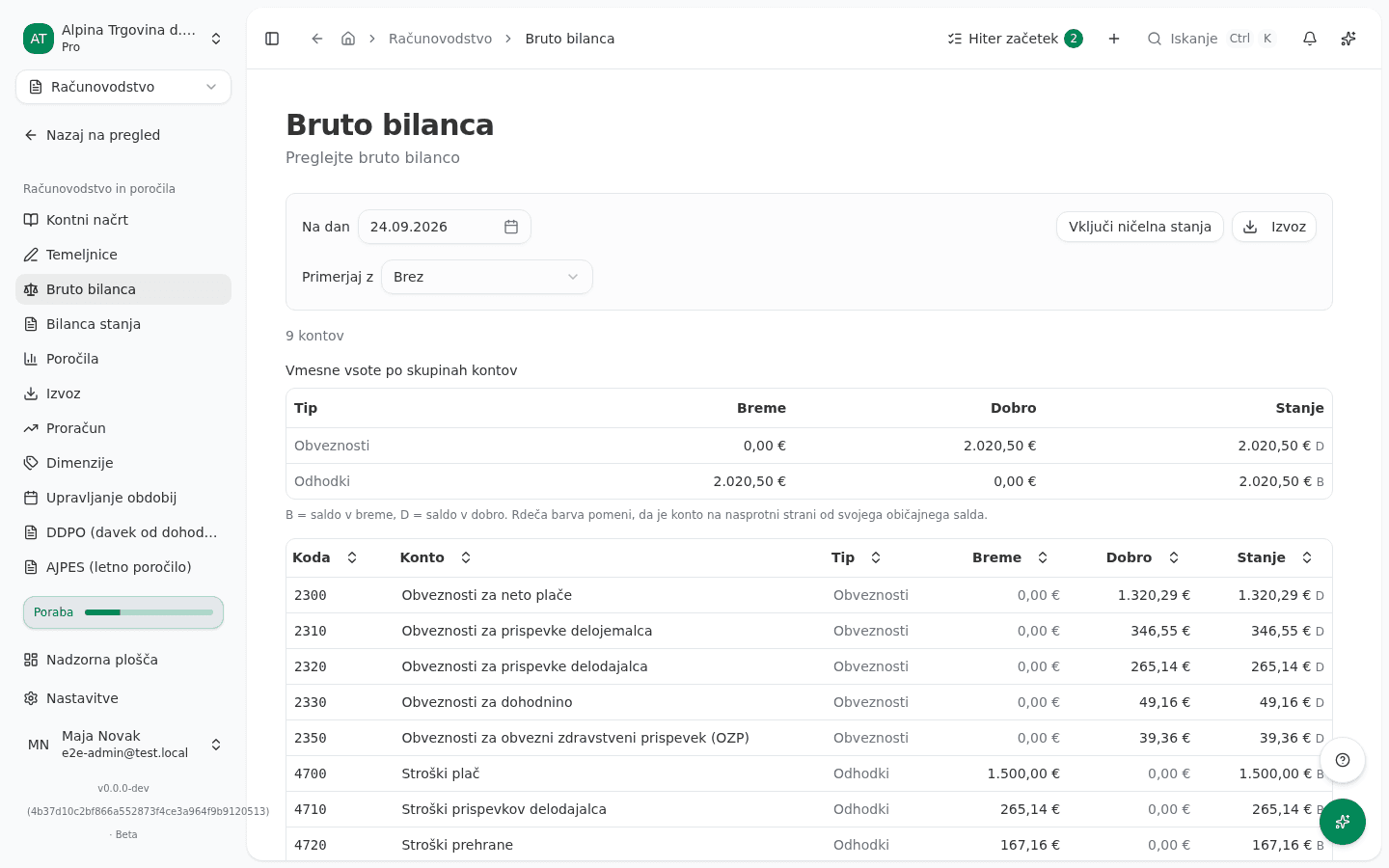
The trial balance answers “what is each account’s balance on this day”. Use it for a quick check before closing a period, or to find an account that does not show the balance you expect.
- In the left menu under Računovodstvo in poročila, click Bruto bilanca (Trial balance).
- Use the Na dan (As of) button to pick a date. The trial balance is a snapshot of ONE day, not a statement for a period.
- Click Izvoz (Export) to download it.
The full walkthrough with what each column means is in General ledger.
Balance sheet, when to use it
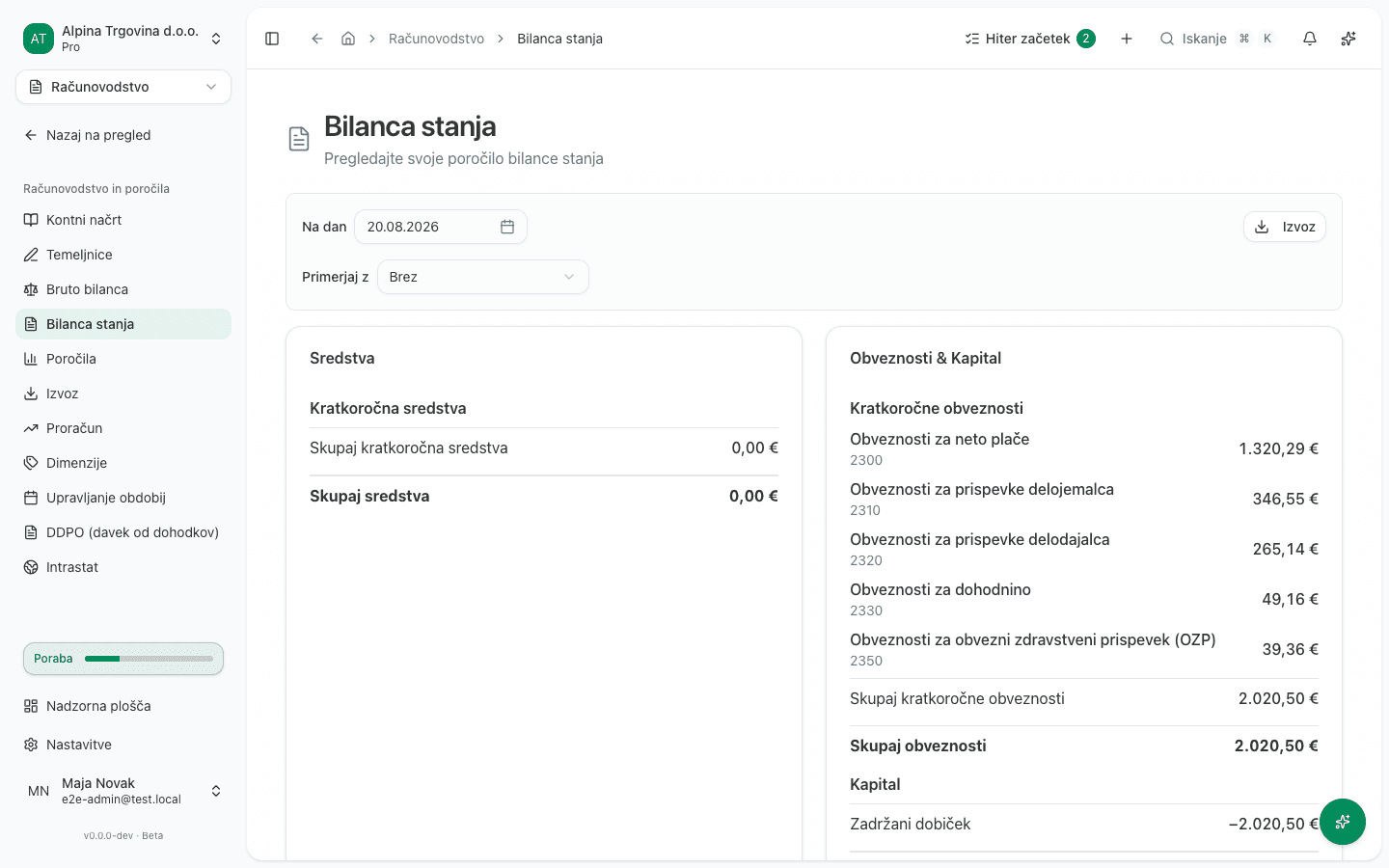
The balance sheet answers “what does the company own, and who is it owed to” on a chosen day: assets on one side, liabilities and equity on the other, in balance.
- In the left menu under Računovodstvo in poročila, click Bilanca stanja (Balance sheet).
- Use the button showing the current date to pick the day you want the balance sheet as of.
- The Skupaj sredstva (Total assets) line must equal the Skupaj obveznosti in kapital (Total liabilities and equity) line.
The full walkthrough is also in General ledger.
Reports, when to use it
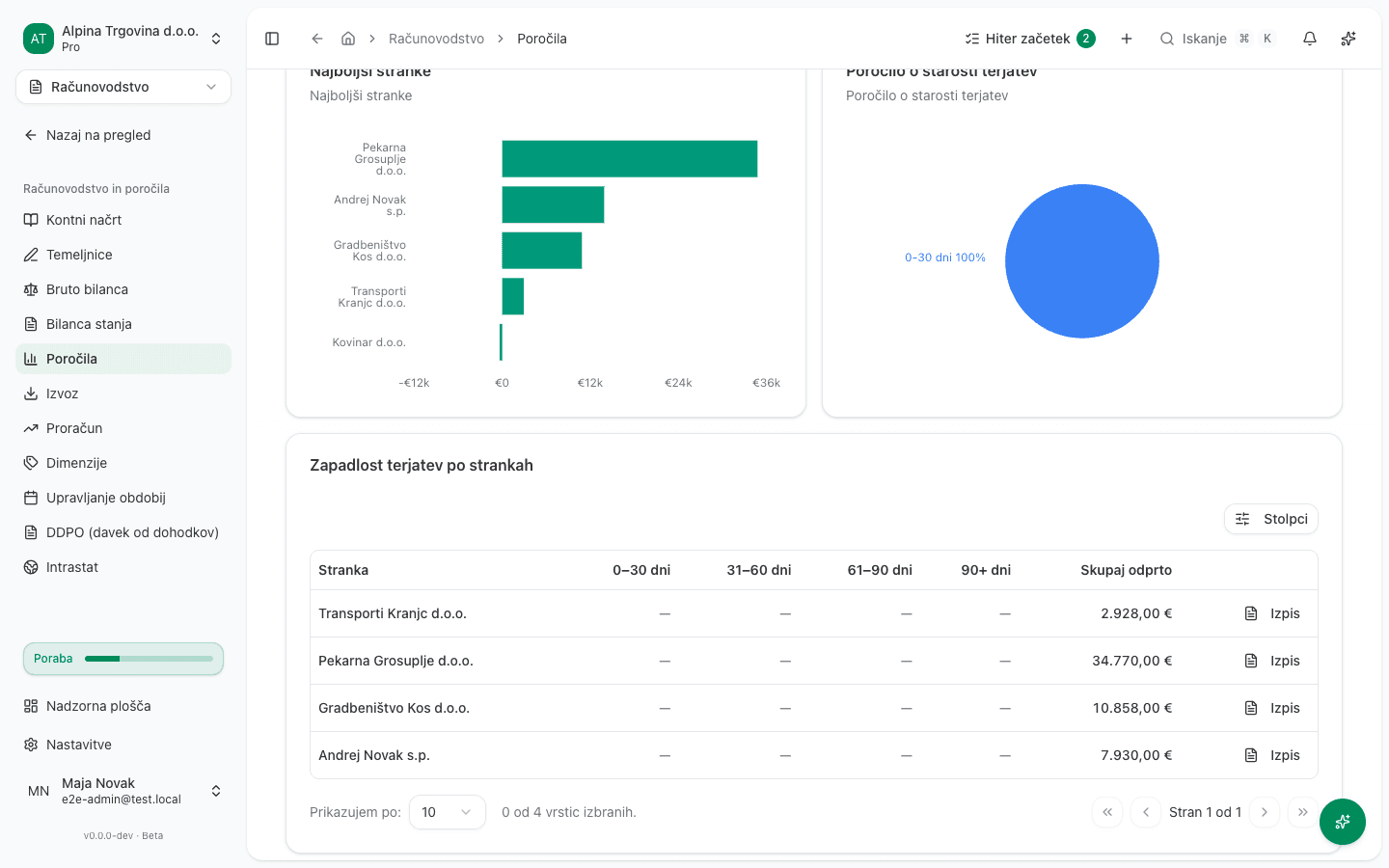
The Poročila (Reports) page answers “how much did we earn this period, and who still owes us”. Unlike the trial balance and balance sheet it is not a single-day snapshot, it covers the PERIOD you choose.
- In the left menu under Računovodstvo in poročila, click Poročila (Reports).
- Use the Obdobje (Period) button to pick the date range you want revenue and profit for. It defaults to the current month to today.
- Review the Skupni prihodek (Total revenue), Neplačano (Outstanding), Zapadlo (Overdue) and Čisti dobiček (Net profit) cards, and below them the Zapadlost terjatev po strankah (Receivables aging by customer) table, which buckets unpaid invoices by age (0-30, 31-60, 61-90, 90+ days) per customer.
- To compare against the previous period or the same period last year, use the comparison picker above the cards.
- Click Izvoz (Export), then Prenesi PDF or Prenesi Excel to download it.
The Izkaz uspeha po dimenziji (Statement by dimension) tab beside it shows the same statement broken down by cost centre or another dimension, if you use them.
If the company was migrated from another system mid-fiscal-year, this page may show a notice that the statement does not cover the full fiscal year, or that it carries revenue and expenses migrated from the previous system as one lump sum dated at the cutover. That is explained in Opening balances and open items.
Cash flow, when to use it
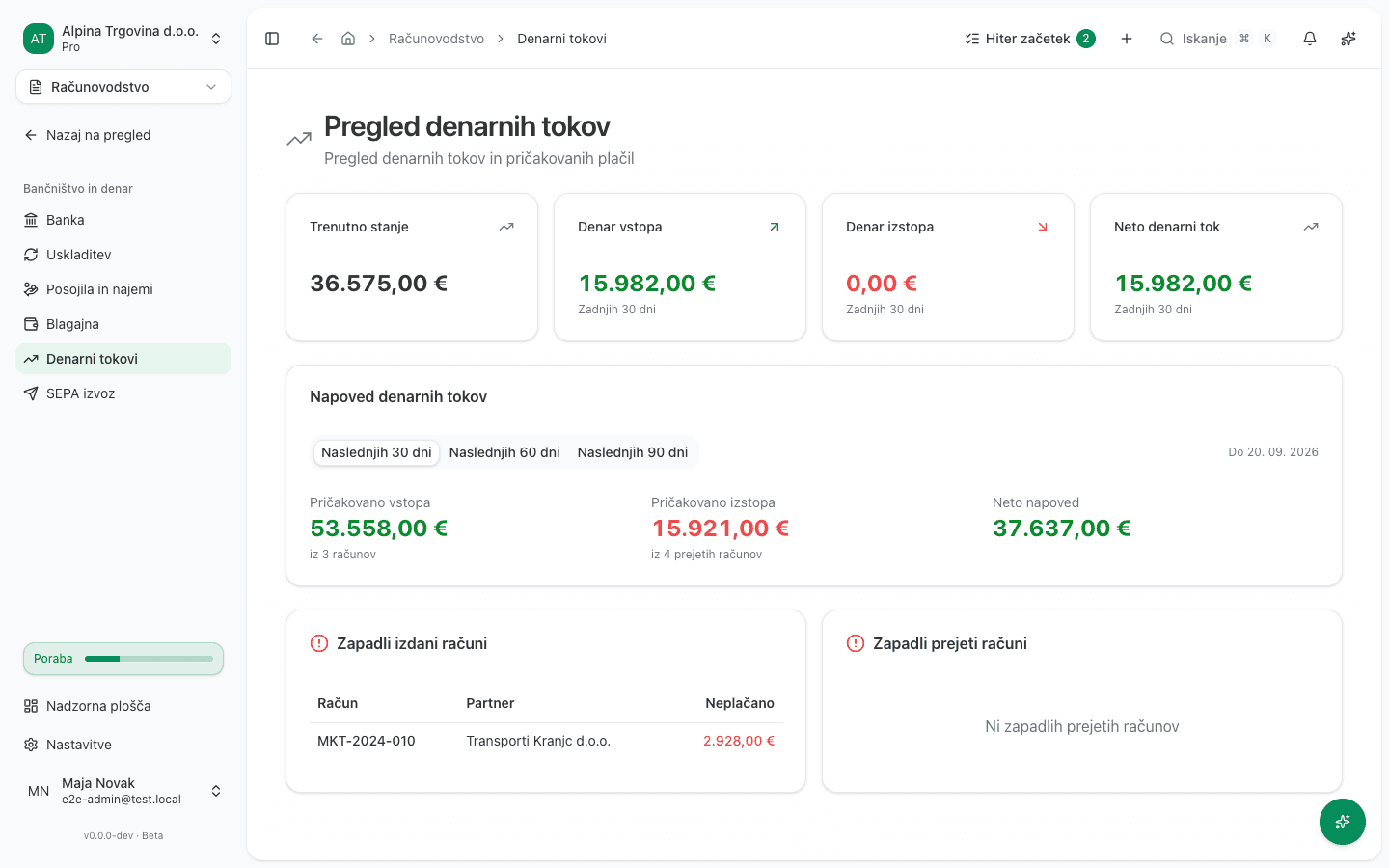
The Denarni tokovi (Cash flow) page answers “will we have enough cash to pay what is coming due”. Unlike the three reports above it is not derived from the general ledger, it comes from the actual balance on your bank accounts and the due dates on your issued and received invoices, so it stays available even for flat-rate tenants.
- In the left menu under Bančništvo in denar, click Denarni tokovi (Cash flow).
- The four cards at the top (Trenutno stanje / Current balance, Denar vstopa / Money in, Denar izstopa / Money out, Neto denarni tok / Net cash flow) show the balance and movement of the last 30 days.
- In the Napoved denarnih tokov (Cash flow forecast) card, pick the forecast window with the Naslednjih 30 dni, Naslednjih 60 dni, or Naslednjih 90 dni (Next 30 / 60 / 90 days) tabs. The forecast comes from the due dates on your existing invoices, not a historical average.
- Below, review the Zapadli izdani računi (Overdue issued invoices) and Zapadli prejeti računi (Overdue received invoices) cards for invoices already past due.
This page has no PDF or Excel export button, because it is meant for a quick check, not an archival document.
What success looks like
- Trial balance: the Razlika (Difference) line in the summary reads 0,00 €.
- Balance sheet: Skupaj sredstva equals Skupaj obveznosti in kapital.
- Reports: the Čisti dobiček card shows a real number for the period you chose, not 0,00 € for no reason.
- Cash flow: Neto denarni tok and the forecast refresh as soon as you change the forecast window.
Common issues
- The Računovodstvo in poročila group is missing from the menu entirely. The tenant is on flat-rate taxation (normirani s.p.) and therefore does not keep double-entry books. Cash flow stays available under Bančništvo in denar.
- The trial balance or balance sheet warns that it is not balanced. See General ledger.
- The Reports page shows a warning about missing class 4/7 activity. The company was migrated mid-fiscal-year and the trial balance imported at cutover did not include revenue and expense accounts. See Opening balances and open items.
- The Receivables aging by customer table is empty even though you have unpaid invoices. Check the date range you picked with the Obdobje button: aging always reads the Do (To) date of the chosen period, not the whole range.
- There is no export button on the Cash flow page. That is intentional, the page is a monitoring view, not an archival one. For a document with figures, use Poročila (Reports) or the trial balance.