Why won’t the app change an item’s type, or accept a row in the item import?
Items in the Blago in storitve (Goods and services) catalogue fall into two kinds: services, which hold no stock, and goods (product, material, component), which do. The app won’t let an item cross that line while it still holds stock. When you import items from a spreadsheet, it checks every row on its own and refuses the row, or the value, it can’t read.
What the screen says
Changing the type on an item
If you open an item that holds stock, choose Uredi postavko (Edit item) from the three-dot menu, pick Storitev (Service) in the Tip (Type) field and click Shrani (Save), the app doesn’t save the change, and under the SKU field it shows:
Ta šifra (SKU) že obstaja. Vnesite drugo. (“This SKU already exists. Enter a different one.”)
In this case that message is misleading. Nothing is wrong with the code, and the change fails even if you change the code. The app refused the change because the item still holds stock in one or more warehouses.
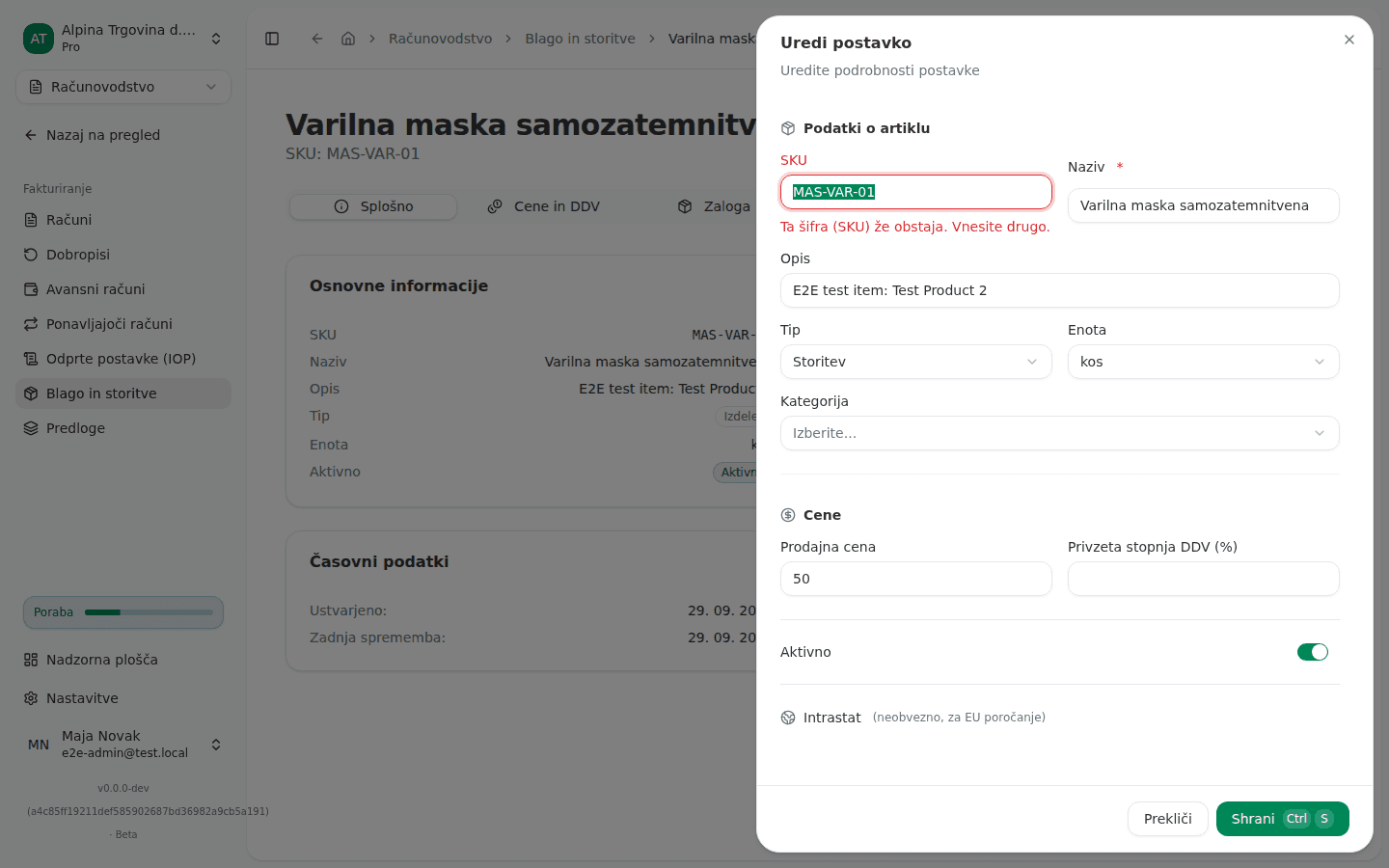
The same happens in the other direction, if a service that still carries stock from older records is changed into goods. Switching between product, material and component is always allowed, since all three hold stock.
Importing the whole file
The item import page has a checkbox that creates goods groups from the codes in the file. If it is ticked and the file refers to more than 50 goods-group codes you don’t have yet, the whole import is refused:
Datoteka se sklicuje na 73 blagovnih skupin, ki še ne obstajajo, kar je več od 50, kolikor jih je mogoče ustvariti naenkrat. Tolikšno število običajno pomeni, da je stolpec z blagovno skupino napačno določen. Preverite določitev stolpcev ali najprej uvozite datoteko Blagovne skupine. Nič ni bilo ustvarjeno. (“The file references 73 goods groups that do not exist yet, which is more than the 50 this can create in one go. That many usually means the goods-group column is mapped to the wrong column. Check the mapping, or import the Blagovne skupine sheet first. Nothing was created.”)
Individual rows in the import
Every other message is shown against its row on the import results screen. A row with no code or no name isn’t imported:
Šifra (SKU) je obvezna (“SKU is required”)
Naziv je obvezen (“Name is required”)
For the rest, the row is imported and only the value the app couldn’t understand is left out. Those messages end in “ignorirano” (“ignored”), for example:
Nabavna cena »12,50 €/kos« ni številka - ignorirano (“Purchase price “12,50 €/kos” is not a number - ignored”)
Stopnja DDV mora biti odstotek ali eden od Minimaxovih davčnih razredov S / Z / 0 / O / N - ignorirano (“VAT rate must be a percentage or one of Minimax’s rate classes S / Z / 0 / O / N - ignored”)
Tarifna oznaka mora imeti natanko 8 številk (kombinirana nomenklatura) - ignorirano (“Tariff code must be exactly 8 digits (Combined Nomenclature) - ignored”)
Država porekla mora biti 2-črkovna ISO oznaka (npr. SI, DE) - ignorirano (“Country of origin must be a 2-letter ISO code (e.g. SI, DE) - ignored”)
Blagovna skupina »120« je Minimaxova šifra skupine, blagovna skupina s to šifro pa ne obstaja. Najprej uvozite list Blagovne skupine ali kategorijo artikla nastavite ročno - ignorirano (“Goods group “120” is a Minimax group code (Šifra) and no goods group with that code exists. Import the Blagovne skupine sheet first, or set the category on the item by hand - ignored”)
Opening stock in the file has a bigger consequence, so its message says so:
Začetna zaloga »12 kos« ni številka - začetna zaloga ni bila knjižena (“Opening stock quantity “12 kos” is not a number - no opening stock was booked”)
Why this happens
An item’s type decides whether it holds stock, whether shipping it reduces stock, and whether cost of goods sold is booked. If an item with stock became a service, the stock would stay in the warehouse but no shipment would ever reduce it again, and its value would never leave the books. So the app counts everything still in a warehouse, including reserved quantities and goods on a transfer that hasn’t arrived, and refuses the change until all of it is zero. When it refuses, it changes nothing, not even the other fields you edited in the same window.
The import has two different cases. A row with no code or name isn’t an item, so it isn’t imported. A value the app can’t read could only be imported by inventing one, so it’s left out and the message says so. The limit of 50 new goods groups at once exists because that many unknown codes almost always means the wrong column is mapped to the goods group, for example the item code or a price, and the import would create one goods group per row.
What to do
If an item with stock can’t become a service:
- If you already typed a different code after the SKU message, click Prekliči (Cancel) in the window and discard the change.
- Open the item and check the Zaloga (Stock) tab for the warehouses where it holds stock.
- Bring the stock in each of them to zero: ship it, transfer it, or, if it genuinely isn’t there any more, correct it with a stock count (see Doing a stock count).
- If the item has reserved quantities, first complete or cancel the document that reserved them, and receive any transfer still in transit.
- Open Uredi postavko (Edit item) again, choose Storitev (Service) and click Shrani (Save). Once there is no stock anywhere, the change goes through. Leave the code as it is.
If the import refused the whole file:
- In the Povežite stolpce (Map columns) section, check which column is mapped to Blagovna skupina (Goods group). If it doesn’t hold goods-group codes, pick the right column or Ne uvozi (Don’t import).
- If the codes are right, import the goods-group list from Minimax first, then the items (see Importing data from Minimax).
If the import refused or trimmed individual rows:
- Note the row numbers and messages on the import results screen before closing the import.
- Fix those cells in the source file: prices and quantities must be plain numbers with no unit, the VAT rate a percentage, the tariff code eight digits, the country a two-letter code.
- Import the file again with Posodobi obstoječe artikle, če se ujema SKU (Update existing items when the SKU matches) ticked, so the corrections land on items already imported.
If you can’t fix this yourself
The import never turns an existing service into goods or the other way round. Such a row is refused with an English message telling you to remove the type column from the file and change the type on the item’s own page, where the rules above apply.
If the Zaloga (Stock) tab shows no stock left but the type change still fails, the item probably has a reserved quantity or goods on a transfer that hasn’t arrived yet. If you can’t find that either, contact support and give the item code.
More about the catalogue and the import is in Your item catalogue.