Why can’t a ZZZS registration (M-1, M-2, M-3) be validated or sent?
The app refused a step on a filing on the ZZZS prijave (ZZZS registrations) page. In every case below nothing was sent to SPOT, so no registration, deregistration or change was created at ZZZS. The message depends on the button you clicked: Preveri (Validate), Pošlji (Send), Prekliči vlogo (Cancel filing), Preveri status (Check status) or Pridobi sklep (Fetch decision).
What the screen says
On Preveri (Validate)
If the filing fails its checks, a Preverjanje ni uspelo. (Validation failed.) notice appears, and the filing’s page shows a warning saying what to fix. The most common one is about the employer’s data:
Podatki delodajalca manjkajo ali niso v obliki, ki jo sprejme ZZZS. Uredi jih v nastavitvah podjetja in vlogo znova potrdi. (“Employer details are missing or not in a format ZZZS accepts. Edit them in company settings, then validate again.”)
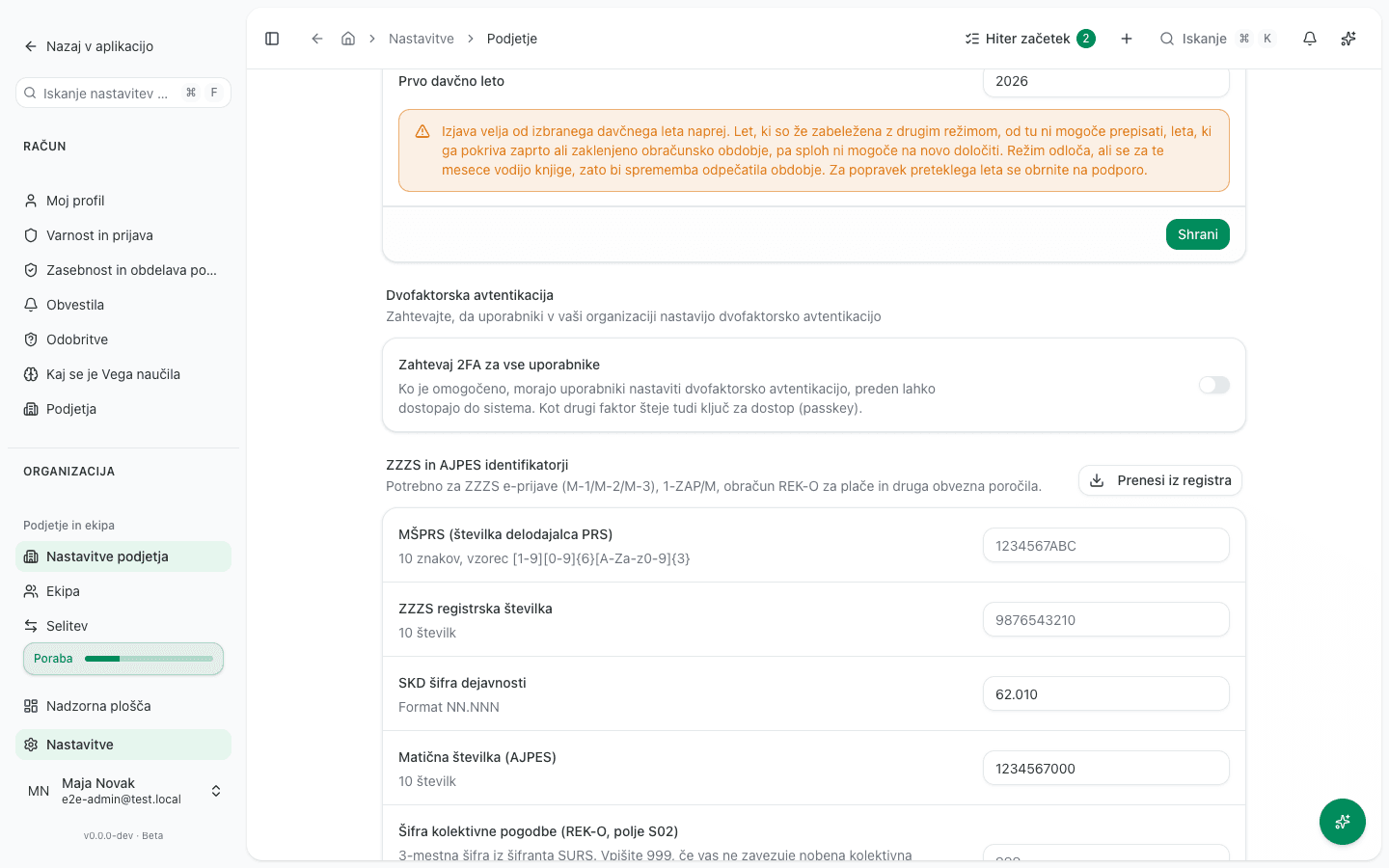
Below it the fields are listed, for example ZZZS registrska številka (ZZZS registration number), MŠPRS (številka delodajalca PRS) (PRS employer number) or SKD šifra dejavnosti (SKD activity code). Other warnings list the employee’s fields that are missing (Manjkajoča polja:), not in the required format (Ni v obliki, ki jo sprejme ZZZS:) or not holding a code from the verified code list (Nepreverjena šifra ZZZS:).
On Pošlji (Send)
Prijava ne prestane več preverjanj pred oddajo, zato v SPOT ni bilo poslano nič. Vrnjena je med osnutke. Ponovno jo preverite, da vidite, katero polje je treba popraviti. (“This registration no longer passes the checks we run before filing, so nothing was sent to SPOT. It is back in draft. Validate it again to see which field needs correcting.”)
Prijava ne ustreza obliki, ki jo zahteva ZZZS, zato v SPOT ni bilo poslano nič. Preverite podatke o zaposlenem in podjetju (imena, naslove, registrsko številko pri ZZZS, šifro dejavnosti) in prijavo ponovno preverite. Če so podatki pravilni, se obrnite na podporo. (“This registration does not match the format ZZZS requires, so nothing was sent to SPOT. Check the employee’s and the company’s details (names, addresses, ZZZS registration number, activity code) and validate it again. If they are correct, contact support.”)
Za pošiljanje v SPOT je potrebno strežniško digitalno potrdilo organizacije (SIGEN-CA, SIGOV-CA, Halcom ali POŠTA•CA), ki ni nameščeno. Namestite ga in poskusite znova. (“Sending to SPOT needs the organisation’s server certificate (SIGEN-CA, SIGOV-CA, Halcom or POŠTA•CA), and none is installed. Install it, then try again.”)
If you send the filing a second time, or someone else has sent it meanwhile:
V SPOT je mogoče poslati le preverjeno prijavo; ta se morda že pošilja ali je že oddana. Trenutno stanje: poslana. (“Only a validated registration can be sent to SPOT; this one may already be on its way or filed. Current status: submitted.”)
A message saying the provider has not finished the SPOT setup means the cause is not in your data.
On Prekliči vlogo (Cancel filing)
On a filing in Neuspela oddaja (Submission failed) status that SPOT received despite the error:
Prijava je v SPOT že oddana, zato je preklic tukaj ne bi umaknil. Preverite njeno stanje, da uskladite oddajo. (“This registration has already been filed at SPOT, so cancelling it here would not withdraw it. Check its status to reconcile the filing.”)
On Preveri status or Pridobi sklep
The messages say the filing has not been sent to SPOT yet, or that the ZZZS decision can be fetched only once ZZZS has accepted or rejected it. A message that the organisation’s ZZZS registration number is missing tells you to validate the filing again.
When two people edit at once
Nekdo drug je hkrati spremenil to prijavo (trenutno stanje: preverjena). Ponovno jo naložite in poskusite znova. (“Someone else changed this registration at the same time (current status: validated). Reload it and try again.”)
Why this happens
The app cannot withdraw a registration, deregistration or change once ZZZS has accepted it. So before signing, it checks the filing against the format and code lists of the ZZZS form, and on Pošlji it checks again. If anything has changed since validation, it returns the filing to draft rather than send one ZZZS would reject or that carries a wrong code. Employer data comes from company settings, and employee data comes from the employee’s record and employment contract.
What to do
- Open the filing on the ZZZS prijave page and read the warning above the form.
- For employer data, open Nastavitve → Nastavitve podjetja (Settings → Company settings) and, in the ZZZS in AJPES identifikatorji (ZZZS and AJPES identifiers) section, fill in or correct ZZZS registrska številka, MŠPRS (številka delodajalca PRS) and SKD šifra dejavnosti. Save.
- For employee fields, correct them directly on the filing and click Shrani spremembe (Save changes). While such missing or invalid fields remain, the Preveri button is not shown. A field you cannot edit on the filing is corrected on the employee’s record, then create the filing again with Nova prijava (New registration).
- Click Preveri. When Vloga je potrjena. (Filing validated.) appears, click Pošlji.
- For a missing server certificate, upload it under Nastavitve → FURS certifikat (Settings → FURS certificate), then click Pošlji again.
- For a filing SPOT has already received, do not cancel it: click Preveri status so the status is reconciled with SPOT.
- When two people edited at once, reload the page and repeat the action.
If you can’t fix this yourself
Pošlji is available only to the Administrator and Računovodja (Accountant) roles. If you do not see the button, ask someone with one of those roles.
The app will not cancel a filing SPOT has received, because it would stay filed at ZZZS. Cancelling in the app is only for filings that were never sent.
If the filing still does not match the ZZZS format after you corrected the data, or the message says the SPOT setup is not finished, contact support. The registration process is described in ZZZS sick leave, reimbursements and registrations.