Why can’t I finalize a stock count?
Finalizing a stock count (inventura) corrects stock and books the difference to the general ledger. Because that can’t be undone, the app first checks that the count is complete and that its date fits the stock that has come and gone since. If something is off, it doesn’t finalize the count and changes nothing.
What the screen says
Lines with no counted quantity
This is the most common case. As long as any line that expects stock has no Prešteta količina (Counted quantity), the Zaključi inventuro (Finalize count) button is disabled, and above the table it says:
10 vrstic še nima vnesene preštete količine. Inventuro lahko zaključite, ko vnesete vse (0, če artikla ni). (“10 lines have no counted quantity yet. You can finalize once every line is entered (0 if the item is not there).”)
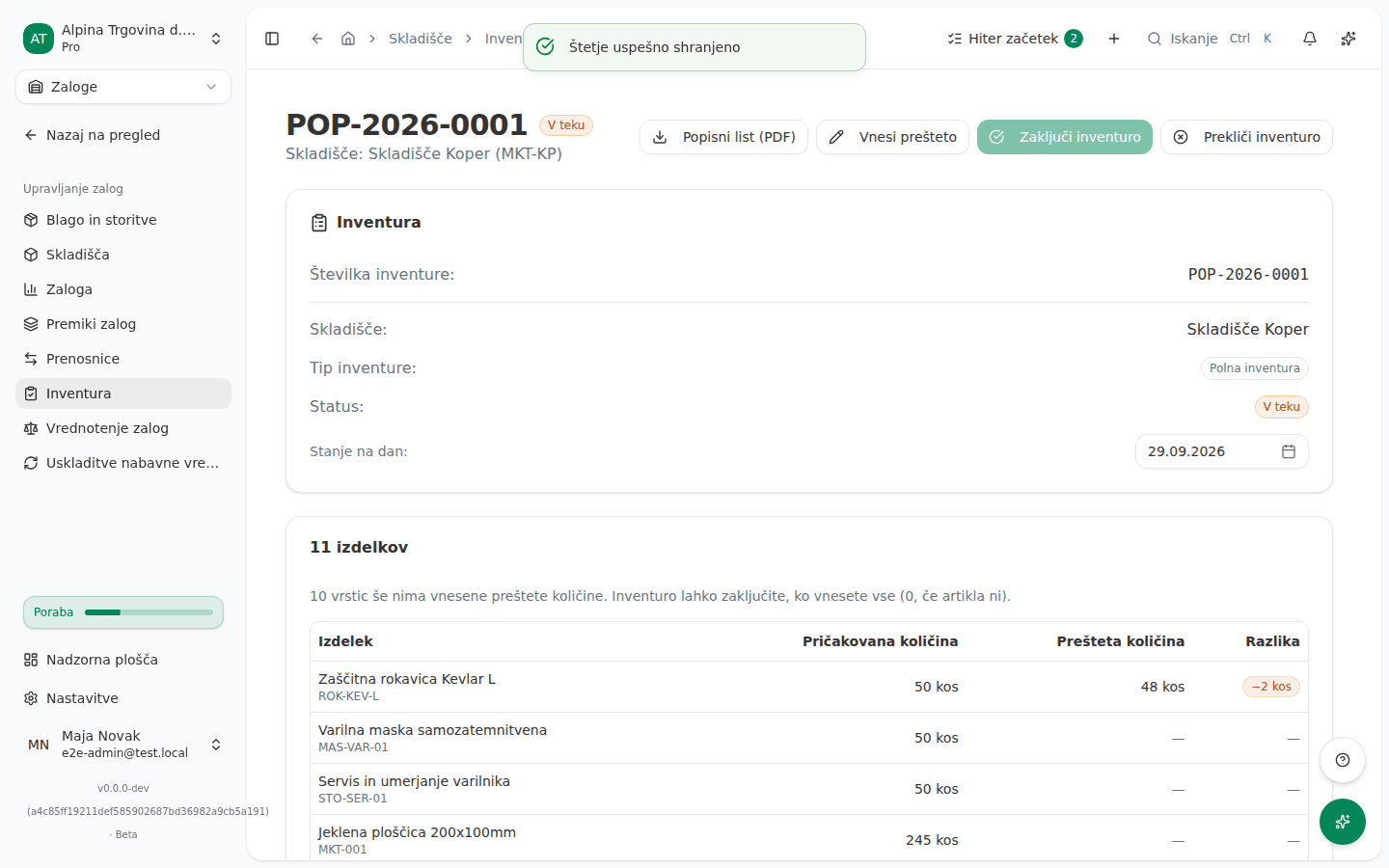
If the page has gone stale in the meantime, for example someone cleared values in another window, clicking Zaključi inventuro (Finalize count) shows a similar message naming the item codes:
3 vrstice inventure nimajo vnesene preštete količine (MAS-VAR-01, ROK-KEV-L, MKT-006). Vnesite prešteto količino (0, če artikla ni) in inventuro nato zaključite. (“3 count lines have no counted quantity (MAS-VAR-01, ROK-KEV-L, MKT-006). Enter the counted quantity (0 if none were found), then finalize the count.”)
The count date
A count can only be booked on a day that has already passed. If you entered a Predviden datum (Scheduled Date) in the future when creating the count and left Stanje na dan (Count as of) empty, the app uses the scheduled date as the count date, and refuses to finalize before that day:
Datum stanja 15. 10. 2026 je v prihodnosti. Inventuro je mogoče knjižiti le na dan, ki je že minil: spremenite datum stanja ali inventuro zaključite na ta dan ali pozneje. (“The count date 15/10/2026 is in the future. A count can only be booked on a day that has already passed: change the count date, or finalize the count on or after that day.”)
You can change the count date until the count is finalized. If you try on a page that has gone stale, you get:
Datuma stanja ni več mogoče spremeniti, ker je inventura že zaključena ali preklicana. (“The count date can no longer be changed because the count is already completed or cancelled.”)
When confirming the finalize
These appear when you click Zaključi inventuro (Finalize count) in the confirmation dialog:
Preštetih 20 na dan 31. 08. 2026 bi pomenilo -5 na zalogi danes, ker je po datumu stanja iz skladišča odšlo več, kot je inventura našla. Preverite datum stanja in prešteto količino. (“Counting 20 on 31/08/2026 would leave -5 in stock today, because more left the warehouse after the count date than the count found. Check the count date and the counted quantity.”)
Poznejša inventura je to zalogo že popisala po 31. 08. 2026, zato bi se razlika te inventure knjižila dvakrat. Spremenite datum stanja ali vrstico odstranite iz te inventure. (“A later stock count already observed this stock after 31/08/2026, so this count’s difference would be booked twice. Change the count date, or remove the line from this count.”)
Ta inventura ni več odprta: v drugem oknu ali drug uporabnik jo je že zaključil ali preklical. Ta zahteva ni ničesar spremenila. (“This count is no longer open: it was finalized or cancelled in another window or by another user. Nothing was changed by this request.”)
Inventure ni bilo mogoče knjižiti v glavno knjigo, zato se zaloga ni spremenila. Poskusite znova ali se obrnite na podporo, če se napaka ponavlja. (“The count could not be posted to the general ledger, so no stock was changed. Try again, or contact support if it keeps failing.”)
Instead of that last message, the app sometimes gives the more specific reason from the general ledger, for example that the account the difference would post to isn’t active, or that the period is closed (see Why can’t I post into this period?).
Why this happens
- A blank line is not a zero. A full count lists every item that has stock when it is created. If the app read a blank line as zero counted, finalizing would write off the whole stock of every item you didn’t get round to entering. So every line that expects stock must be filled in, with 0 if the item really isn’t there.
- The count date is the day you counted. Stock and the booking are dated with it. The app adds the difference between what you counted and the book quantity on that day to today’s stock. A count for a day that hasn’t come yet can’t know what will arrive and leave before then.
- Stock can’t go negative. If more left the warehouse after the count date than the count found, stock would drop below zero today. That almost always means a wrong count date or a mistyped quantity.
- A later count wins. If a finalized count with a later count date already counted the same item in the same warehouse, it has already corrected the difference up to that day. This count would book it a second time.
- The booking and the stock go together. If the difference can’t be posted to the general ledger, stock isn’t corrected either.
What to do
- With the button disabled, click Vnesi prešteto (Enter counts), fill in every blank line in the Prešteta količina (Counted quantity) column, entering 0 for items that aren’t there, and click Shrani štetje (Save counts). Once no blank line is left, Zaključi inventuro (Finalize count) becomes available.
- With a count date in the future, pick the day you actually counted in the Stanje na dan (Count as of) row, or wait until the scheduled day.
- With negative stock, check Stanje na dan (Count as of). If the date is right, check the quantity entered for the item in the message.
- With a later count, check that Stanje na dan (Count as of) really is the right day. If the later count already recorded the stock correctly, you don’t need this one: click Prekliči inventuro (Cancel count) and enter a reason. You can’t remove a single line from a count in the app, even though the message mentions it.
- If the count is no longer open, refresh the page. You’ll see whether it was finalized or cancelled. A finalized count doesn’t need repeating.
- After the fix, click Zaključi inventuro (Finalize count) again and confirm in the dialog.
Once finalizing succeeds, the count shows Zaključeno (Completed), and the Knjižena razlika (Posted difference) row shows the amount posted to the general ledger. The full flow is in Doing a stock count.
If you can’t fix this yourself
If the difference couldn’t be posted to the general ledger and the app gives no more specific reason, contact support with the count number. Stock stays unchanged in that case, so there’s nothing to clean up.
Two messages don’t appear in the app, because the date picker won’t allow them: that the count date or the scheduled date is not a real calendar day. They can only appear when working with the Vega AI assistant, for example with 30 February.
If a count takes items into stock for the first time, that is opening stock. If the company hasn’t yet recorded whether it is moving over from another program, the app refuses to finalize and shows an explanation in the confirmation dialog with the checkbox “To podjetje začenja na novo: prejšnjih poslovnih knjig ni in uvoza otvoritvene bilance ne bo. To začetno zalogo poknjiži v glavno knjigo.” (“This company is a fresh start: no prior books, and no opening-balance import is coming. Post this opening stock to the general ledger.”). Tick it only if that is true. If the company is moving over from another program, first record the migration context under Nastavitve → Uvoz (Settings → Import).