Why can’t this credit note be saved or issued?
On the Nov dobropis (New credit note) form you click Shrani (Save), or on a draft credit note you click Izdaj dobropis (Issue credit note), and VegaERP refuses. The most common reason is that the invoice has already been credited, and the new credit note together with the earlier ones would exceed the invoice.
A refused credit note takes no number and posts nothing. If the draft was already saved, it stays a draft that you can correct and issue again.
What the screen says
The credit note would exceed the invoice
Ta račun je že v celoti ali delno dobropisan, zato bi ta dobropis presegel znesek izdanega računa. Odprite račun in preverite, koliko je še mogoče dobropisati. Dobropis nad zneskom računa bi storniral prihodke in obračunani DDV, ki nista bila nikoli obračunana.
(“This invoice has already been credited in full or in part, so this credit note would credit more than was ever invoiced. Open the invoice to see how much is still creditable. Crediting more than was invoiced would reverse revenue and output VAT that was never charged.”)
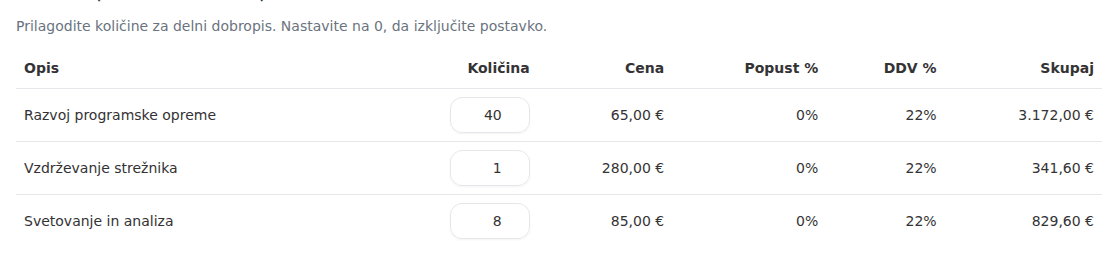
Ta dobropis bi na postavki dobropisal več enot, kot jih je bilo na računu sploh zaračunanih. Zmanjšajte količine na to, kar je na posamezni postavki še nedobropisano.
(“This credit note would credit more units on a line than the invoice ever charged. Reduce the quantities to what is still uncredited on each line.”)
Dobropis mora biti izdan v isti valuti kot račun, ki ga popravlja, sicer preostalega zneska za dobropis ni mogoče določiti.
(“A credit note must be issued in the same currency as the invoice it corrects, otherwise the remaining creditable amount cannot be determined.”)
The issue date falls into a closed period
Dobropisa ni bilo mogoče izdati: obdobje »julij 2026«, v katero spada datum izdaje, je zaključeno. Znova ga odprite ali dobropis datirajte v odprto obdobje. Dobropis je ostal osnutek in ni dobil številke.
(“The credit note was not issued: accounting period “julij 2026”, which covers its issue date, is closed. Reopen it, or re-date the credit note into an open period. It is still a draft and took no number.”) If the period is locked, the message says it can never be reopened and suggests only a different date.
Someone else changed the credit note first
Ta dobropis je bil z drugim dejanjem že izdan (ali izbrisan), zato ga ni mogoče izdati znova. Dvojna izdaja bi pri FURS vložila drugi storno, česar ni mogoče razveljaviti. Ponovno naložite stran, da vidite trenutno stanje.
Dobropis je bil izdan, medtem ko ste ga urejali, zato vaše spremembe niso bile shranjene. Ponovno naložite stran. Izdan dobropis je že vknjižen v vaše poslovne knjige.
Dobropis je bil izdan, medtem ko ste ga brisali, zato ga ni več mogoče izbrisati. Ponovno naložite stran. Izdan dobropis je že vknjižen v vaše poslovne knjige.
Dobropis ni najden.
These say, in order: it was already issued (or deleted) by another action; it was issued while you were editing it, so your changes were not saved; it was issued while you were deleting it; and it no longer exists.
Why this happens
- All issued credit notes of an invoice add up. VegaERP compares the new credit note with the invoice total minus every credit note already issued against it. It also checks each line: the total can still fit while one line would be credited twice. A credit note above what was charged would reverse revenue and VAT that never existed.
- Drafts don’t count. The check on Shrani is an early warning. The deciding check runs on Izdaj dobropis, so two drafts can both save and the second one is refused at issue because the first was issued in the meantime.
- The currency must match. The form always prepares a credit note in the invoice’s currency. The currency message appears when the same invoice already carries an issued credit note in another currency, for example one imported from another program. The program does not add amounts across two currencies.
- The issue date decides the period. A credit note posts on its issue date. If that period is closed, issuing is refused before a number is assigned, so no gap opens in the credit-note sequence.
- Issuing happens once. If someone else issued or deleted the credit note in another window, your action is refused rather than issuing it a second time.
What to do
The credit note exceeds the invoice:
- Open the original invoice. Under POVEZANI DOKUMENTI (Related documents) the Dobropis (Credit note) rows list the credit notes’ amounts. A Dobropis (osnutek) (Credit note, draft) row is an unissued draft and does not count.
- Work out what is left, and on the Nov dobropis form lower the quantities so the credit note stays within it. Set a line that is already fully credited to 0.
- Click Shrani, then Izdaj dobropis on the credit note’s page.
If the invoice has already been credited in full, the correction is done and you don’t need another credit note. For an invoice issued with wrong content, issue a new, correct invoice.
Closed period: on the draft credit note click Uredi dobropis (Edit credit note), change Datum izdaje (Issue date) to an open period, and issue it again. When reopening a period makes sense is covered in Why can’t I post into this period?.
Someone else changed it: reload the page and check its state. If the credit note is issued, the work is done. Don’t press Izdaj dobropis again.
What success looks like: the credit note gets a number, and on the original invoice its row under POVEZANI DOKUMENTI shows that number instead of the draft label.
If you can’t fix this yourself
The currency message needs a correction to a credit note already issued in another currency. You can’t fix that from the form; contact support and give the invoice number.
The full procedure for issuing a credit note, including cash invoices fiscalized with FURS, is in Fixing an invoice you already issued. Why an issued invoice can’t simply be edited is explained in Why can’t I edit this issued invoice?.