General ledger
The general ledger is VegaERP’s double-entry bookkeeping: the chart of accounts, journal entries, and the Bruto bilanca (trial balance) and Bilanca stanja (balance sheet) reports. Open all four from the left menu under Računovodstvo (Accounting).
If your tenant is a flat-rate sole trader (normirani s.p.), you will not see the Računovodstvo in poročila (“Accounting and reports”) group in the menu. Flat-rate tenants do not keep double-entry books, so the group is hidden for them. The Računovodstvo module itself stays visible.
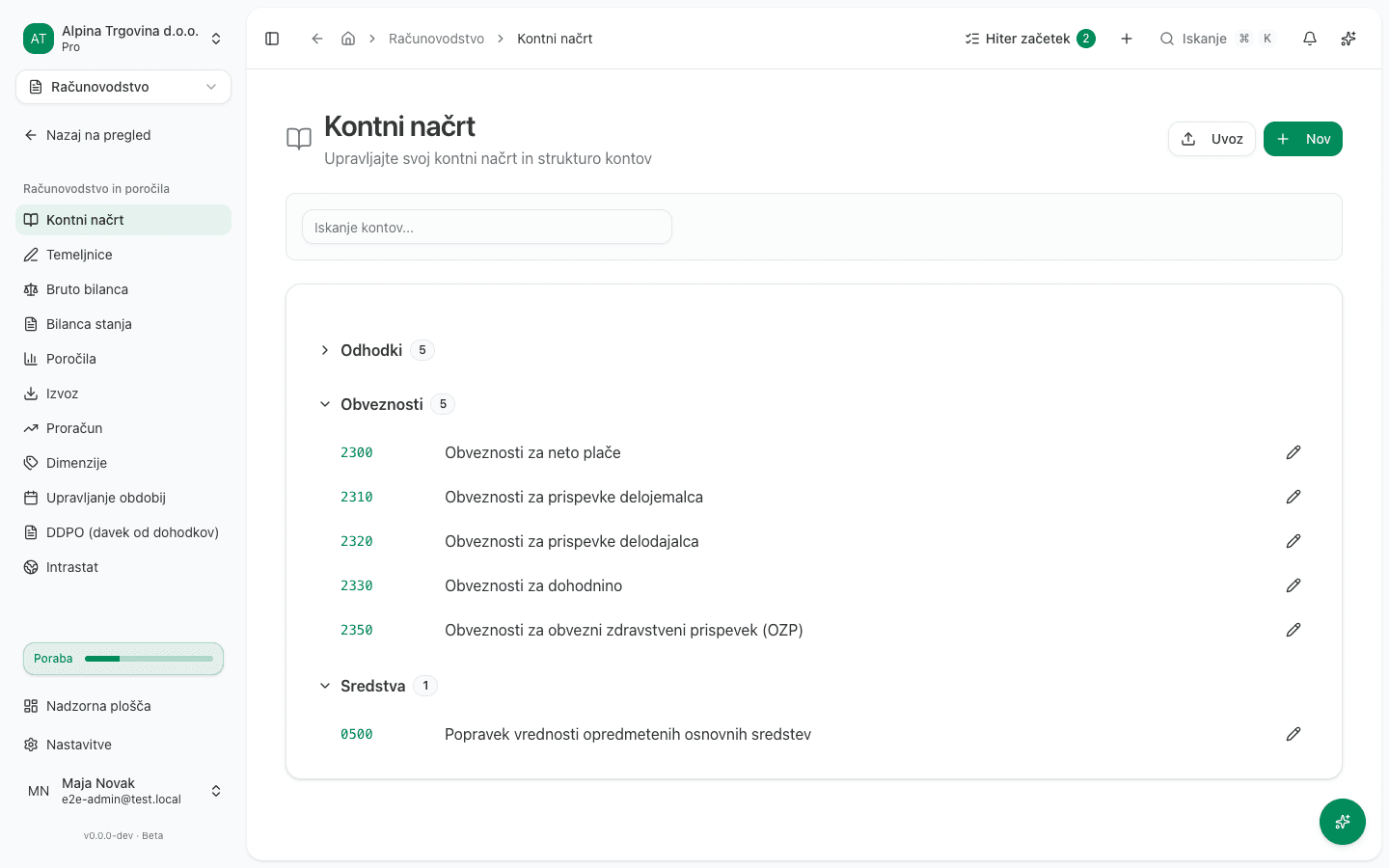
Maintaining the chart of accounts
- In the left menu, open Računovodstvo and click Kontni načrt (Chart of accounts).
- Search accounts with the Iskanje kontov… field, or filter them by type with the buttons at the top of the list (for example Obveznosti or Odhodki).
- To create an account, click Nov (New).
- Enter Številka konta (Account number) and Ime konta (Account name). Choose Tip konta (Account type: Sredstva, Obveznosti, Kapital, Prihodki, or Odhodki) and optionally Kategorija (neobvezno) (Category) and Nadrejeni konto (neobvezno) (Parent account).
- If the account carries an opening balance from a previous system, fill in Začetno stanje (Opening balance) and Datum začetnega stanja (Opening balance date), then choose Normalno stanje (Normal balance: Breme or Dobro).
- Click Shrani (Save).
If you are migrating your chart of accounts from Minimax, use Uvoz (Import) at the top of the list instead of entering every account by hand. The process is described in Importing data from Minimax.
To review one account’s postings, click its Številka konta in the list. This opens Kartica konta (the account ledger card) with the account’s opening balance, every posting, and its running balance, in columns Datum, Temeljnica, Opis, Protikonto, Breme, Dobro, and Saldo.
Posting a journal entry
- In the left menu under Računovodstvo, click Temeljnice (Journal entries).
- Click Nov (New).
- Enter a date in Izberite datum (Pick a date), and optionally Sklic (Reference) and Opis (Description) for the entry.
- Under Postavke temeljnice (Entry lines), for each line pick a Konto (Account) and enter an amount in either Breme (Debit) or Dobro (Credit), never both. Add another line with Dodaj vrstico (Add line).
- Click Shrani (Save). The button stays disabled until total Breme equals total Dobro.
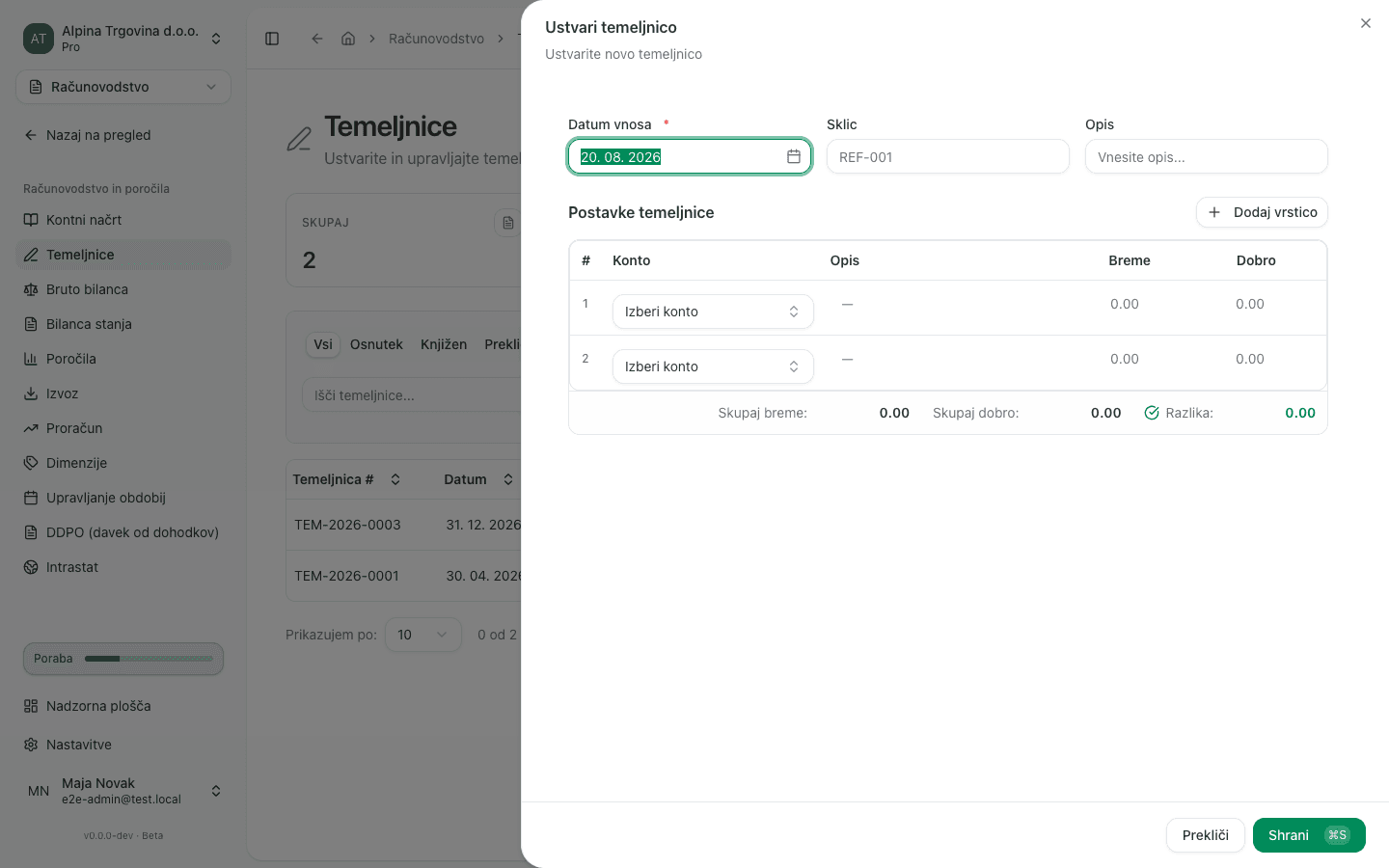
The entry saves as Osnutek (Draft) and is not yet in the general ledger. To actually post it:
- Open the entry from the Temeljnice list.
- Click Več (More), then Knjiži (Post).
- Confirm with Knjiži in the Knjiži temeljnico? dialog.
Reviewing the trial balance
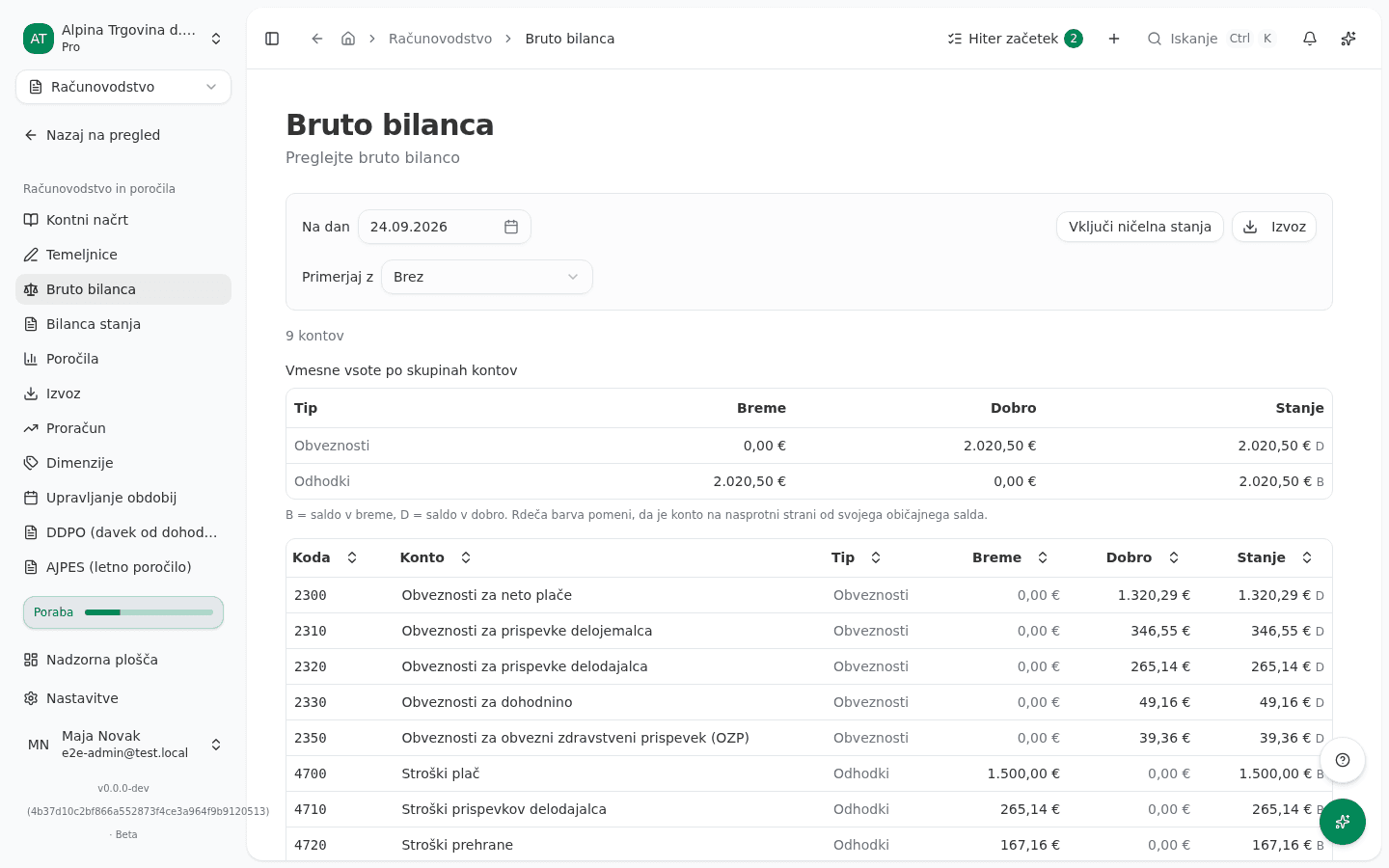
- In the left menu under Računovodstvo, click Bruto bilanca (Trial balance).
- Use the Na dan (As of) button to set the date you want account balances for.
- Optionally turn on Vključi ničelna stanja (Include zero balances) to also see accounts with no activity.
- Review the columns Koda (Code), Konto (Account), Tip (Type), Breme (Debit), Dobro (Credit), and Stanje (Balance). Click Izvoz (Export) to download the report.
Reviewing the balance sheet
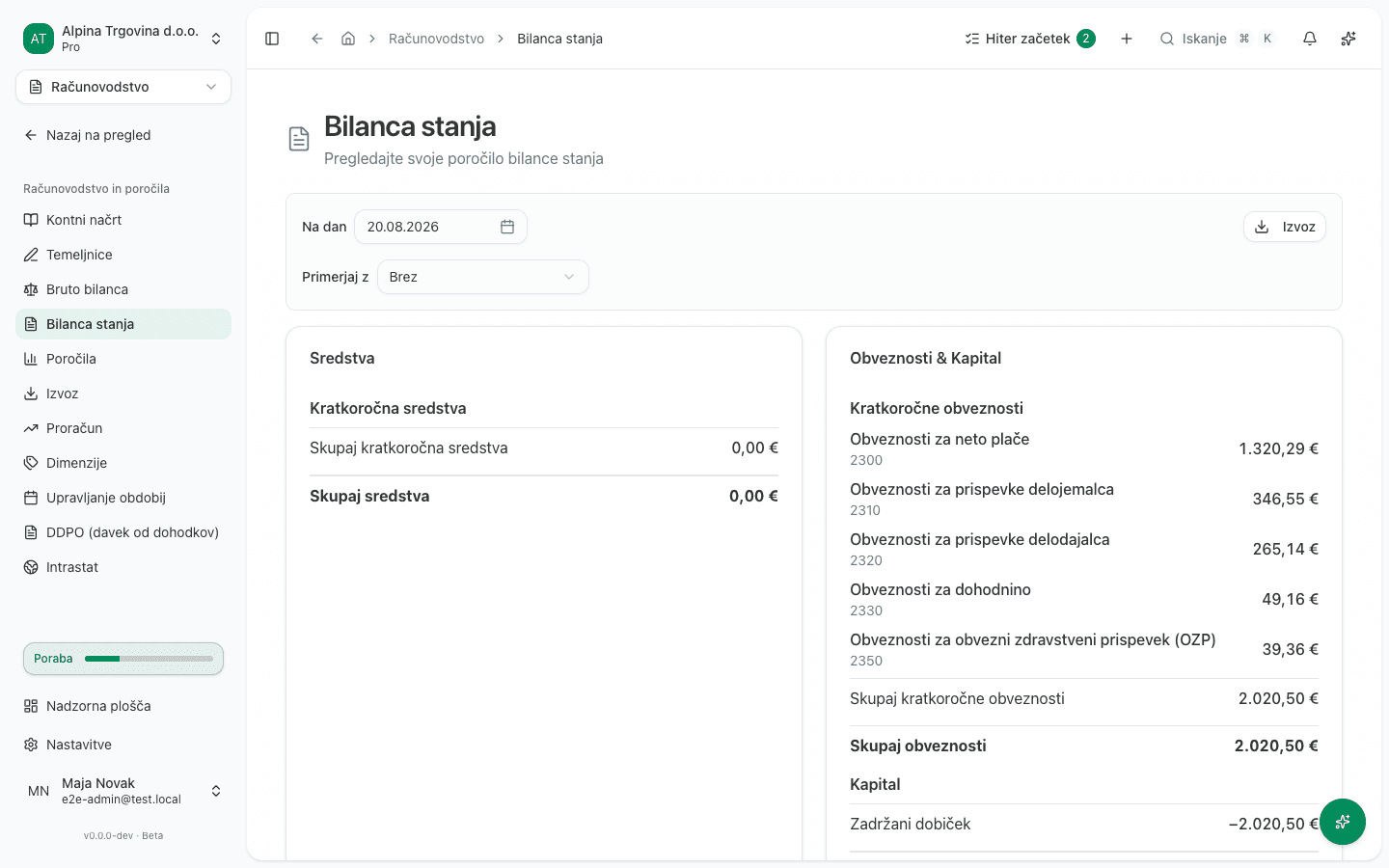
- In the left menu under Računovodstvo, click Bilanca stanja (Balance sheet).
- Use the button that shows the current date to pick the date you want the balance sheet as of.
- Review the Sredstva (Assets) section and the combined liabilities-and-equity section, both with subgroups such as Kratkoročna sredstva (Current assets) and Kratkoročne obveznosti (Current liabilities).
- The Skupaj sredstva (Total assets) line must equal the Skupaj obveznosti in kapital (Total liabilities and equity) line.
What success looks like
- Chart of accounts: the new account shows up in the list under its type, and you can pick it when posting a journal entry.
- Journal entry: the status changes from Osnutek to Knjižen (Posted), and the amount is immediately visible on the Kartica konta page of every account it touches and on the Bruto bilanca page.
- Trial balance: the Razlika (Difference) line in the summary reads 0,00 €. If it does not, there is an imbalance somewhere in the books.
- Balance sheet: Skupaj sredstva equals Skupaj obveznosti in kapital.
Common issues
- The Shrani button on a journal entry stays disabled. Total Breme and total Dobro across the lines are not yet equal. Check the amounts on every line.
A journal entry cannot be edited. A posted entry can only be reversed with Storniraj (Reverse), not edited. Make the correction with a new, reversing entry.
- The trial balance or balance sheet warns that it is not balanced. The messages Opozorilo: bruto bilanca ni uravnotežena! Razlika: or Opozorilo: Bilanca stanja ni uravnotežena! Razlika: usually mean there is an unposted entry that touches only one side, or an entry with unequal debit and credit.
- The Računovodstvo group is missing from the menu entirely. The tenant is on flat-rate taxation (normirani s.p.) and therefore does not keep double-entry books.
- You cannot approve a journal entry you prepared yourself. When the company has another administrator or accountant, they click Odobri (Approve): the review is a second pair of eyes. If nobody else holds that role, you can approve your own entry.
- A cancelled journal entry cannot be deleted. An entry cancelled with Prekliči temeljnico (Cancel entry) was posted, and it stays on the record together with who cancelled it and when (the Storniral field). It is already out of the ledger.
- An account in the chart of accounts cannot be deleted. If the account has posted entries, deletion is refused, because it would leave the general ledger unreconciled.