Why can’t a cash register entry be recorded?
Every receipt and payment in a cash register (blagajna) is posted to the general ledger at the same moment (except for flat-rate sole traders, who don’t keep a general ledger in the app). If the posting can’t be made, the app doesn’t save the entry, so the register’s balance and its cash account in the ledger never drift apart. Every message below follows from that.
What the screen says
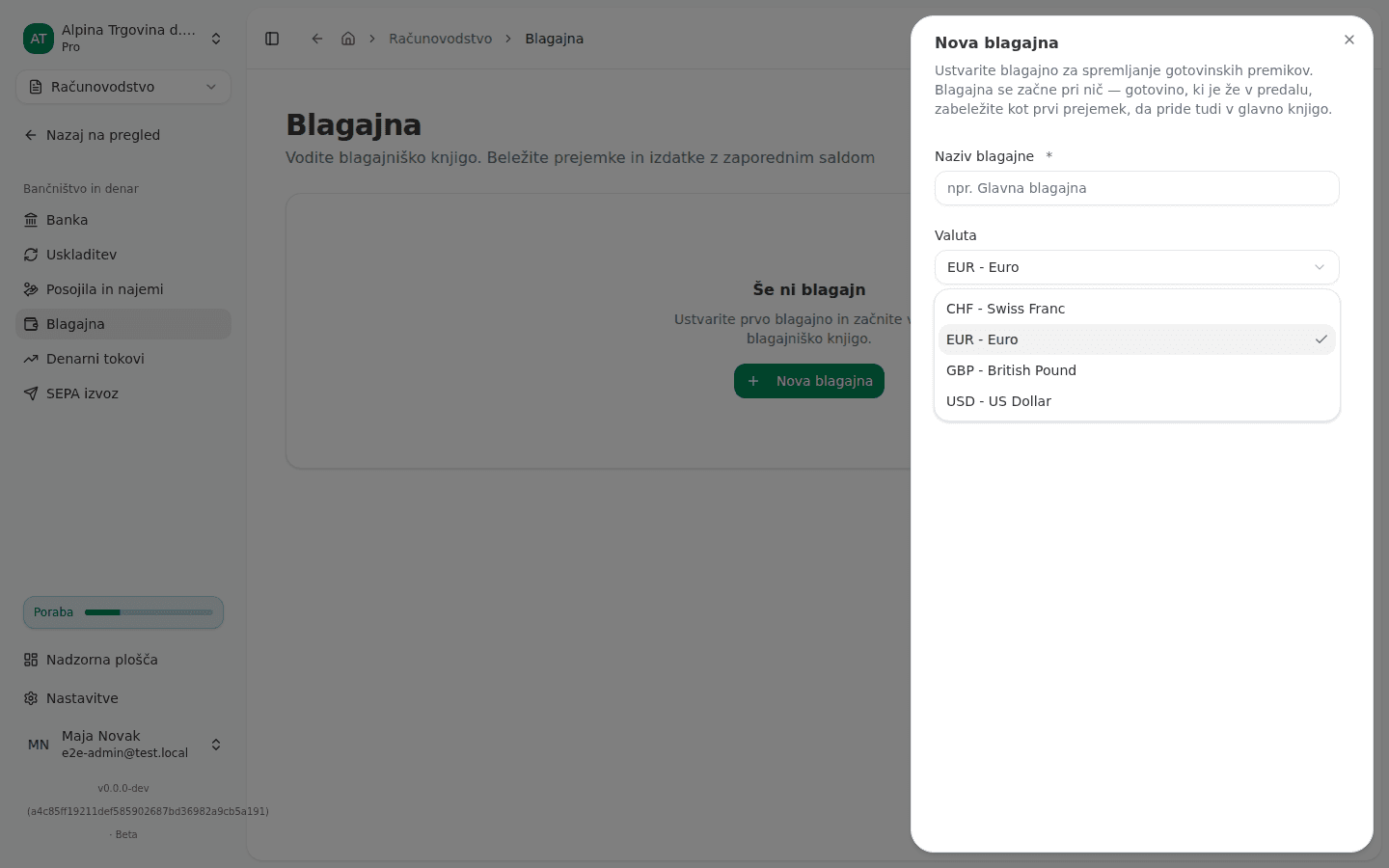
The register isn’t in EUR
When you create a register in the Nova blagajna (New cash register) dialog, you choose Valuta (Currency). The app offers other currencies too, but in a register that isn’t in EUR, every click on Vpiši prejemek (Record receipt) or Vpiši izdatek (Record payment) ends with:
Ta blagajna ni v EUR. V glavno knjigo je mogoče knjižiti le blagajne v EUR. (“This cash register is not in EUR. Only EUR registers can be booked to the general ledger.”)
The entry can’t be posted
If the general ledger refuses the posting, the entry isn’t saved and this appears:
Blagajniškega prometa ni bilo mogoče knjižiti v glavno knjigo, zato ni bil zabeležen. Preverite konte, ki jih uporablja, in poskusite znova. (“The cash entry could not be posted to the general ledger, so it was not recorded. Check the accounts it uses and try again.”)
Often the app shows a more specific reason instead, for example that the chosen account isn’t active, or that the period the Datum (Date) falls in is closed (see Why can’t I post into this period?).
If the account you chose in Konto (protipostavka) (Counter account) has been deleted in the meantime, you get:
Izberite konto za protipostavko tega gotovinskega prometa. (“Select an account for the other side of this cash movement.”)
Cash payout of an expense reimbursement
For expenses the company pays back to a coworker, you choose Gotovina (Cash) and a Blagajna (Cash register) in the Označi kot povrnjeno (Mark as reimbursed) dialog. If that payout was already recorded in the cash book, and you then cancelled the reimbursement journal entry and are recording the reimbursement again, the app checks that it is the same payout:
To izplačilo je v blagajniškem dnevniku že zabeleženo, vendar v drugi blagajni. Zabeležite ga v tisti blagajni. (“This payout is already recorded in the cash book, in a different cash register. Record it in that register instead.”)
Blagajniški dnevnik to izplačilo že vodi v drugem znesku. Izplačilo zabeležite v tem znesku ali popravite strošek, da se zneska ujemata. (“The cash book already records this payout for a different amount. Record the payout for that amount, or correct the expense so the two agree.”)
Why this happens
- The general ledger is kept in EUR. A register in another currency would post its amount as if it were euros, because the app keeps no exchange rate on a register. So a register that isn’t in EUR isn’t posted at all.
- An entry without a posting doesn’t exist. The app doesn’t save an entry it can’t post, and doesn’t post it later. An entry that lived only in the register would mean the register and the ledger disagree without anyone noticing.
- One payout is one cash-book payment. When cash leaves the register, the payment documents it with its own BI- number. Cancelling the reimbursement journal entry doesn’t delete that payment, because the cash did leave. When you record it again, the app reuses it, so the register and the amount have to stay the same.
What to do
If the register isn’t in EUR:
- In the left menu choose Računovodstvo → Blagajna (Accounting → Cash register) and click Nova blagajna (New cash register).
- Enter Naziv blagajne (Register name), leave Valuta (Currency) on EUR, and click Ustvari blagajno (Create register).
- Record receipts and payments in the new register. An existing register can’t be switched to another currency.
If the entry couldn’t be posted:
- Read the reason in the message. If it names an account, pick a different, active account in Konto (protipostavka) (Counter account).
- If it names a closed period, correct the Datum (Date) or reopen the period.
- Click Vpiši prejemek (Record receipt) or Vpiši izdatek (Record payment) again.
For a cash payout of a reimbursement:
- Look in the cash book for the register and the amount the payment was already recorded with.
- In the Označi kot povrnjeno (Mark as reimbursed) dialog, choose that register.
- If the expense amount differs from the recorded payment, first bring the expense in line with the cash actually paid out, then click Potrdi povračilo (Confirm reimbursement).
Once an entry succeeds, a new numbered line appears in the book and the app shows “Prejemek zabeležen” (“Receipt recorded”) or “Izdatek zabeležen” (“Payment recorded”).
If you can’t fix this yourself
A few messages in this group don’t appear in the app, because the form never offers the wrong choice. They can appear when working with the Vega AI assistant:
- A register with an opening balance. Create the register without one, and record the cash already in the drawer as the first receipt.
- The counter account is the receivables or payables control account. Record the payment on the invoice itself, not in the cash register.
- The counter account is the register’s own cash account. Choose the account that says what the cash was for.
If an entry keeps being refused with no more specific reason, contact support and give the register and the entry date.
The full flow is in The cash register (cash book), and cash reimbursement of an expense in Reimbursing a coworker’s expense.