Planning a day’s route and its travel order
When a day holds several meetings at different addresses, you do not have to retype those addresses into a map or into a travel order. The calendar already has them. Načrtuj pot (Plan the route) turns them into a route and a travel order.
The Načrtuj pot button only appears when Način vodenja potnih nalogov (travel-order mode) is set to Napredno (Advanced). In Osnovno (Basic) mode the feature is not available.
Only meetings that have a Lokacija (Location) reach the route. A meeting with no address is left out, and a message under the stop list tells you so.
Preparation: the meeting’s address
- In the calendar click Nov dogodek (New event).
- For Vrsta (Type) choose Sestanek (Meeting).
- In the Lokacija field start typing the address and pick it from the suggestions.
Picking from the list attaches a map point to the address. An address you only type still works. Its distance simply cannot be measured.
Planning the route
- Open CRM → Koledar (Calendar).
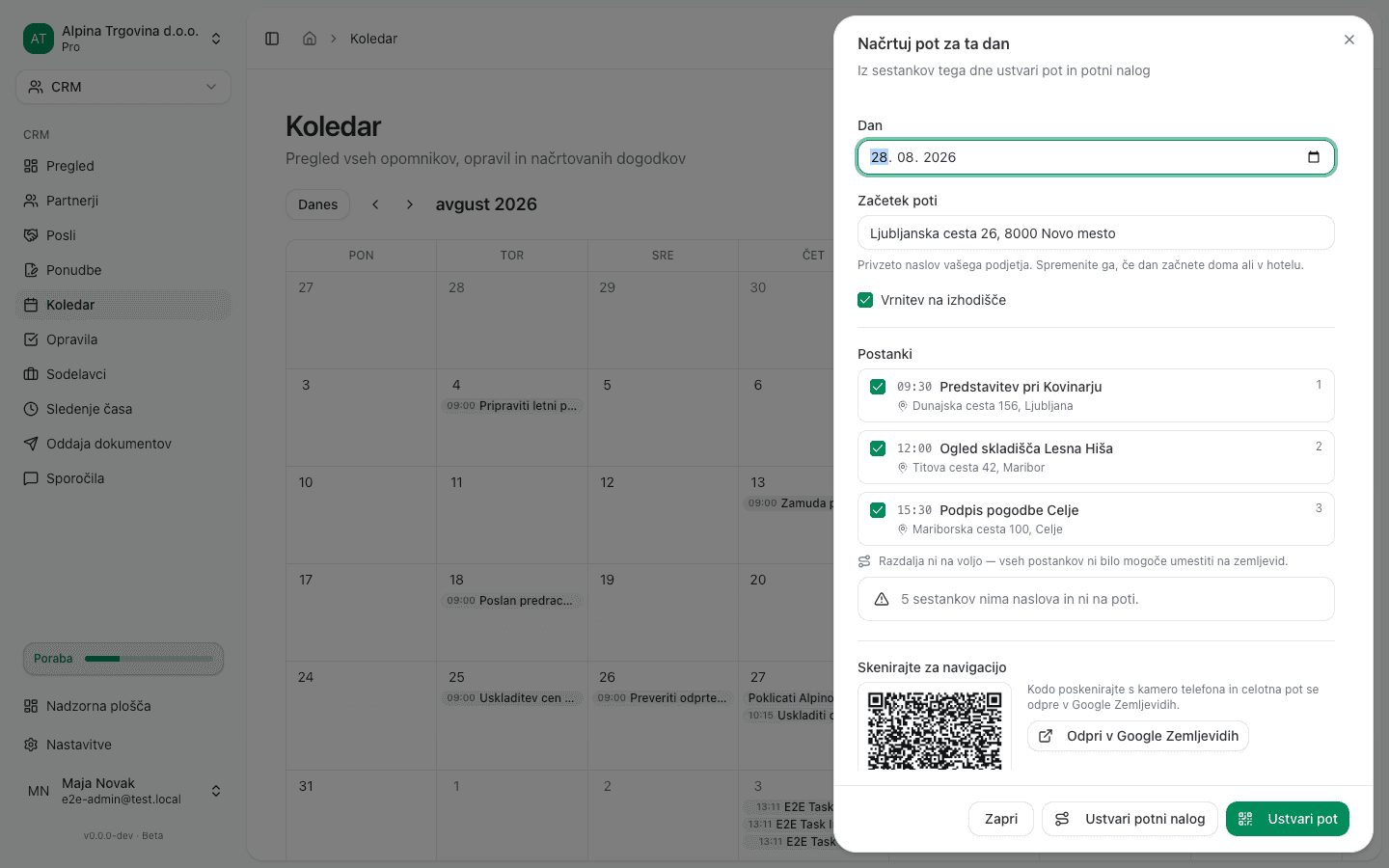
- Click Načrtuj pot in the toolbar.
- Choose the date under Dan (Day).
- Check Začetek poti (Start of route). It defaults to your company address; correct it if the day starts somewhere else.
- Leave Vrnitev na izhodišče (Return to the starting point) on if you drive back at the end of the day. If you do not, switch it off and enter the final address.
- Untick any meeting you do not want on the route.
- The total route length and estimated driving time appear under the list. They appear only once every stop can be placed on the map; otherwise it says the distance is unavailable.
Navigating from your phone
Under Skenirajte za navigacijo (Scan to navigate) there is a QR code. Point your phone camera at it and the whole route, with every stop, opens in Google Maps ready to navigate. On a computer you can open the same route with Odpri v Google Zemljevidih (Open in Google Maps).
One Google Maps link carries at most nine intermediate stops. If the day has more, a message says so. The travel order still contains every stop.
The travel order
- In the same panel click Ustvari potni nalog (Create travel order).
- The newly created travel order opens in the Osnutek (Draft) state.
- Its Pot (Route) tab lists every stop in order, with arrival and departure times and the meeting’s title as the purpose of the visit.
Complete the travel order the usual way. See Travel orders.
Common issues
- The Create travel order button is disabled. A travel order is issued in an employee’s name, so your user account has to be linked to a record under CRM → Sodelavci (Coworkers). An administrator sets that link up.
- No distance is shown. At least one stop has no map point. Open the meeting and pick its address from the suggestions instead of typing it.