Year-end close
Letni zaključek (year-end close) is a page for accounting firms that run several client companies in VegaERP at once. If you manage only one company, you won’t see this page in the menu. You handle the fiscal-year period directly on the Upravljanje obdobij (period management) page instead, see Closing and locking periods.
You’ll find the page in the left menu under Servis → Skladnost in roki → Letni zaključek (Firm dashboard → Compliance and deadlines → Year-end close).
Start the year-end close
- Under Začni zaključek (start close), in the Poslovno leto (fiscal year) field, pick the year you’re closing.
- Under Stranke (clients), check the clients to include, or click Izberi vse (select all).
- Click Začni zaključek.
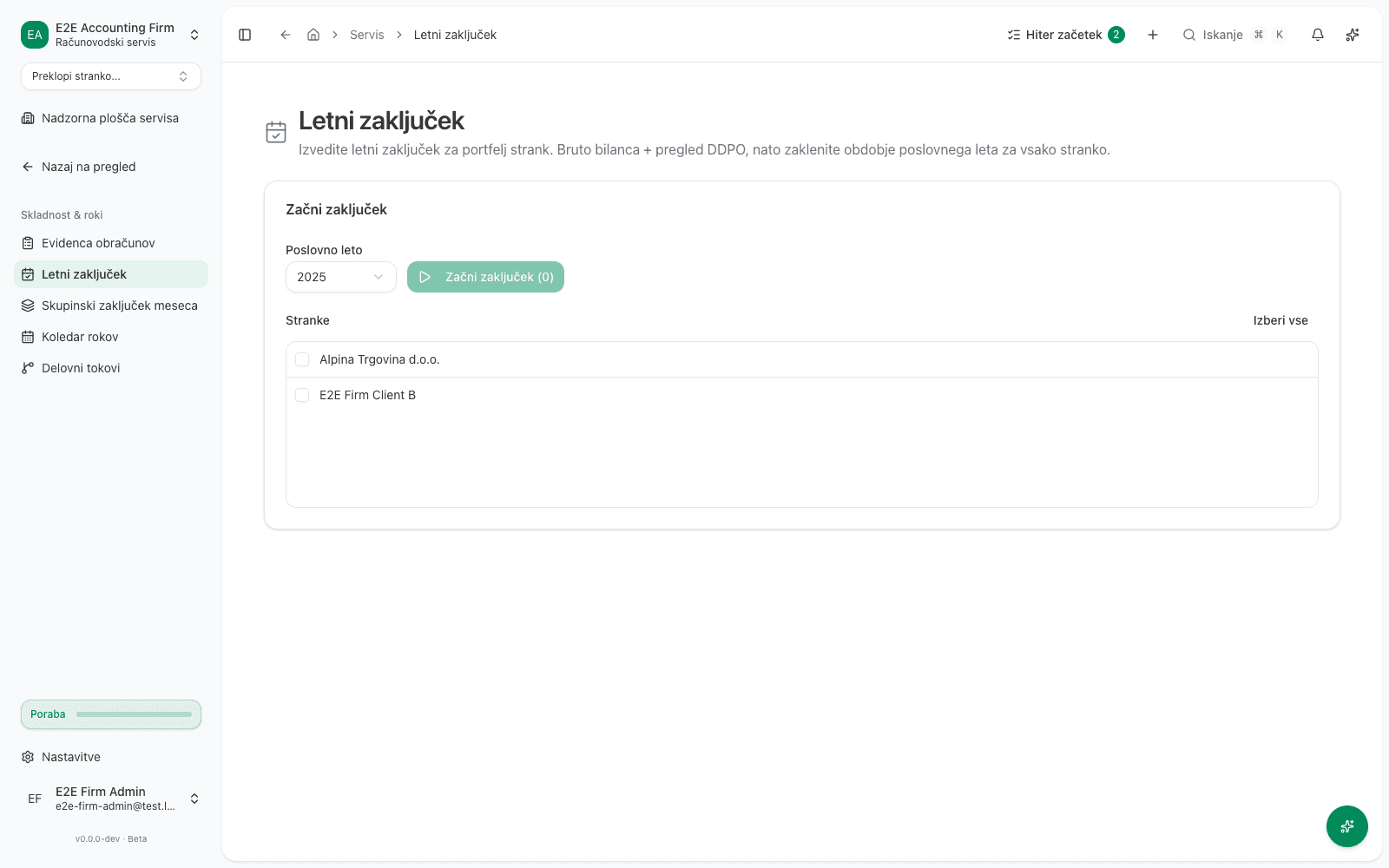
Starting a run is safe and you can repeat it anytime. It only reads each client’s current state, it doesn’t post or lock anything.
Check each client’s readiness
Once started, a table titled Letni zaključek appears, with the chosen year in the title (for example Letni zaključek 2025), with one row per selected client:
| Column | Meaning |
|---|---|
| Stranka | The client’s company name. |
| Zaprti meseci (months closed) | Popolno (complete) if every month of the fiscal year is closed for this client, otherwise Nepopolno (incomplete). |
| Bruto bilanca (trial balance) | Pripravljeno (ready) or Ni pripravljeno (not ready). |
| Nepravilnosti (anomalies) | How many anomalies were found for this client. |
| DDPO | Filing status, for example Ni oddano (not filed), Osnutek (draft), Sprejeto (accepted) or Ni relevantno (not applicable). |
| Dejanje (action) | The Zakleni obdobje (lock period) button. |
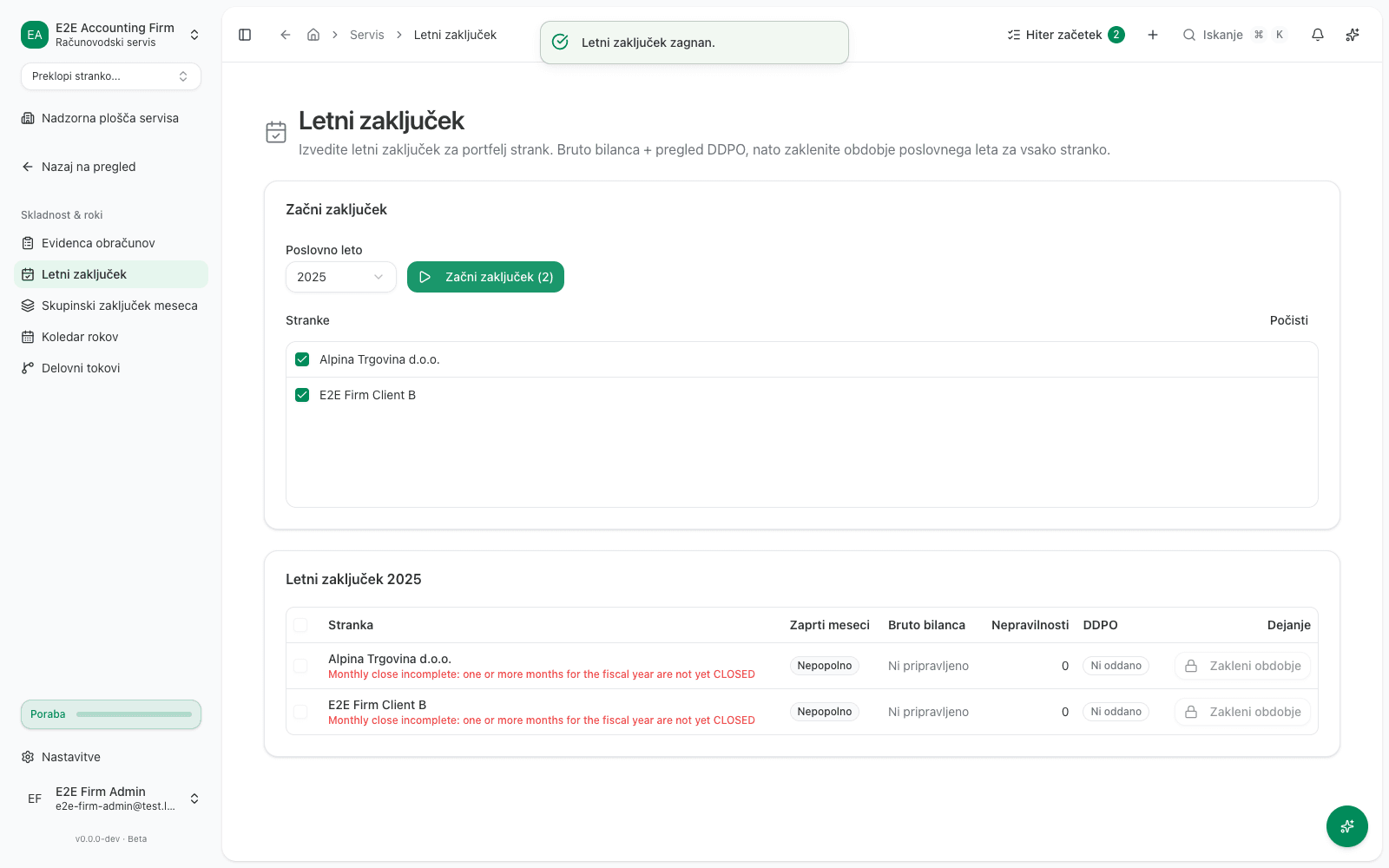
The Zakleni obdobje button unlocks for a client only once all three conditions hold at the same time: Zaprti meseci reads Popolno, Bruto bilanca reads Pripravljeno, and DDPO reads Sprejeto or Ni relevantno. While any of the three isn’t met, the button stays locked (a padlock icon) and can’t be clicked.
Lock the client’s period
One client:
- In the row of a ready client, click Zakleni obdobje. The click fires the lock immediately, with no further confirmation dialog.
Several clients at once:
- Check the boxes on several ready clients.
- Click the bulk-lock button above the table.
- In the Zaklenete poslovno leto za te stranke? (lock the fiscal year for these clients?) dialog, click Zakleni vse (lock all).
What locking does, and what it doesn’t
- In the client’s row, the Zakleni obdobje button disappears, replaced by a Zaklenjeno (locked) badge with the lock date.
- Behind the scenes, the client’s fiscal-year period, from January 1 to December 31 of the chosen year, gets locked on their own Upravljanje obdobij page. This is the same lock described in Closing and locking periods. From that moment on, no journal entry, invoice, or payment dated inside that period can be posted for that client.
- Locking by itself doesn’t post any journal entry. It doesn’t move the year’s result into any account and it doesn’t create a new ledger entry. It only blocks further postings into that period.
This is permanent. Exactly like the ordinary period lock described in Closing and locking periods, a locked period can never be reopened again, neither one at a time nor in bulk. Double-check the client’s readiness before you click Zakleni obdobje or Zakleni vse.
What success looks like
- Starting a run: you see the Letni zaključek table with the chosen year in the title, and one row per selected client, showing the current state of all four readiness columns.
- Locking: in the client’s row, the Zakleni obdobje button is replaced by a Zaklenjeno badge and a date. That client’s Upravljanje obdobij page now shows Zaklenjeno status for the fiscal-year period.
Common issues
-
You don’t see Letni zaključek in the left menu. The page is only available to accounts registered in VegaERP as an accounting firm (Servis) with linked clients. For a single company, use Upravljanje obdobij instead, see Closing and locking periods.
-
An extra note under the client’s name is in English. When a client’s fiscal-year months aren’t all closed yet, a note appears under their name that is in English today regardless of the interface language, for example:
Monthly close incomplete: one or more months for the fiscal year are not yet CLOSED. It only says that monthly close isn’t finished for that client yet. The status itself, in the Zaprti meseci column (Nepopolno), is in Slovenian. -
Clicking a client’s status (for example Nepopolno or Ni oddano) switches to that client, but the page stays on Letni zaključek. This is a known bug. After the switch, open Servis → Stranke manually, pick the client, then find Računovodstvo → Upravljanje obdobij, Bruto bilanca, or DDPO in their own menu.