Deadline calendar
Koledar rokov (deadline calendar) shows statutory filing deadlines for every linked client on one page: DDV-O, KIR/KPR, OPSVL and REK-O.
You’ll find the page in the left menu under Servis → Skladnost in roki → Koledar rokov (Firm dashboard → Compliance and deadlines → Deadline calendar).
Pick a range
- In the Obseg (range) field, pick a quick preset: Ta teden (this week), Ta mesec (this month), Naslednjih 30 dni (next 30 days) or Po meri (custom).
- With Po meri selected, set the dates manually in the Od (from) and Do (to) fields.
Narrow the list
- Use the Obračun (filing) field to limit the list to one filing kind (DDV-O, KIR/KPR, OPSVL or REK-O), or leave it on Vsi (all).
- Use the Status field to filter by filing status.
- Check Samo zapadli (overdue only) to see only deadlines that have already passed.
- In the Odgovorni (assignee) field, pick Moji roki (my deadlines) to see only the clients you lead or back up. You can also pick a colleague: you then see the clients they lead or back up, but only among those you may see yourself. The default, Vsi roki (all deadlines), is every client you may see.
Group the deadlines
In the Združi (group) field, choose how deadlines are folded:
- Po obračunu (by filing, the default): one group per filing and period, for example DDV-O for August. The group header shows how many clients it holds and how many are overdue.
- Po roku (by due date): one group per due day.
- Brez združevanja (no grouping): one row per client and filing, as a table.
Groups start collapsed. Click a group header to see its clients; each shows the due date, the assigned accountant, the status and the Odpri v evidenci button.
Review deadlines and status
Above the list are four summary cards: Zapadli (overdue), Ta teden (due this week), Ta mesec (due this month) and Skupno v obdobju (total in range). The cards count the same deadlines the list below shows, including when Moji roki is selected. With Brez združevanja, the table shows the Rok (due date), Stranka (client), Odgovorni (assignee), Obračun (filing), Obdobje (period), Status and Dejanja (actions) columns. The Odgovorni column names the client’s lead, with the backup beneath. An overdue row is highlighted red and shows how many days overdue it is under the date.
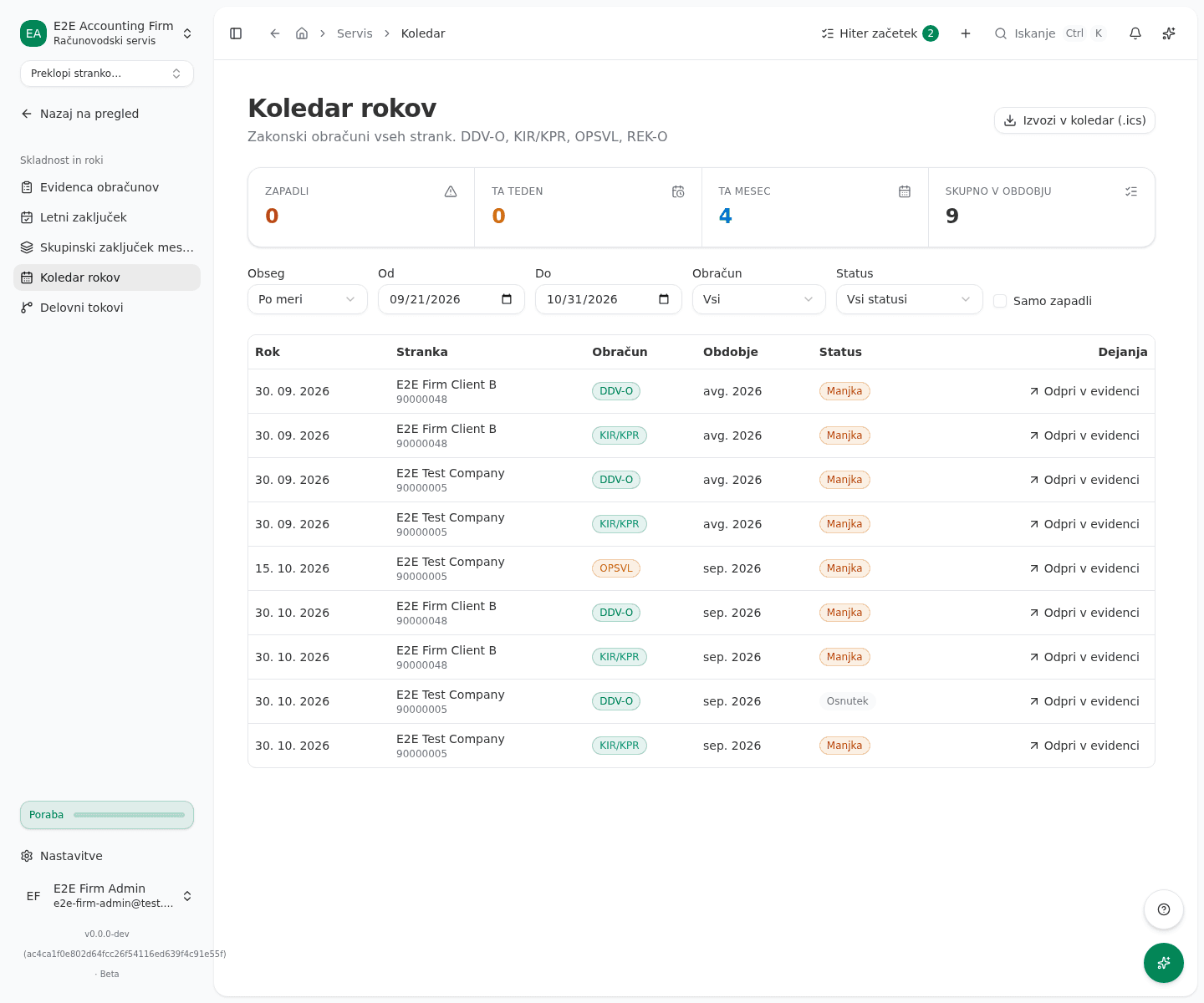
- In the Dejanja column, click Odpri v evidenci (open in filings) to open that deadline in the filings register, already filtered to the right period and filing kind.
Prepare a filing for several clients at once
With Po obračunu grouping, a DDV-O or REK-O group has a batch button in its header, for example “Pripravi DDV-O za vse 3” (prepare DDV-O for all 3) or “Pripravi REK-O za vse 5” (prepare REK-O for all 5). The button counts only the clients that have not yet filed for that period. Only a firm admin sees the button, because only an admin can start a batch.
- Click the button in the group header. The batch preview opens and shows which clients are eligible and which are skipped, and why. Nothing is sent yet.
- Confirm the preview. The batch is queued and its progress page opens, the same as a batch started from the filings register.
A batch submits nothing to eDavki. DDV-O is offered only once the period has ended; the batch prepares and validates a draft return per client. For REK-O it prepares every form of the payroll run. You then review and submit each one yourself, in your own eDavki session. KIR/KPR, RP-O and OPSVL have no batch; use Odpri v evidenci for those.
Export deadlines to your own calendar
- Click Izvozi v koledar (.ics) (export to calendar) in the top right. The file honors your currently set filters, including the Odgovorni choice.
- The downloaded
firm-deadlines.icsfile opens in Outlook, Google Calendar or Apple Calendar as a one-time import of deadlines. It’s not a live subscription that refreshes itself when deadlines change.
What success looks like
- The list shows deadlines matching your selected range and filters, with overdue deadlines highlighted red, folded the way you chose in Združi.
- After you confirm the preview, the batch’s progress page opens.
- Clicking Odpri v evidenci takes you to the filings register with the right period already preselected.
- The download produces a
firm-deadlines.icsfile you can import into an external calendar.
Common issues
-
A group has no batch button. The button appears only with Po obračunu grouping, only for DDV-O and REK-O, for DDV-O only once the period has ended, and only when the group has at least one client that has not filed yet.
-
With Moji roki selected, the list is empty. No client in the range has you as lead or backup. A firm admin sets the lead and backup on the client.
-
The list is empty. No deadline matches the current filters. Widen the date range or clear the Obračun and Status filters.
-
Could not download the calendar file. Try the download again in a moment. If it keeps failing, check your internet connection.
-
A deadline in the calendar doesn’t update itself. The downloaded .ics file is a snapshot taken at download time. Download and re-import it again to get the current deadlines.