AJPES annual financial statements
Every year, companies that keep double-entry books file their annual financial statements (letno poročilo: bilanca stanja and izkaz poslovnega izida) with AJPES. VegaERP builds both statements from that year’s posted journal entries, checks that everything needed is in place, and gives you the XML file to submit at the AJPES portal.
A flat-rate company (normiranec) keeps no double-entry books and is exempt from AJPES annual financial statements (ZGD-1, Article 73, paragraph 4, and Article 59, paragraph 1). If your company is recorded as flat-rate, the checklist shows this as the reason nothing can be prepared.
Open it from the sidebar: Accounting → Accounting & Reports → AJPES Annual Statements.
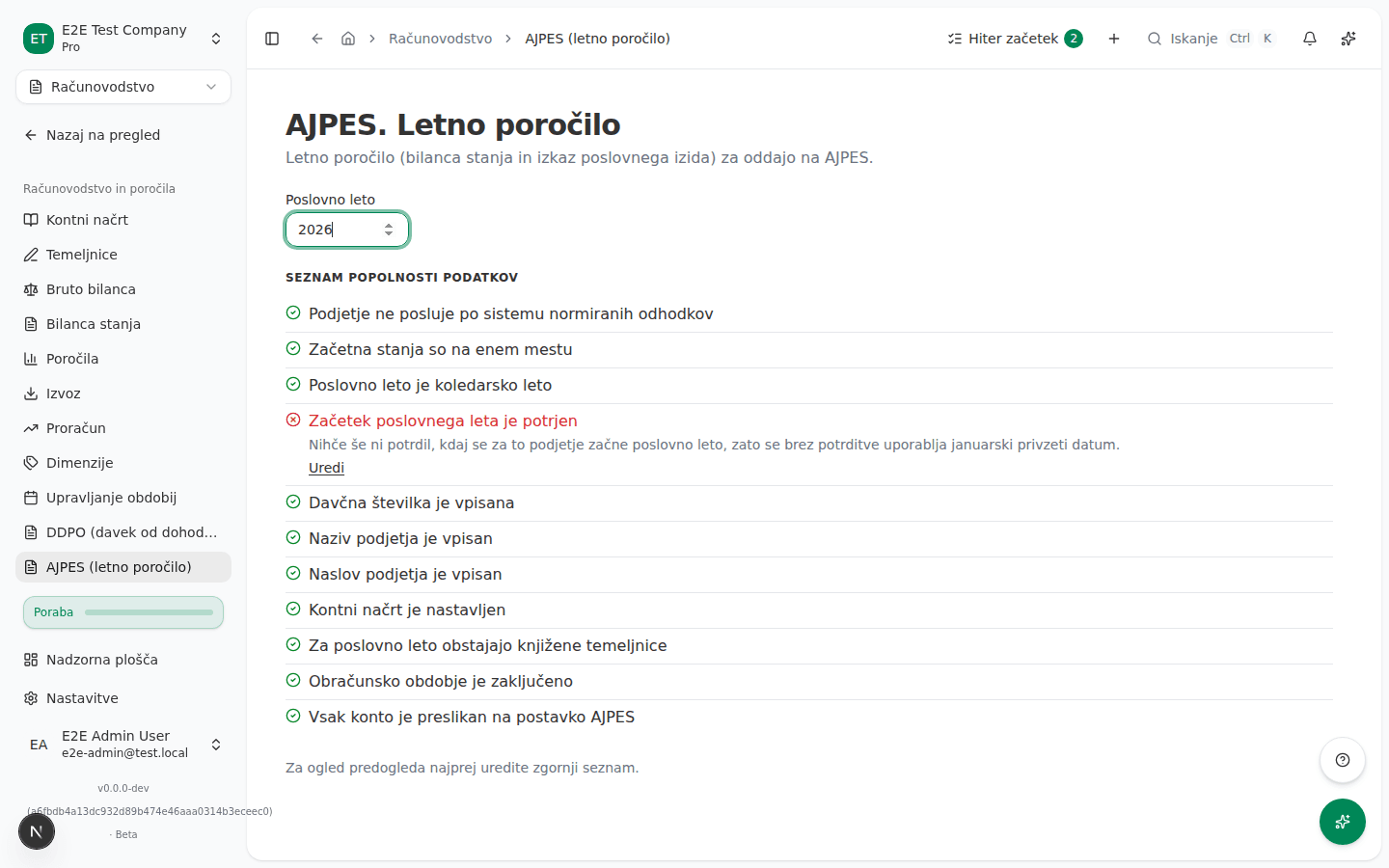
Pick the fiscal year and review the checklist
- Enter the Fiscal year you want to prepare statements for. The page opens on last year by default.
- Read the checklist below it. Each row is a condition VegaERP checks before it will build the statements. A passed item shows a green check, and a failed one shows what is missing and, where there is somewhere to fix it, a Fix this link.
- Follow each Fix this link and resolve the item, then come back to this page.
What success looks like
Once every checklist item passes, the page shows the Preview: the company’s name, tax number and address, then the Balance sheet (bilanca stanja) and Profit & loss (izkaz poslovnega izida) as two tables of AOP-coded lines, each with this year’s amount and, where a comparable prior year exists, last year’s.
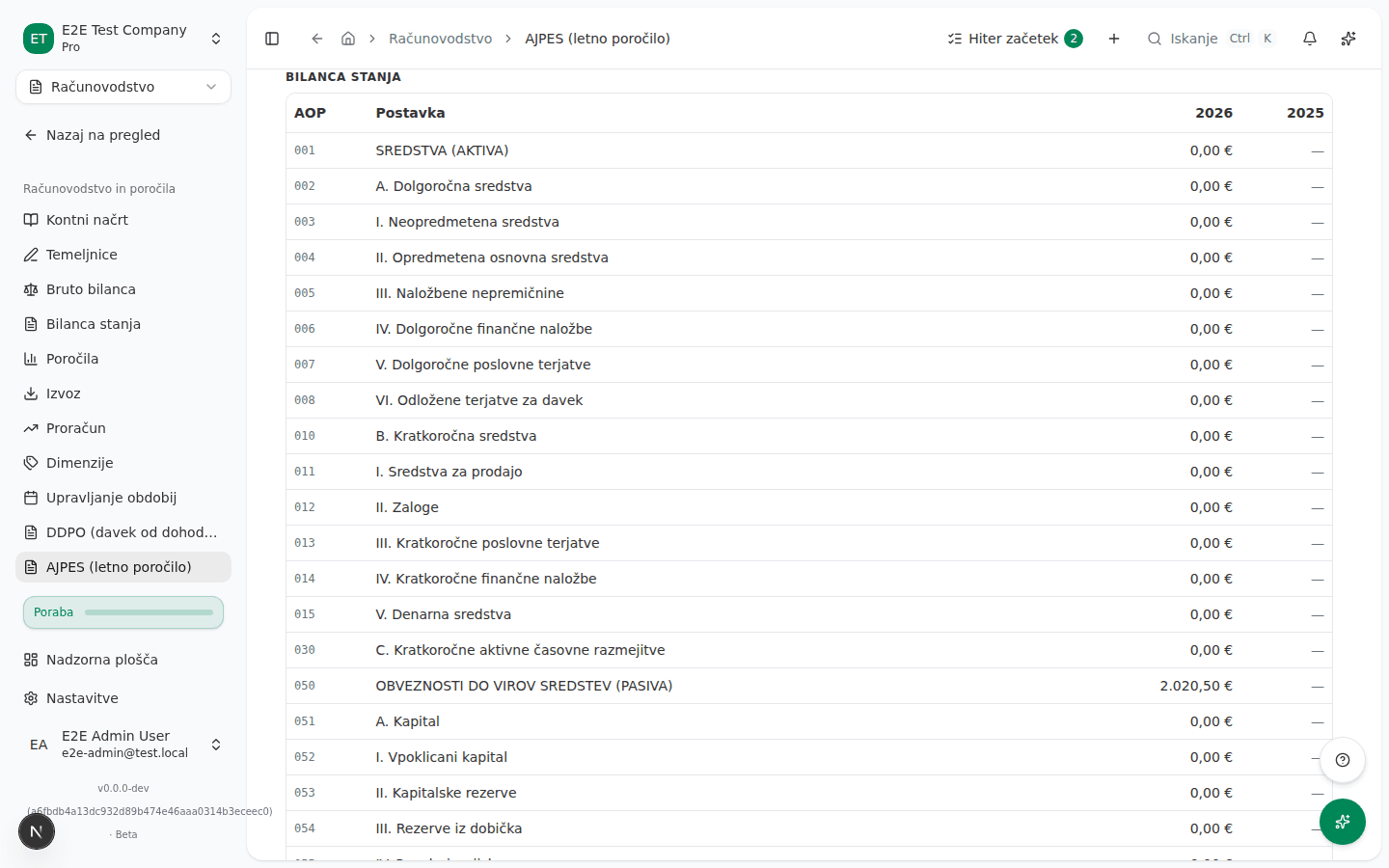
If the prior year cannot be compared (for example your books were migrated into VegaERP partway through it), a notice above the tables says so instead of showing a fabricated comparative figure.
Download the XML
Once you are satisfied with the preview, click Download XML. The file is not in the format the AJPES application imports, so enter the figures in the AJPES application yourself; VegaERP does not transmit them for you, unlike the eDavki-connected filings.
The balance sheet and profit and loss lines carry the official AJPES AOP numbers. Lines that split a figure further than your chart of accounts does (for example material, energy and other material costs, AOP 131 to 133, or land and buildings, AOP 011 and 012) are not in the file; fill them in the AJPES application. VegaERP shows the net profit or loss for the year (AOP 070 and 071) even before the year is closed. The part of a long-term loan or lease due within one year is shown under short-term liabilities (AOP 087, or AOP 091 for a konto 98 account) when you manage the EUR loan in VegaERP; for other long-term debt, move that part yourself.
Common issues
- The checklist shows “Not on the flat-rate regime” as failed. Your company is recorded as flat-rate (normiranec) and is exempt from AJPES annual financial statements; there is nothing to fix here.
- “Financial-year start confirmed” or “Financial year is the calendar year” is failed. Confirm the fiscal-year start in company settings (the Fix this link opens the right card); if your fiscal year genuinely is not the calendar year, contact support.
- “Tax number on file”, “Company name on file” or “Company address on file” is failed. Fill in the missing field under Settings → Company (the Fix this link opens that card).
- “Accounting period closed” is failed. The accounting period for this fiscal year is still open, so its figures may still change; close the period before filing if you want to be sure the figures are final.
- “Opening balances held in one place”, “Chart of accounts configured”, “Posted journal entries for the fiscal year” or “Every account maps to an AJPES line” is failed. These need your bookkeeper or support to resolve; there is no settings screen for them.
- “Every foreign-market sales account has a market” is failed. AJPES reports net sales separately for the domestic market, the EU market and outside the EU, by where the buyer is registered. Sales VegaERP books from now on land on the right line, but a sale to a foreign buyer booked before this split stays on the domestic accounts (7600 / 7620) and files as domestic; no check flags it. If the year holds such sales, your bookkeeper can move them with a journal entry in an open period. The failed item lists your own accounts under konto 761 or 763 that carry a balance but do not say which foreign market they belong to. Open each listed account in the chart of accounts, choose EU or Outside the EU under Market (AJPES) and save; until then its balance is counted in net sales (AOP 110) but on neither AOP 115 nor AOP 118.
Who can do this
Any user with access to the Accounting module can pick a fiscal year and review the checklist and preview. Download XML can only be run by a user with the Administrator or Računovodja (Accountant) role.