Why can’t this journal entry be posted or reversed?
The app refused to post, reverse or cancel a journal entry (temeljnica). In none of the cases below is a half-written entry left in the general ledger: the refused action simply did not happen.
Messages about the account an entry posts to (a summary account, a deactivated account, a reserved code) are covered in Why does VegaERP refuse this account code?. A refusal because the period is closed or locked is in Why can’t I post into this period?.
What the screen says
The automatic entry failed because the document has no date
On an invoice, credit note, supplier invoice or expense page a warning titled Samodejna temeljnica ni uspela (Auto journal entry failed) appears, with Napaka (Error) and this text:
This document has no date for the event being booked (shipment, completion, count, issue or payment), so it was not posted to the ledger. It was not dated today instead, because that would put it in the wrong period and could judge it under the wrong tax regime. Set the date on the document, then post it again.
Every automatic entry is dated with the date of the event on its document: the issue date for an invoice or credit note, the payment date for a payment, the shipping date for a delivery note, the count date for a stock count, the expense date for an expense. If that date is missing, no entry is created.
The entry is already reversed
Journal entry TEM-2026-0014 cannot be cancelled: it has already been reversed by the posted storno TEM-2026-0021. Cancelling it as well would take it out of the ledger a second time, so the books would show it reversed twice. If the reversal was the mistake, cancel TEM-2026-0021 instead.
The entry is part of an FX revaluation
Journal entry TEM-2026-0030 is a period-end FX revaluation or its automatic reversal. The two must leave the ledger together; on its own, the revaluation would stay on the foreign-currency receivables, payables or cash with nothing to take it back out. To undo it, reopen the accounting period it was posted for: that cancels the revaluation and its reversal together. If that period is locked, the pair stays: together it nets to zero.
Such an entry’s page has no Storniraj (Reverse) action, so you mostly meet this message when you ask Vega AI to reverse or cancel it.
Other messages when reversing, cancelling or reviewing
- An entry that carries VAT and is dated inside a VAT period already reported to FURS can’t be cancelled. The message says up to which day the period is reported and points you at a new correction in a return that hasn’t been filed yet.
- Only a posted entry can be reversed. For a draft the message suggests deleting it; for an entry already cancelled it says the entry is already out of the ledger.
- An entry marked as a reversal must say which entry it reverses.
- Odobri (Approve) and Zavrni (Reject) only apply to a draft. If someone posted the entry in the meantime, you are told review is no longer possible. Refresh the page.
You mostly see the first three when you act through Vega AI, because the entry’s page doesn’t offer those actions.
Why this happens
A posted journal entry is a permanent record. You correct it with a reversing entry (storno) that books the same amount the other way. Each entry can be taken out only once, by a storno or by a cancellation, never both, or the trial balance would subtract it twice. A period-end FX revaluation and its automatic reversal are one pair that nets to zero, so the app only removes them together, when the period is reopened. The app won’t cancel an entry carrying VAT in a period already reported, because the general ledger would then disagree with the return that was filed.
What to do
For a missing date on a document:
- Open the document showing the warning and fill in the missing date.
- Click Ponovi (Retry) in the warning if it is shown. If it isn’t, create the entry by hand under Temeljnice (Journal entries).
To correct a posted entry:
- In the left menu under Računovodstvo (Accounting) click Temeljnice and open the entry.
- Click the three-dot button at the top right (Več, More) and then Storniraj. In the Storniraj knjižbo? (Reverse journal entry?) window confirm with Storniraj.
- The app creates the reversing entry as an Osnutek (draft) and opens it. The reversal isn’t in effect until you post it.
- Click the three-dot button (Več) and then Knjiži (Post). Then post a new, correct entry if you need one.
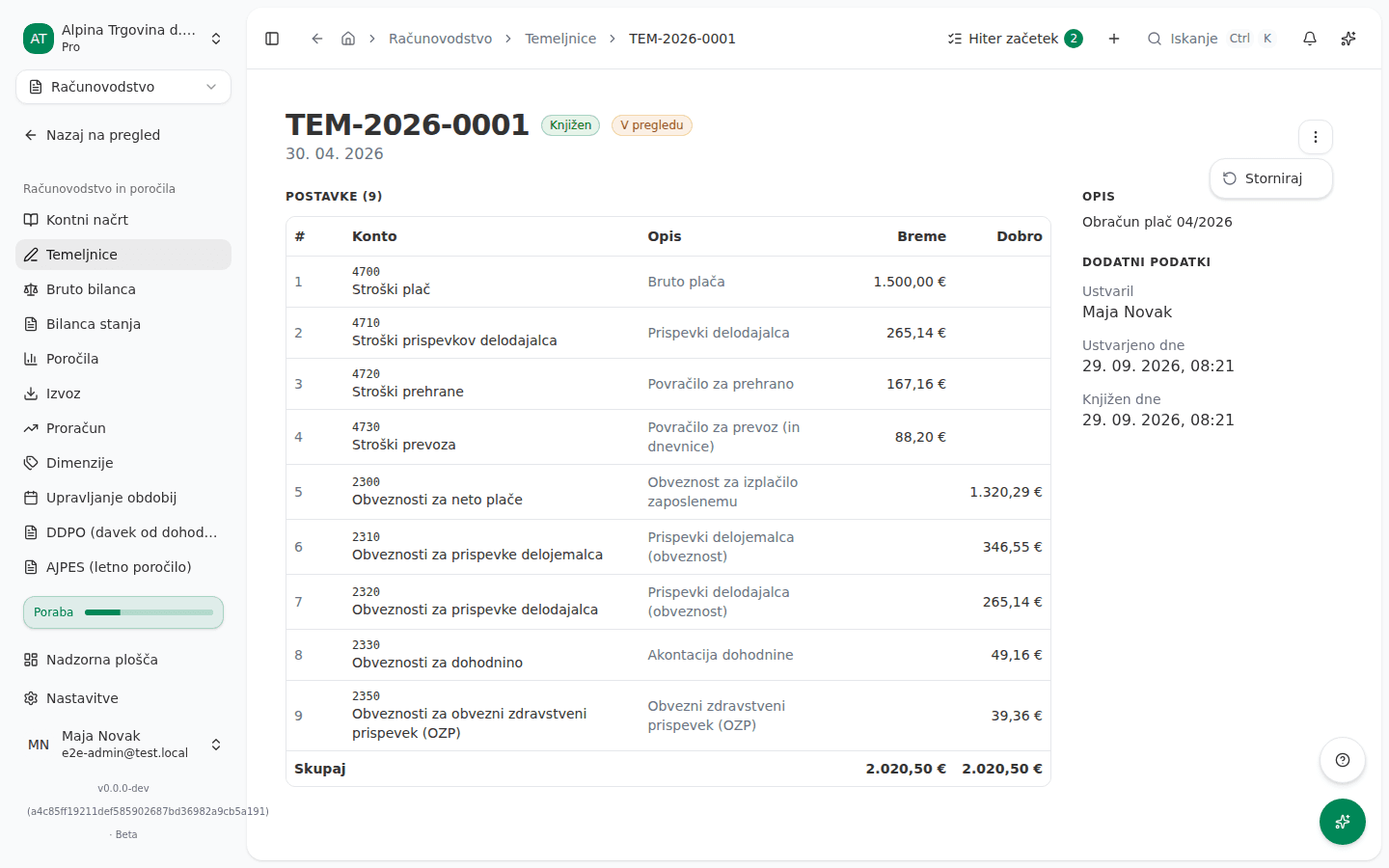
The screenshot shows the Slovenian interface. If the entry is already reversed and the storno itself was the mistake, it is the storno the message names that has to be cancelled, not the original. A storno can’t itself be reversed, and the entry’s page doesn’t offer cancelling a posted entry, so contact support.
If you can’t fix this yourself
An FX revaluation is removed only by reopening the period it was posted for. A user with the Administrator or Računovodja (Accountant) role can do that, and only if the period isn’t Zaklenjeno (locked). The steps are in Closing and locking periods.
For an entry carrying VAT in a period already reported to FURS, talk to whoever prepares your DDV-O returns before you correct anything.