ZZZS sick leave, reimbursements and registrations
When an employee is off sick for an extended period, the employer pays the first 30 working days of the absence (ZDR-1, čl. 137, third paragraph). From the 31st working day on, ZZZS takes over the burden. For the period ZZZS covers, the app prepares a reimbursement claim from the absence and files it through the SPOT portal. This page covers the path from a sick absence to a reimbursed amount, what each claim status means, and where the employer registers and deregisters an employee’s insurance with ZZZS.
How a claim is generated from an absence
A claim is generated from an already-recorded sick absence for the employee. You record the absence on the Odsotnosti (Absences) page (see below), or it arrives automatically from a digital sick certificate (see Sick certificates that arrive automatically below).
- Go to Plače (Payroll) → Oddaje in povračila (Filings & reimbursements) → ZZZS povračila (ZZZS reimbursements).
- Click Ustvari iz odsotnosti (Generate from absence). The dialog lists sick absences (own illness or a workplace injury) for which ZZZS reimburses at least one working day that has no claim yet. Each one shows how many working days, in how many months, ZZZS reimburses.
- Next to the absence you want, click Ustvari iz odsotnosti again. The app creates one draft claim for each month ZZZS reimburses.
Which absences appear depends on the Razlog zadržanosti (ZZZS) (reason for absence) field:
- For a reason ZZZS covers from the first day (for example isolation, transplantation, blood donation or an injury under Article 18), even an absence shorter than a week appears.
- For illness and injury (reasons 01 to 05) the employer pays the first 30 working days, so the absence appears only once it runs longer than that.
- An absence with no reason recorded is treated as illness.
If no absence has a period ZZZS reimburses that is not already claimed, the dialog shows “Nobena bolniška odsotnost nima obdobja, ki ga povrne ZZZS in še ni uveljavljeno” (No sick-leave absence has a period ZZZS reimburses that is not already claimed) instead of a list.
You add an absence on Plače → Čas in odsotnosti (Time & absence) → Odsotnosti (Absences), button Dodaj odsotnost (Add absence), kind Bolniška (lastna) (Sick, own illness) or Bolniška (poškodba pri delu) (Sick, workplace injury). The Razlog zadržanosti (ZZZS) (Reason for absence, ZZZS) field sets ZZZS’s reimbursement percentage; for a manually entered absence you set it yourself, for one created from a sick certificate (eBOL) it is filled in automatically.
ZZZS treats each employer as a separate case. When an employee changes employer, the sick leave closes at the previous employer and opens again with you on the first day of employment, and the 30 working days the employer pays count from that day. So when a sick absence started before the employment with you began and continues into it, enter it from the first day of employment: the app refuses an earlier start date and names the date to use. Sick certificates that arrive through eBOL already follow this.
Sick certificates that arrive automatically (eBOL)
The digital sick certificates a doctor issues to ZZZS are pulled in automatically and matched to the right coworker and their absence.
- Go to Plače → Čas in odsotnosti → Bolniški listi (eBOL) (Sick certificates, eBOL).
- For an immediate pull instead of waiting for the next automatic run, click Prenos eBOL (Pull eBOL).
- Every certificate that arrives gets one of three statuses: Povezan (Linked, a matching coworker and absence were found), Sirota (Orphan, no matching coworker could be found), or Preklican (Cancelled, ZZZS later cancelled the certificate).
For a certificate marked Sirota, open it and pick the right coworker via the Poveži z odsotnostjo (Link to absence) button in the detail view: an existing absence is extended, or a new one is created if none exists.
Sick certificates that could not be read
When ZZZS sends a sick certificate the app cannot read or save, no absence is created from it, and so no reimbursement claim either. Such certificates are collected separately.
- On the Bolniški listi (eBOL) page, open the Neobdelani dokumenti (Failed documents) tab. The number next to the tab name says how many are still waiting.
- Click Poskusi znova (Retry). If the app can now read the certificate, it moves to the sick certificates; if not, it stays on the list with the new error.
- Remove a certificate you have handled another way with Opusti (Dismiss). A dismissed certificate is no longer processed.
Poskusi znova and Opusti are available to the Administrator and Računovodja (Accountant) roles.
Claim statuses
A claim moves through a sequence of statuses shown in the Status column:
| Status | Meaning |
|---|---|
| Osnutek (Draft) | Generated from an absence, not yet validated. |
| Pripravljeno (Ready) | An intermediate state before validation. |
| Preverjeno (Validated) | Successfully validated, the amount and payment reference are computed, the claim is ready to submit. |
| Pošiljanje… (Submitting) | The claim is being sent. If it stays here, the SPOT connection failed after sending and ZZZS may already have it; it cannot be sent again or cancelled. Contact support. |
| Oddano (Submitted) | Sent to ZZZS through SPOT. |
| Potrebna dopolnitev (Supplement needed) | ZZZS received the filing but is asking for more information. |
| Sprejeto (Accepted) | ZZZS accepted the claim; the decision document (sklep) is available for download. |
| Zavrnjeno (Rejected) | ZZZS rejected the claim. |
| Neuspela oddaja (Submission failed) | The SPOT submission succeeded but the app failed to save the result; click Preveri status (Check status) to reconcile it. |
| Povrnjeno (Reimbursed) | The amount actually arrived in the bank account and has been recorded. |
| Preklicano (Cancelled) | The claim was cancelled before it was sent to ZZZS. |
The right to a refund lapses three years from the 19th of the month following the absence month, or from the day after the wage compensation was paid if that was earlier. Every claim not yet submitted shows its last safe filing day in the Rok za vložitev (Filing deadline) column. When the deadline is close (90 days or less) the days left appear next to the date, and once it has passed the claim is marked Zastarano (Lapsed).
Company details for claims
Every claim the app sends to ZZZS carries three company details: the account ZZZS pays the reimbursement into, a contact phone, and the ZZZS office the claims are sent to. While any of them is missing, a claim cannot be validated, and the ZZZS povračila list shows the warning “Podatki za zahtevke ZZZS niso popolni” (ZZZS claim details are incomplete) above the table.
- Open Plače → Oddaje in povračila → ZZZS povračila.
- In the page header, click Podatki za zahtevke ZZZS (ZZZS claim details).
- Under Bančni račun za nakazilo (Refund bank account), pick one of the company’s active bank accounts. Only accounts with a valid IBAN are offered; ZZZS pays only to an IBAN.
- Enter the Kontaktni telefon (Contact phone): digits, spaces and + - / ( ), at most 30 characters.
- Under Območna enota ZZZS (ZZZS office), pick the regional office or branch from the list.
- Click Shrani (Save).
If the company has no active bank account with a valid IBAN yet, the dialog says so and offers a Dodaj bančni račun (Add a bank account) link. Add the account, then come back and pick it.
The app writes the account’s IBAN onto the claim as it stands when you save. Changing the bank account’s number later does not change what claims carry until you pick the account here again.
Submitting a claim
- A claim in Osnutek or Pripravljeno status can only be validated once the payroll run for that month has been filed (status Oddan, Filed), see Monthly payroll runs. Click Preveri (Validate). The app computes the claimed amount and builds the payment reference.
- On a claim in Preverjeno status, click Oddaj (Submit). The app builds and signs the XML and sends it to ZZZS through SPOT.
Submitting requires the absence to carry a Številka bolniškega lista (Sick certificate number). If it’s missing, the submission is refused with “Oddaja zahteva številko bolniškega lista” (Submission requires the sick certificate number); enter the number from the paper certificate directly on the claim page, in the Številka bolniškega lista field, then click Shrani (Save).
Once ZZZS accepts the claim, click Prenesi sklep (Download decision) on the claim page for ZZZS’s decision document, or Prenesi oddani XML (Download submitted XML) for the filed form. A claim in Sprejeto status that has no decision document yet shows a Osveži sklep (Refresh decision) button to retry the download; that button is available to the Administrator and Računovodja (Accountant) roles.
Once the money actually arrives in the account, on a claim in Sprejeto status click Označi kot povrnjeno (Mark as reimbursed), fill in Znesek (EUR) (Amount) and Datum prejema (Date received), and under Bančna transakcija (Bank transaction) pick the transaction the money arrived on. The most likely ones are marked; search if it is not among them. The confirm button stays disabled until a transaction is picked, because a claim marked reimbursed without one would stay open in bank reconciliation. If the statement is not imported yet, import it first and then come back. Once confirmed, the app posts the receipt to the general ledger: a debit to cash and a credit to the ZZZS reimbursement income account (768).
For a company on the flat-rate tax regime (normiranec) this posting is skipped, since such companies don’t keep double-entry books.
A claim in Osnutek, Pripravljeno or Preverjeno status can be cancelled with the Prekliči zahtevek (Cancel claim) button; a cancellation reason is required and gets recorded.
To correct a claim that has not been submitted yet, cancel it and click Ustvari iz odsotnosti (Generate from absence) for the same absence again. The dialog lists the cancelled month marked “cancelled”, unticked: the app creates a new claim for it only if you tick it. The cancelled claim stays in the list as it was, and a month that still has a claim which is not cancelled is never claimed twice.
A month is usually cancelled for a reason, so the app never claims it again on its own. Tick it only once you have resolved that reason.
When SPOT eBOL and eNDM access is missing
Submitting a claim requires that SPOT eBOL and eNDM access be enabled for the tenant. Until it is, the ZZZS povračila list shows a warning above the filter bar: “Oddaja zahteva SPOT eBOL+eNDM dostop” (Submission requires SPOT eBOL+eNDM access). The warning does not block generating, validating or marking a claim as reimbursed, only submission.
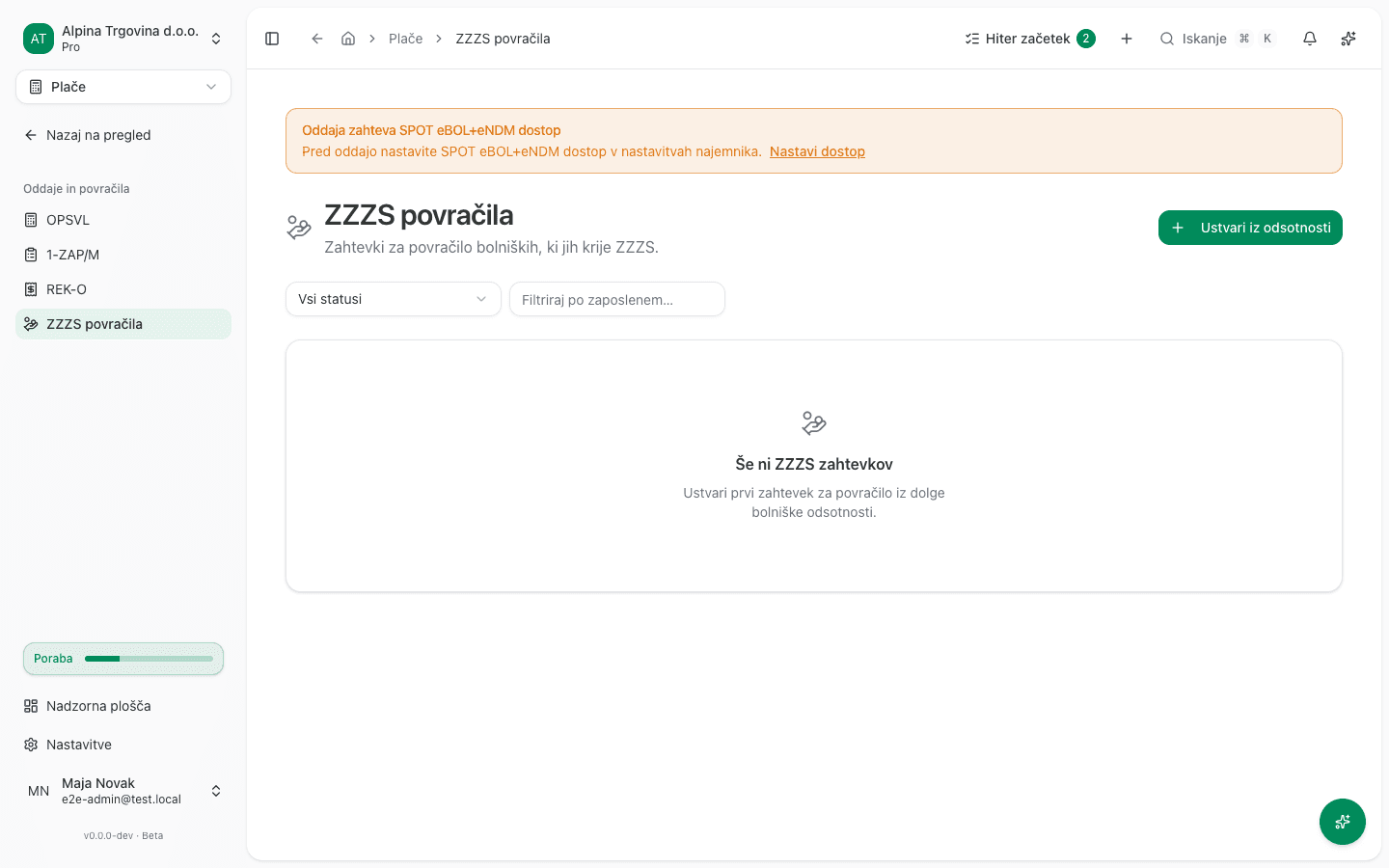
Access takes two steps. The first is yours, the second is ours:
- Download the client registration form for the eBOL and eNDM interface from spot.gov.si and send it, signed, to ZZZS per their instructions.
- Wait for ZZZS to confirm (typically a few working days).
- Once the confirmation arrives, contact support. We switch the access on.
There is no setting for this in the app. The same goes for the choice between the ZZZS test environment and production: we set it, and we only switch to production once a test claim has been submitted successfully and accepted by ZZZS. A submitted claim cannot be withdrawn, so that choice is not a setting anyone should be able to move by accident.
Employee registrations with ZZZS (M-1, M-2, M-3)
Separate from reimbursements, this registers, changes or ends an employee’s insurance with ZZZS. It is not a monthly filing but an event tied to an employment change: a new hire (M-1), a change in insurance terms (M-3), or an employment ending (M-2).
- Go to Plače → Zaposleni (People) → ZZZS prijave (ZZZS registrations).
- Click Nova prijava (New registration). In the Nova ZZZS prijava (New ZZZS registration) dialog, choose the Pogodba zaposlitve (Employment contract) and the Vrsta obrazca (Form kind) field (M-1 = registration, M-2 = deregistration, M-3 = change).
- Click Ustvari (Create).
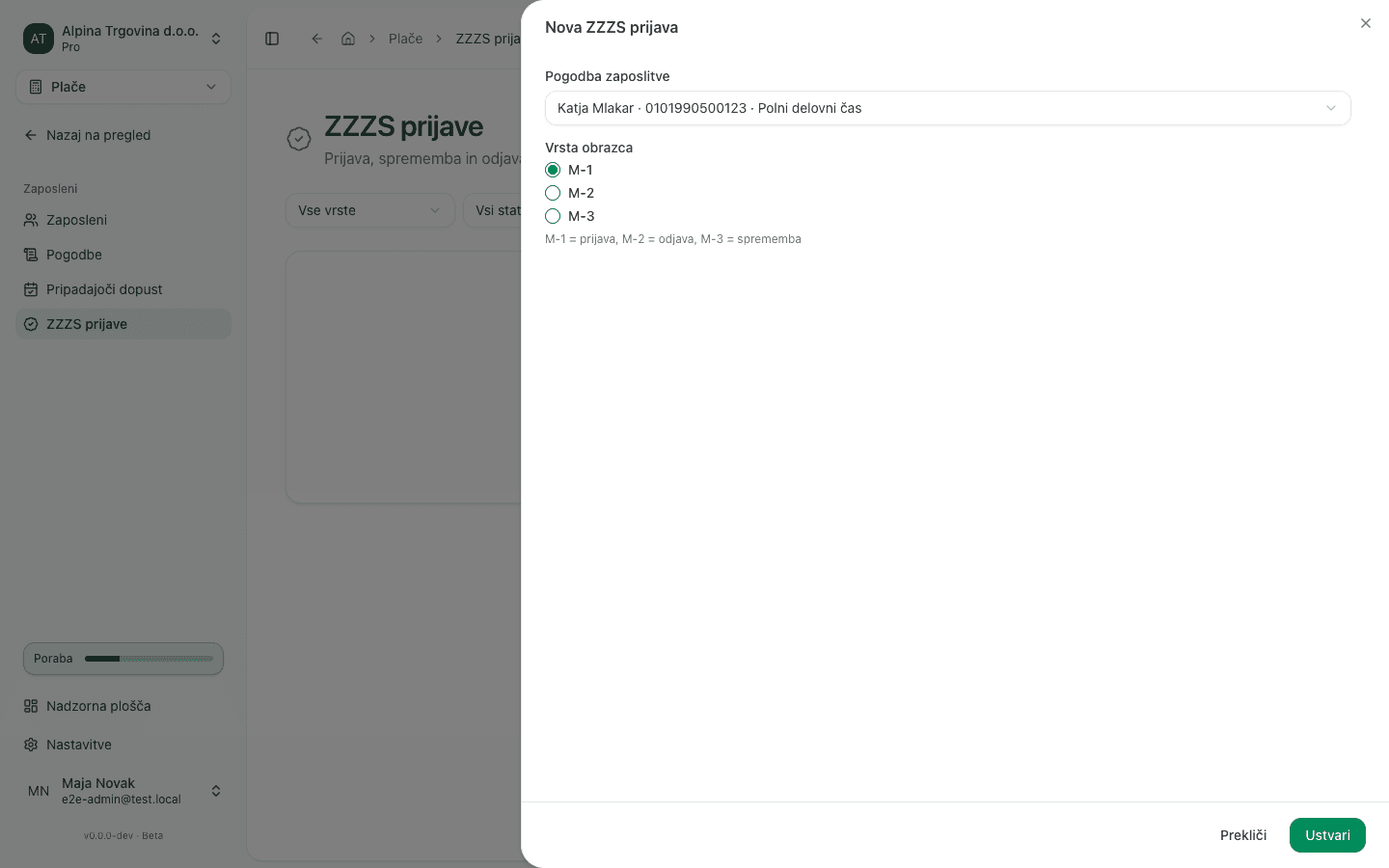
A registration goes through the same sequence as a claim: Osnutek → Pripravljena → Preverjena → Poslana → Sprejeta (or Vrnjena v dopolnitev / Zavrnjena). Validate it with the Preveri button and submit with the Pošlji button. An open registration can be cancelled with Prekliči vlogo.
Common issues
- “Zahtevka ni mogoče poslati na ZZZS (trenutno stanje: osnutek). Najprej ga preverite.” (“This claim cannot be sent to ZZZS (current status: draft). Validate it first.”) appears when you click a button that isn’t available for the claim’s current status (for example Oddaj on a claim that isn’t yet Preverjeno, or Preveri before the source payroll run has been filed). The message names the current status and what to do first; see ZZZS claim refused and Claim statuses above.
- Clicking Submit returns an English sentence about missing SPOT access, even though the warning on the list is in Slovenian. This happens when you reach the claim page directly (for example via a link) without seeing the warning on the ZZZS povračila list first. The fix is the same: the access has to be switched on, see the section above.
- An absence does not appear in the “Ustvari iz odsotnosti” dialog. Check the Razlog zadržanosti (ZZZS) field on the absence: with no reason recorded, the app assumes the employer pays the first 30 working days. An absence is also left out when every one of its months already has a claim, or when it is care (nega), escort (spremstvo) or staying with a child (sobivanje), which are recorded as a different kind of absence and which the app does not prepare as a reimbursement claim.
- A claim can’t be validated. The source payroll run for that month hasn’t been filed yet (status Oddan). File it first, see Monthly payroll runs.
- Validation is refused because the company’s ZZZS claim data is incomplete. Record the missing details, see Company details for claims, then validate the claim again.
Who can do what
What draws the line is the consequence of the action, not the module. Anything that reaches neither the authority nor the ledger can be done by any user with edit access to the Payroll module: generating a claim from an absence, Preveri (Validate), and querying the status at ZZZS.
The actions that do reach ZZZS or the general ledger are reserved for the Administrator and Računovodja (Accountant) roles: Oddaj (the irreversible SPOT eNDM deposit), Označi kot povrnjeno (which posts the journal entry), Prekliči zahtevek (terminal, with no way back) and Osveži sklep.
The company details for claims (refund bank account, contact phone, ZZZS office) can be changed by the Administrator and Računovodja (Accountant) roles; other users can see them but not change them.
SPOT eBOL and eNDM access and the ZZZS environment cannot be changed by anyone in the app, not even an Administrator. We set both, at your request.