Why can’t a ZZZS reimbursement claim be validated or submitted?
The app refused a step on a reimbursement claim on the ZZZS povračila (ZZZS reimbursements) page. The claim stays in the state it was in, and nothing was sent to ZZZS. The message depends on the button you clicked: Preveri (Validate), Oddaj (Submit), Označi kot povrnjeno (Mark reimbursed) or Osveži sklep (Refresh decision).
What the screen says
On Preveri (Validate)
The most common refusal says the payroll run for the claim’s month has not been filed yet:
Zahtevka ni mogoče preveriti (trenutno stanje: osnutek). Najprej oddajte obračun plač za 2026-05. (“This claim cannot be validated (current status: draft). File the payroll run for 2026-05 first.”)
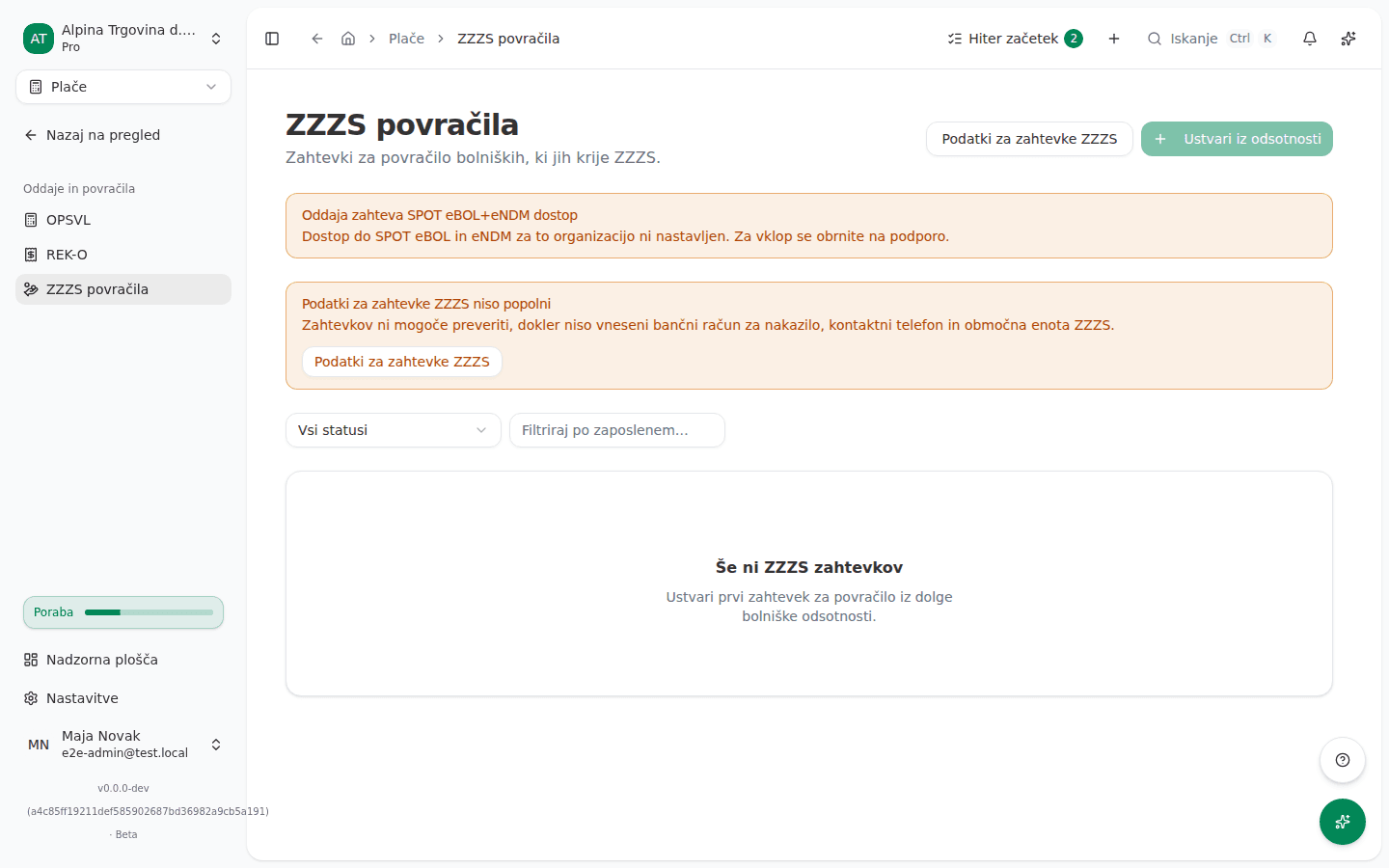
When the company’s claim data is missing, the list already shows the Podatki za zahtevke ZZZS niso popolni (ZZZS claim data is incomplete) warning, and validation refuses:
Zahtevka še ni mogoče preveriti, ker podatki podjetja za zahtevke ZZZS niso popolni. Na strani ZZZS povračila pod Podatki za zahtevke ZZZS vnesite bančni račun za nakazilo, kontaktni telefon in območno enoto ZZZS. Nato zahtevek ponovno preverite. (“This claim cannot be validated yet because the company’s ZZZS claim data is incomplete. Record the refund bank account, contact phone and ZZZS office under ZZZS claim details on the ZZZS reimbursements page. Then validate the claim again.”)
If the company’s registration number (matična številka) is missing, the message sends you to company settings instead.
Other messages on validation:
Zaposleni nima vpisane številke zavarovane osebe ZZZS. Vpišite jo med podatke o zaposlenem in zahtevek ponovno preverite. (“The employee has no ZZZS insurance number. Add it to the employee record, then validate the claim again.”)
Obračun plače, iz katerega je bil ta zahtevek pripravljen, nima zabeleženega datuma izplačila, zato datuma izplačila (DtIzplacila), ki ga zahteva zahtevek ZZZS, ni mogoče določiti. To se zgodi pri obračunih, oddanih pred uvedbo zahteve po datumu izplačila. Za ta obračun pripravite popravek z dejanskim datumom izplačila, nato zahtevek znova preverite. (“The payroll run this claim was filed from records no payment date, so the ZZZS filing’s required payment date (datum izplačila) cannot be determined. This happens for a run filed before payment dates were required. File a correction for that payroll run recording the actual payment date, then validate this claim again.”)
Rarer messages say the filed run holds no reimbursement figures for this absence, that the absence records hours per day outside the allowed range, or that its relapse dates do not meet the conditions the message names.
On Oddaj (Submit)
Pri odsotnosti manjka številka bolniškega lista. Pred oddajo jo vpišite s potrdila. (“The sick certificate number is missing on the absence. Enter it from the certificate before submitting.”)
Dostop do SPOT eBOL in eNDM za to organizacijo ni omogočen. Pred oddajo se za vklop obrnite na podporo. (“SPOT eBOL+eNDM access is not enabled for this organisation. Contact support to have it enabled before submitting.”)
The other submit messages say the organisation has no SPOT certificate set up, that ZZZS cancelled the sick certificate for this absence (eBOL storno), or that the provider has not finished the SPOT setup. If SPOT does not accept the claim, you get:
SPOT zahtevka ni sprejel, zato ni bilo oddano nič. Zahtevek je znova v stanju preverjeno in ga lahko ponovno oddate. (“SPOT did not accept the claim, so nothing was filed. The claim is validated again and can be resubmitted.”)
On Označi kot povrnjeno (Mark reimbursed)
Izberite bančno transakcijo, na katero je prispelo povračilo ZZZS. Če izpisek še ni uvožen, ga najprej uvozite, nato zahtevek označite kot povrnjen. (“Pick the bank transaction the ZZZS reimbursement arrived on. If the statement is not imported yet, import it first, then mark the claim reimbursed.”)
Related messages say the chosen transaction is already linked to another claim, that it is not incoming money, or that the reimbursed amount is not greater than 0.
On Osveži sklep (Refresh decision)
ZZZS issues a decision only for an accepted claim. If the decision is already stored, or the claim has no ZZZS submission number, the app says so and fetches nothing.
Why this happens
A claim is built from the filed payroll run for the same month: it takes the compensation amounts and the payment date from it. That is why the app will not validate it until the run is filed. Before submitting, it also checks that everything the ZZZS form needs is there: the company data, the insurance number, the sick certificate number and SPOT access. When you mark a claim reimbursed it requires an incoming bank line, or the incoming payment would stay open in bank reconciliation.
What to do
-
If the payroll run for the claim’s month is not filed yet, approve and file it, see Monthly payroll run, then click Preveri on the claim.
-
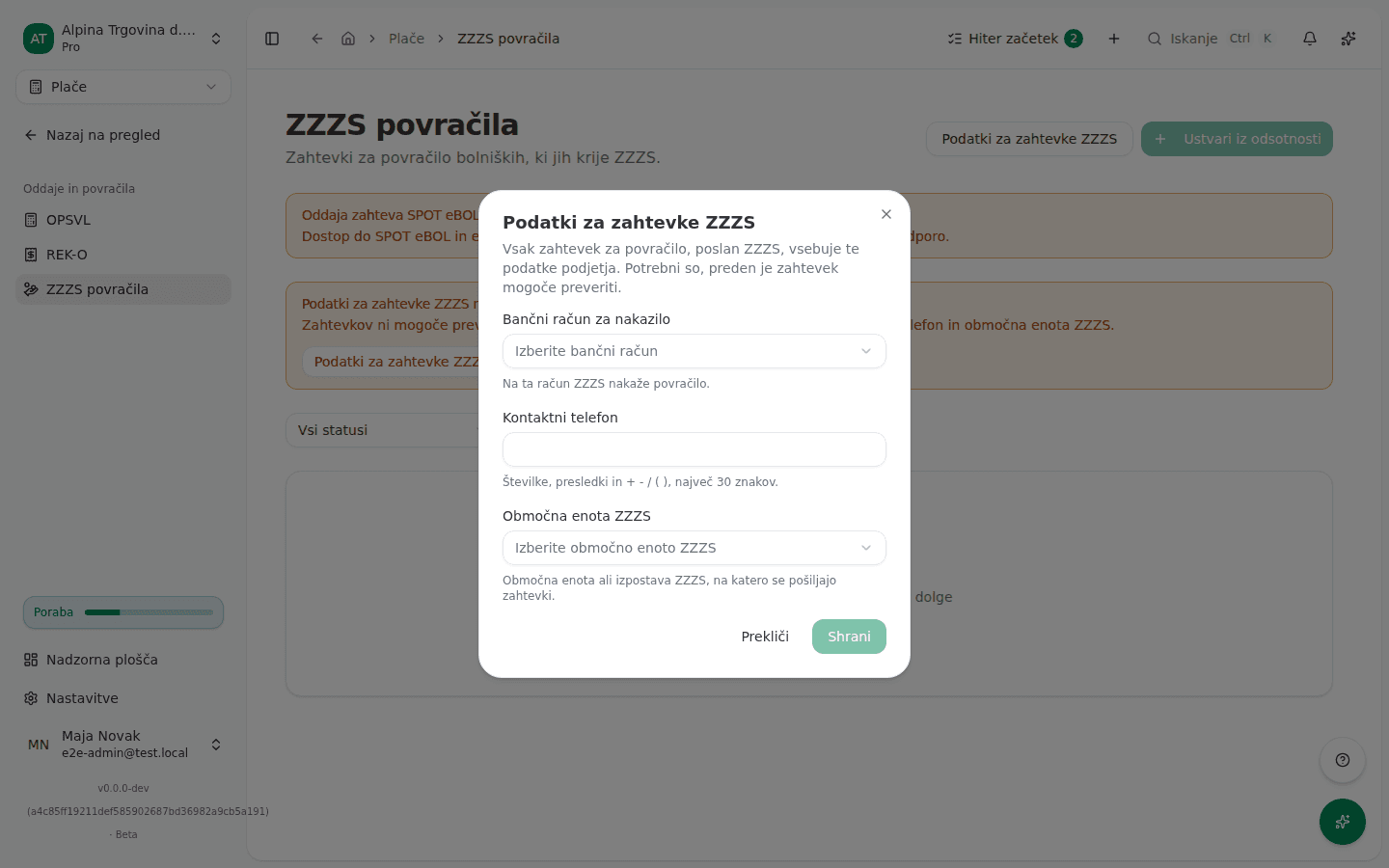
If the company data is incomplete, click Podatki za zahtevke ZZZS (ZZZS claim details) on the ZZZS povračila page, choose the Bančni račun za nakazilo (Refund bank account), enter the Kontaktni telefon (Contact phone), choose the Območna enota ZZZS (ZZZS office) and click Shrani (Save).
-
If the insurance number is missing, enter it in the ZZZS številka (ZZZS number) field on the employee’s record, see Coworkers and employees.
-
If the run has no payment date, file a correction for it with the actual payment date, see Correcting a filed payroll run.
-
If the sick certificate number is missing, enter it on the claim page in the Številka bolniškega lista (Sick certificate number) field and click Shrani, then Oddaj again.
-
If the bank transaction is not there, import the statement first, then click Označi kot povrnjeno on the claim and pick the incoming line under Bančna transakcija (Bank transaction).
-
After each fix, validate the claim again with Preveri.
If you can’t fix this yourself
You cannot set up SPOT eBOL and eNDM access, the SPOT certificate or the provider settings in the app. Contact support for those. How to obtain access is described in ZZZS sick leave, reimbursements and registrations.
Submit, Mark reimbursed, Cancel claim and Refresh decision are reserved for the Administrator and Accountant roles. If you do not see the button or the click fails, ask someone with one of those roles.
If ZZZS cancels the sick certificate, the claim for that absence cannot be submitted. The cancellation is ZZZS’s decision, so cancel the claim with Prekliči zahtevek (Cancel claim).