Setting up payroll
Payroll (obračun plač) has more setup dependencies than most modules, because Slovenian payroll calculations depend on statutory parameters that must exist before any run.
1. Statutory catalog
VegaERP ships with the current statutory payroll catalog (minimum wage, contribution rates, tax brackets, per-diem caps). You normally don’t need to touch this — it’s seeded and kept up to date centrally — but it’s worth knowing it’s the foundation every calculation reads from.
2. Employees
Go to Plače → Obračuni → Zaposleni (“Payroll → Employees”) and add each employee with their personal and employment data. If you migrated from Minimax, this step may already be done — see Importing from Minimax.
3. Contracts
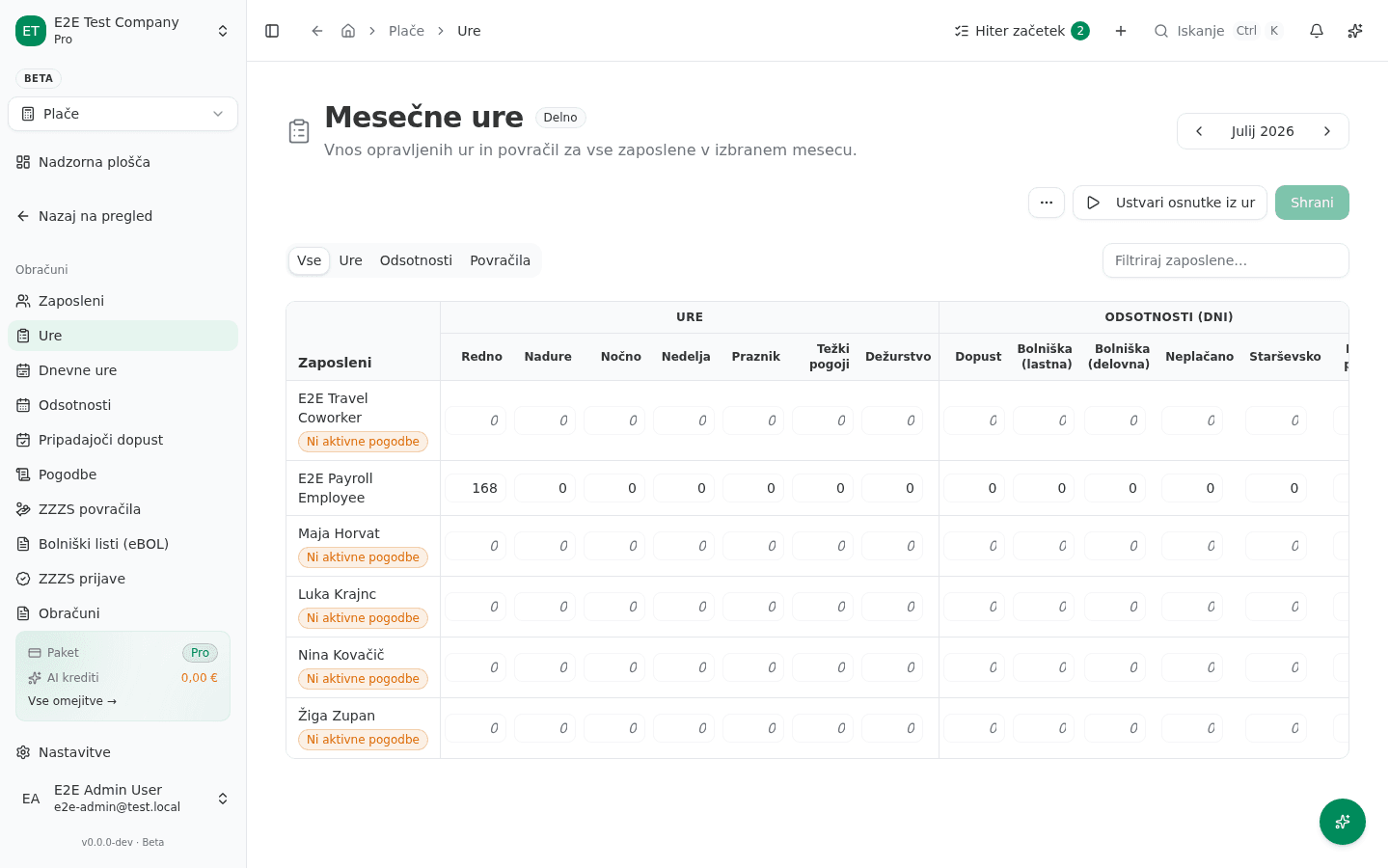
Each employee needs an active employment contract record under Plače → Obračuni → Pogodbe (“Contracts”): contract type, start date, base salary or hourly rate, and working-time arrangement. The contract is what the payroll engine actually reads when calculating a period — an employee without an active contract can’t be included in a run. On the monthly-hours grid, an employee missing one shows a Ni aktivne pogodbe (“No active contract”) link right where their hours would go, instead of silently excluding them.
4. Carry-in data (mid-year starts)
If you’re starting mid-year, enter each employee’s year-to-date figures (gross pay, tax paid, vacation days used — Plače → Prenos začetnih stanj) so annual calculations — like the year-end vacation-pay true-up — are correct from your first run onward. Skipping this produces wrong annual totals later, even if each individual monthly run looks fine.
5. Enter monthly hours
- Go to Plače → Obračuni → Ure (“Hours”). The Mesečne ure (“Monthly hours”) grid lists every employee for the selected month, with columns for Redno (regular), Nadure (overtime), Nočno (night), Nedelja (Sunday), Praznik (holiday) hours, plus Dopust (vacation) and Bolniška (sick leave) days and allowances (Malica — meals, Prevoz — commuting, Dnevnice — per diems).
- Fill in each employee’s hours for the period and click Shrani (“Save”).
6. Generate the run
Click Ustvari osnutke iz ur (“Generate drafts from hours”) on the same Hours page — this creates a draft obračun (payroll run) per employee for the period, calculating gross-to-net pay and statutory contributions from the hours you entered. The runs then appear under Plače → Obračuni → Obračuni, filterable by Osnutki (drafts), Čakajo na oddajo (pending submission), Oddani (filed), and Plačani (paid).
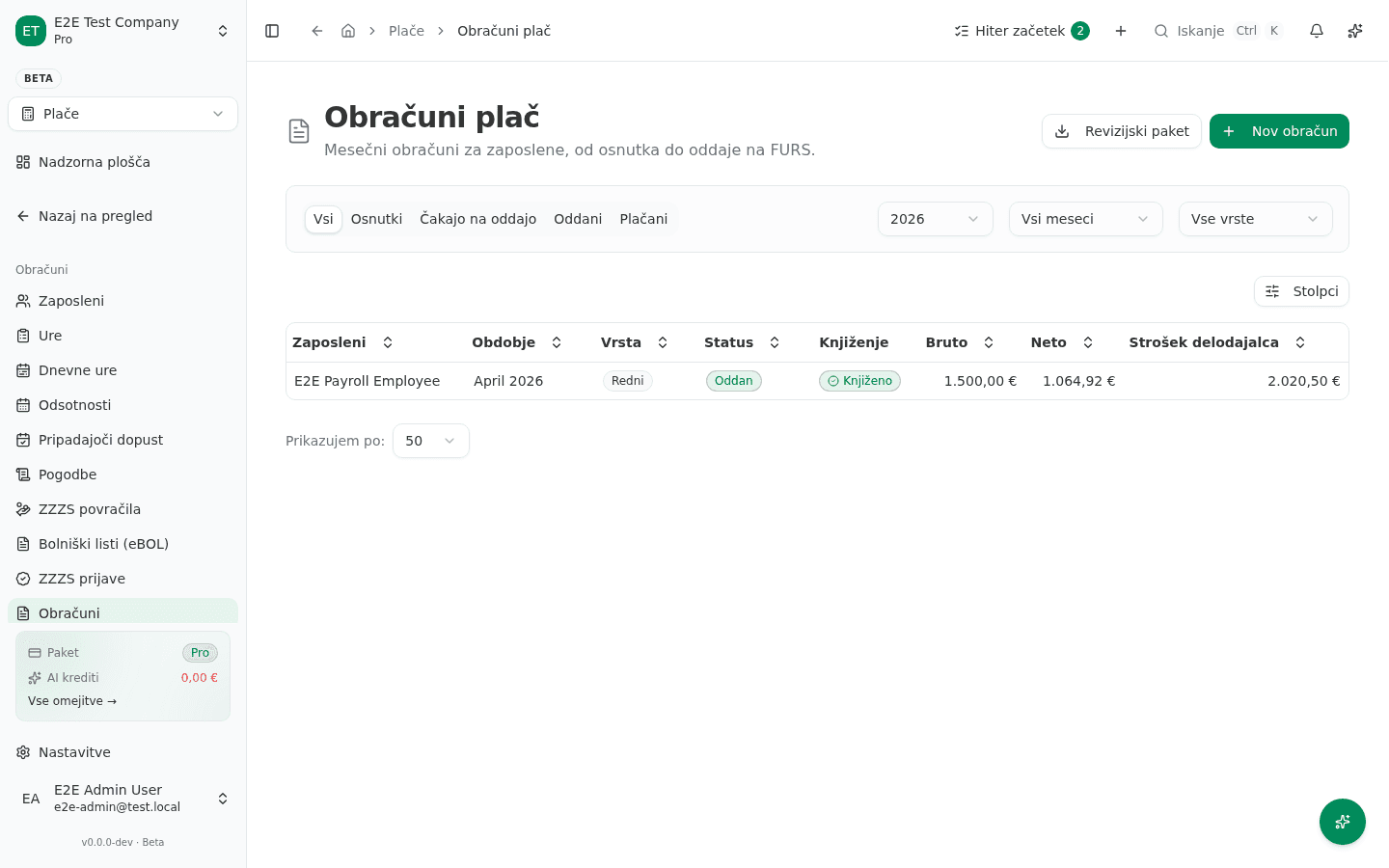
Where applicable, VegaERP books the corresponding journal entries automatically. Flat-rate (normirani s.p.) companies don’t get GL postings for payroll, since flat-rate taxpayers don’t keep double-entry books — this is expected, not a bug.
Vacation pay reservation
VegaERP accrues a holiday-pay (regres) provision automatically as part of the monthly run, and reduces it as employees take vacation or receive payout. This, too, is skipped for flat-rate companies for the same reason as above.
Common setup mistakes
- Using “Nov obračun” for a routine month. The Obračuni page also has a Nov obračun (“New run”) button, but it opens a single-employee, single-period correction form — the app itself flags this: “Za rutinski mesečni obračun raje uporabi Mesečne ure in »Ustvari osnutke iz ur« — ta obrazec je namenjen enkratnim popravkom” (“For a routine monthly run, use Monthly Hours and ‘Generate drafts from hours’ instead — this form is for one-off corrections”). Use the Hours-page flow above for a normal month; reach for Nov obračun only when correcting a single employee’s single period.
- Running payroll before an employee’s contract is active — the run will simply exclude them, which looks like a missing person rather than an error.
- Forgetting carry-in data on a mid-year migration, which throws off year-end totals.
- Not confirming the flat-rate flag on the company profile before the first run — it changes which screens and postings apply.